



A simple desktop app that lives in your system tray and gives Rclone a graphical interface. Mount, sync, and serve your cloud storage without touching the command line — a free alternative to Mountain Duck.
Platform support: RcloneTray is developed and tested primarily on macOS. Windows and Linux builds are provided and should work, but are not actively tested — if something breaks there, please open an issue. Pull requests are welcome.
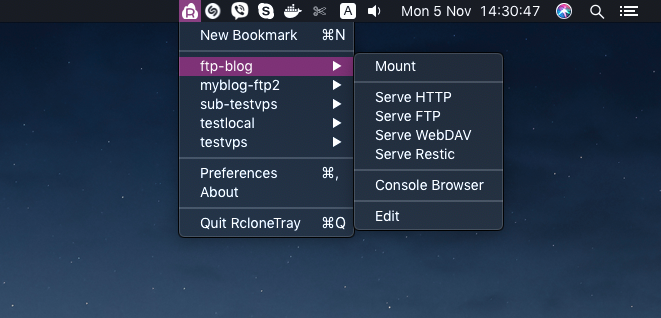
- Features
- Install
- Requirements
- Usage
- FAQ
- Troubleshooting
- Development
- Changelog
- Contributing
- Support
- License
- Credits
- Mount remote storage as a local drive.
- Sync safely between local folders and remotes (upload and download) with root-path guards and a dry-run confirmation.
- Serve remotes over HTTP, FTP, WebDAV, or Restic.
- Activity view — see active and recent mounts, transfers, servers, logs, and failures.
- Bundled Rclone — works out of the box, no separate install.
- Cross-platform — Windows, macOS, and Linux.
- Light and dark mode — follows your system theme, or pick Light or Dark in Preferences.
- Secure by default — sandboxed renderers with context isolation, a strict Content-Security-Policy, and checksum-verified bundled rclone.
Download the latest release for your platform:
| Platform | Architecture | Files |
|---|---|---|
| Windows | x64, arm64 | .exe installer |
| macOS | Intel & Apple Silicon | .dmg, .zip |
| Linux | x64 | .AppImage, .deb |
New to RcloneTray? The Getting Started guide walks through installation in plain English.
To build from source instead, see Development.
Release builds are not code-signed yet, so each OS shows a one-time warning for unknown apps. This is expected.
macOS — after installing from the .dmg, run this once in Terminal:
xattr -dr com.apple.quarantine /Applications/RcloneTray.app(Alternatively: right-click the app, choose Open, then Open again. The Terminal command is the most reliable.)
Windows — if SmartScreen warns about an unknown publisher, click More info → Run anyway.
Linux — make the AppImage executable, then run it:
chmod +x RcloneTray-*.AppImage
./RcloneTray-*.AppImage
On Ubuntu 23.10 and later the AppImage may refuse to start because AppArmor
restricts the Chromium sandbox. Install the .deb instead, or see
Getting Started.
Operating systems
- Windows 10 or 11 (x64, arm64)
- macOS 13 or later (Intel and Apple Silicon)
- Linux (x64) with a desktop environment that supports tray icons
Mounting (optional)
The mount feature needs a FUSE driver for your OS:
| OS | Required package |
|---|---|
| Windows | WinFsp |
| macOS | macFUSE or FUSE-T |
| Linux | fuse3 (e.g. sudo apt install fuse3 on Debian/Ubuntu) |
On macOS and Linux a mounted remote appears in your home folder as mount.<type>.<name>; on Windows it gets a free drive letter.
On macOS, restart after installing or updating macFUSE and allow its system extension when macOS asks. Mounting does not work until then.
If you would rather not install a FUSE driver, turn on WebDAV in Preferences → Serving and use Serve WebDAV instead.
- Launch RcloneTray — it starts in your system tray.
- Open the tray menu and choose New Remote.
- Pick a provider (Amazon S3, Google Drive, Dropbox, and so on).
- Enter your credentials and settings (only the Name is required up front; the provider-specific fields like bucket, access key, region, and so on appear once you pick a provider).
- Mount, sync, or serve the remote from the tray menu. Use Activity to see running jobs and recent rclone output.
RcloneTray changes only the remote you create, edit or delete. Other sections of
rclone.conf are left byte-for-byte, and an encrypted config is not modified.
Prefer the terminal? You don't have to use the dialog at all. Run rclone config
in your terminal to create or edit remotes — RcloneTray reads the same
rclone.conf, so anything you configure there shows up in the tray automatically
(and vice-versa). Advanced and provider-specific flags are also available under
Advanced in the remote dialog, and global flags under Preferences → Rclone →
Custom args.
How do I use my own Rclone installation?
Open Preferences → Rclone and uncheck Use bundled, then restart RcloneTray when it asks. RcloneTray looks for rclone on your PATH and also in /opt/homebrew/bin and /usr/local/bin on macOS.
My drive mounts, but files won't save or editing fails.
Open Preferences → Rclone → Mounting and set VFS cache mode to Writes (the default) or Full, then re-mount the remote. This lets apps open, edit, and save files on the mounted drive.
Why can't I mount my remote?
Make sure the FUSE driver for your OS is installed — see Requirements. Without one, Mount shows a notification that names the driver and where to get it. On macOS, restart after installing or updating macFUSE.
Before 1.8.1, every mount on macOS failed with "failed to retrieve mount path information: stat /Volumes/…". Update to the latest release.
How do I add authentication to serving?
Open Preferences → Serving and set a username and password.
Where is the config file stored?
RcloneTray uses the default Rclone location:
- Windows:
%APPDATA%\rclone\rclone.conf - macOS:
~/.config/rclone/rclone.conf - Linux:
~/.config/rclone/rclone.conf
To use a different file, set Preferences → Rclone → Config file. Before its first change in each session, RcloneTray saves a timestamped copy next to it (rclone.conf.<time>.bak; the three newest are kept).
A provider field I expect is missing.
Some fields only apply to a specific sub-provider (for example one S3 vendor). Choose the matching Provider value and the field appears. Rarely used options are on the Advanced tab.
macOS: "RcloneTray can't be opened" / "Apple could not verify…"
Release builds are not signed or notarized yet, so macOS quarantines the app after download. Either right-click the app → Open → Open, or run once in Terminal:
xattr -dr com.apple.quarantine /Applications/RcloneTray.appThe bundled Rclone won't start (macOS).
The same Gatekeeper quarantine can block the bundled rclone helper. RcloneTray
tries to clear the quarantine attribute automatically on first run. If it still
fails, either run the xattr command above, or open Preferences → Rclone,
uncheck Use bundled, and install Rclone yourself:
brew install rclone # macOS (Homebrew)Nothing happens / an error pops up when I create a remote.
Errors from Rclone are shown in the dialog. Read the message — it usually points at a
missing required field. You can always fall back to rclone config in the terminal to
create the remote, then it appears in the tray. Activity in the tray menu shows
the log of every recent rclone job.
Prerequisites: Node.js 22.12+ and npm.
git clone https://github.com/ysalitrynskyi/RcloneTray
cd RcloneTray
npm install
npm start
Scripts
| Script | Description |
|---|---|
npm start |
Build and start the app |
npm run build |
Compile TypeScript |
npm run typecheck |
Type-check without emitting |
npm run lint |
Run ESLint |
npm run test |
Run unit and integration tests (Vitest) |
npm run test:coverage |
Run tests with a coverage report |
npm run test:e2e |
Run E2E smoke tests (Playwright + Electron) |
npm run fetch-rclone |
Download the bundled rclone (checksum-verified) |
npm run pack |
Build an unpacked app in release/ |
npm run dist |
Build distribution packages |
Project structure
src/                  TypeScript source
  main.ts             Main Electron process
  tray.ts             System tray menu
  rclone.ts           Rclone integration (remotes, mount, sync, serve, jobs)
  rclone/             Pure helpers: config editing, commands, logs, paths
  settings.ts         Settings storage
  settings/           Atomic settings writes
  ipc/                Validation of renderer requests
  dialogs.ts          Dialog windows
  dialogs-preload.ts  Preload (context bridge)
  types.ts            Shared types
  ui/                 HTML, CSS, icons
scripts/              rclone download and packaging helpers
dist/                 Compiled JavaScript
tests/                Unit, integration, E2E tests
rclone/               Bundled rclone binaries (downloaded, not in git)
docs/                 Getting Started and the maintainer handoff
Recent highlights — see CHANGELOG.md for the full history.
- v1.8.1 — Mounting works on macOS: remotes mount in your home folder as
mount.<type>.<name>instead of/Volumes, where every mount failed. Includes all of 1.8.0, which was not published on its own. - v1.8.0 —
rclone.confsafety: only the remote you change is touched, defaults and[object Object]are no longer written, any password works. Transfers, servers, automatic upload and quit fixed; Activity with live progress, Stop and Copy log; theme and many new Preferences; Electron 44 and rclone v1.74.4. - v1.7.0 — Safety/release hardening: sync now blocks root/relative local paths and shows a dry-run preview before destructive runs; automatic upload copies changes without mirroring deletes; Activity shows rclone job state/logs; IPC/external links/terminal launch paths hardened; CI/release gates now verify tests, coverage, pinned rclone, and artifacts.
- v1.6.0 — Fixed provider forms showing only the Name field (S3 and others now render all fields); provider-specific options correctly show/hide per sub-provider; bundled Rclone auto-repairs macOS quarantine; cleaner dialog header; terminal/
rclone configguidance in-app and in the docs. macOS is the primary tested platform. - v1.5.1 — Fixed bookmark creation silently failing: errors (like a missing required S3 bucket) are now shown in the dialog instead of the window just closing.
- v1.5.0 — Reliability pass (clearer errors, safer add/update/delete, native file-manager open); unified
ui.cssdesign system with form-field fixes; platform-aware "Show in Finder/Explorer/Files" labels. - v1.4.2 — Adding a remote now appears in the tray immediately; brand icon restored and modernized; larger Preferences window; working About buttons.
- v1.4.0 — Working mounts (
--vfs-cache-mode writesby default); searchable provider picker; custom app icon; in-app guidance. - v1.3.0 —
execFilefor rclone commands, real test suite, and a tag-triggered release pipeline for all three platforms.
Contributions are welcome. See CONTRIBUTING.md for the setup and the checks to run.
- Fork the repository.
- Create a feature branch:
git checkout -b feature/my-change. - Make your change and run the checks from CONTRIBUTING.md.
- Commit and push, then open a Pull Request.
If RcloneTray is useful to you, consider sponsoring its development:


Released under the MIT License.
- Original RcloneTray by Adrian Dimitrov
- Rclone by Nick Craig-Wood
- Built with Electron