
A flexible web view and analysis platform for solver log files of mathematical optimization software, backed by Elasticsearch.
The fastest way to get a working instance is the bundled compose stack, which runs Elasticsearch and Rubberband together and needs no local Python or Elasticsearch installation. It requires Docker with the compose plugin, and about 4GB of memory available to the Docker VM.
docker compose up --build
The first build takes a few minutes. Once the log settles, open
http://127.0.0.1:8888/. The Elasticsearch indices are
created automatically on startup; to load the sample test runs from tests/data
into a fresh instance, run
docker compose run --rm rubberband bin/rubberband-ctl populate-indices
The repository is bind-mounted into the container, so edits to the source are
picked up by tornado's autoreload without rebuilding. Rebuild the image
(docker compose build) after changing requirements.txt. To start over from
an empty database, run docker compose down -v.
Other useful commands:
docker compose run --rm rubberband pytest            # run the test suite
docker compose run --rm rubberband bin/rubberband-ctl  # see all ctl commands
docker compose logs -f rubberband                    # follow the server log
The stack sets num_processes to 1, which puts tornado in debug mode. Besides
autoreload, this makes the frontend skip the X-Forwarded-Email check described
under Authentication, so that the app is usable without an
auth proxy in front of it. It is a development setup and should not be exposed
as-is; see Deployment for what a real deployment needs.
Configuration follows the usual precedence RUBBERBAND_* environment variable >
/etc/rubberband/app.cfg > built-in default. Every option in
config/app.cfg has an environment variable counterpart, so for
example elasticsearch_url is set with RUBBERBAND_ELASTICSEARCH_URL. Add
these to the rubberband service in
docker-compose.yml to connect a Gitlab instance, an SMTP
server or a LogAnalyzer instance.
The instructions below install everything directly on the host, for developing against a system Elasticsearch. To get a working instance without installing Elasticsearch or a Python environment, use the Docker quickstart instead.
sudo apt install gcc git curl libffi-dev libssl-dev libsqlite3-dev libbz2-dev libncurses-dev libreadline-dev liblzma-dev zlib1g-dev tk-dev libxml2-dev libxslt1-dev
Download the .deb package and install it manually. Elasticsearch comes bundled with the version of Java that it needs to run.
wget https://artifacts.elastic.co/downloads/elasticsearch/elasticsearch-9.1.3-amd64.deb
wget https://artifacts.elastic.co/downloads/elasticsearch/elasticsearch-9.1.3-amd64.deb.sha512
shasum -a 512 -c elasticsearch-9.1.3-amd64.deb.sha512
sudo dpkg -i elasticsearch-9.1.3-amd64.deb
This version of Elasticsearch comes with various security configurations enabled. For local development, you can turn all of these off. To do that, open up /etc/elasticsearch/elasticsearch.yml and change the following configuration options to false:
xpack.security.enabledxpack.security.enrollment.enabledxpack.security.http.ssl.enabledxpack.security.transport.ssl.enabled
Rubberband is built on tornado and IPET, an interactive performance evaluation tool that comes with a parsing library for benchmark files. To get Rubberband running locally, make sure you first have Elasticsearch installed and running.
sudo service elasticsearch start
Now install pyenv.
curl -fsSL https://pyenv.run | bash
Then clone this repository, install the correct python version and set up a virtual environment.
pyenv install
pyenv virtualenv venv
pyenv activate venv
pip install -r requirements.txt
pip install -r requirements-dev.txt
The first install command will clone and install IPET from github, you don't need to do this manually.
For a deployed version of Rubberband copy the configuration file in config/app.cfg into /etc/rubberband/, and edit the required variables. Rubberband has some sane defaults already configured, so this step isn't strictly required. However, if you want to connect Rubberband to a Gitlab instance, or to an SMTP server to send email, you will need to edit app.cfg.
NOTE: If you install Rubberband as a developer version, you don't need to do this.
To populate the database or run unit tests, first install Rubberband inside the virtualenv.
python -m pip install .
Now take a look at the control script in bin/rubberband-ctl. Running the control script with no options will show the help. For first-time, create the indices, and populate the indices with data. This can be accomplished with the following two commands.
bin/rubberband-ctl create-indices
bin/rubberband-ctl populate-indices
The second command will need a few minutes to finish. If the commands complete sucessfully, stdout should look something like this:
...
16-09-2025 12:19:29 - 488 INFO  elastic_transport.transport POST http://127.0.0.1:9200/testset/_doc [status:201 duration:0.030s]
16-09-2025 12:19:29 - 500 INFO  elastic_transport.transport POST http://127.0.0.1:9200/settings/_doc [status:201 duration:0.005s]
16-09-2025 12:19:29 - 512 INFO  elastic_transport.transport POST http://127.0.0.1:9200/settings/_doc [status:201 duration:0.007s]
16-09-2025 12:19:29 - 521 INFO  elastic_transport.transport POST http://127.0.0.1:9200/testset/_update/4o1SU5kBKuV0IQ9c9FAz?if_primary_term=1&if_seq_no=15&refresh=false [status:200 duration:0.009s]
16-09-2025 12:19:29 - 529 INFO  elastic_transport.transport POST http://127.0.0.1:9200/result/_doc [status:201 duration:0.004s]
16-09-2025 12:19:29 - 537 INFO  elastic_transport.transport POST http://127.0.0.1:9200/result/_doc [status:201 duration:0.004s]
16-09-2025 12:19:29 - 548 INFO  elastic_transport.transport POST http://127.0.0.1:9200/result/_doc [status:201 duration:0.008s]
16-09-2025 12:19:29 - 556 INFO  elastic_transport.transport POST http://127.0.0.1:9200/result/_doc [status:201 duration:0.004s]
16-09-2025 12:19:29 - 563 INFO  elastic_transport.transport POST http://127.0.0.1:9200/result/_doc [status:201 duration:0.004s]
16-09-2025 12:19:29 - 571 INFO  elastic_transport.transport POST http://127.0.0.1:9200/result/_doc [status:201 duration:0.004s]
16-09-2025 12:19:29 - 580 INFO  elastic_transport.transport POST http://127.0.0.1:9200/result/_doc [status:201 duration:0.006s]
16-09-2025 12:19:29 - 584 INFO  elastic_transport.transport POST http://127.0.0.1:9200/testset/_update/4o1SU5kBKuV0IQ9c9FAz?if_primary_term=1&if_seq_no=16&refresh=false [status:200 duration:0.003s]
16-09-2025 12:19:29 - 584 INFO  rubberband.utils.importer Data for file /home/user/workspace/r/tests/data/check.IP_1s_1m.scip-3.2.1.linux.x86_64.gnu.dbg.cpx.opt-low.default.out was successfully imported and archived
16-09-2025 12:19:29 - 587 INFO  rubberband.utils.importer Backing up /home/user/workspace/r/tests/data/check.IP_1s_1m.scip-3.2.1.linux.x86_64.gnu.dbg.cpx.opt-low.default.out in Elasticsearch
16-09-2025 12:19:29 - 594 INFO  elastic_transport.transport POST http://127.0.0.1:9200/file/_doc [status:201 duration:0.006s]
16-09-2025 12:19:29 - 595 INFO  rubberband.utils.importer Backing up /home/user/workspace/r/tests/data/check.IP_1s_1m.scip-3.2.1.linux.x86_64.gnu.dbg.cpx.opt-low.default.set in Elasticsearch
16-09-2025 12:19:29 - 602 INFO  elastic_transport.transport POST http://127.0.0.1:9200/file/_doc [status:201 duration:0.005s]
16-09-2025 12:19:29 - 602 INFO  rubberband.utils.importer Backing up /home/user/workspace/r/tests/data/check.IP_1s_1m.scip-3.2.1.linux.x86_64.gnu.dbg.cpx.opt-low.default.meta in Elasticsearch
16-09-2025 12:19:29 - 608 INFO  elastic_transport.transport POST http://127.0.0.1:9200/file/_doc [status:201 duration:0.003s]
16-09-2025 12:19:29 - 609 INFO  rubberband.utils.importer Backing up /home/user/workspace/r/tests/data/check.IP_1s_1m.scip-3.2.1.linux.x86_64.gnu.dbg.cpx.opt-low.default.err in Elasticsearch
16-09-2025 12:19:29 - 614 INFO  elastic_transport.transport POST http://127.0.0.1:9200/file/_doc [status:201 duration:0.005s]
16-09-2025 12:19:29 - 615 INFO  rubberband.utils.importer /home/user/workspace/r/tests/data/check.IP_1s_1m.scip-3.2.1.linux.x86_64.gnu.dbg.cpx.opt-low.default.out file bundle backed up in Elasticsearch.
16-09-2025 12:19:29 - 615 INFO  rubberband.utils.importer Finished!
Cross your fingers and run the following command from your virtual environment.
python server.py
If everything went well, you should be able to open http://127.0.0.1:8888/ in your browser and see something that looks like this.
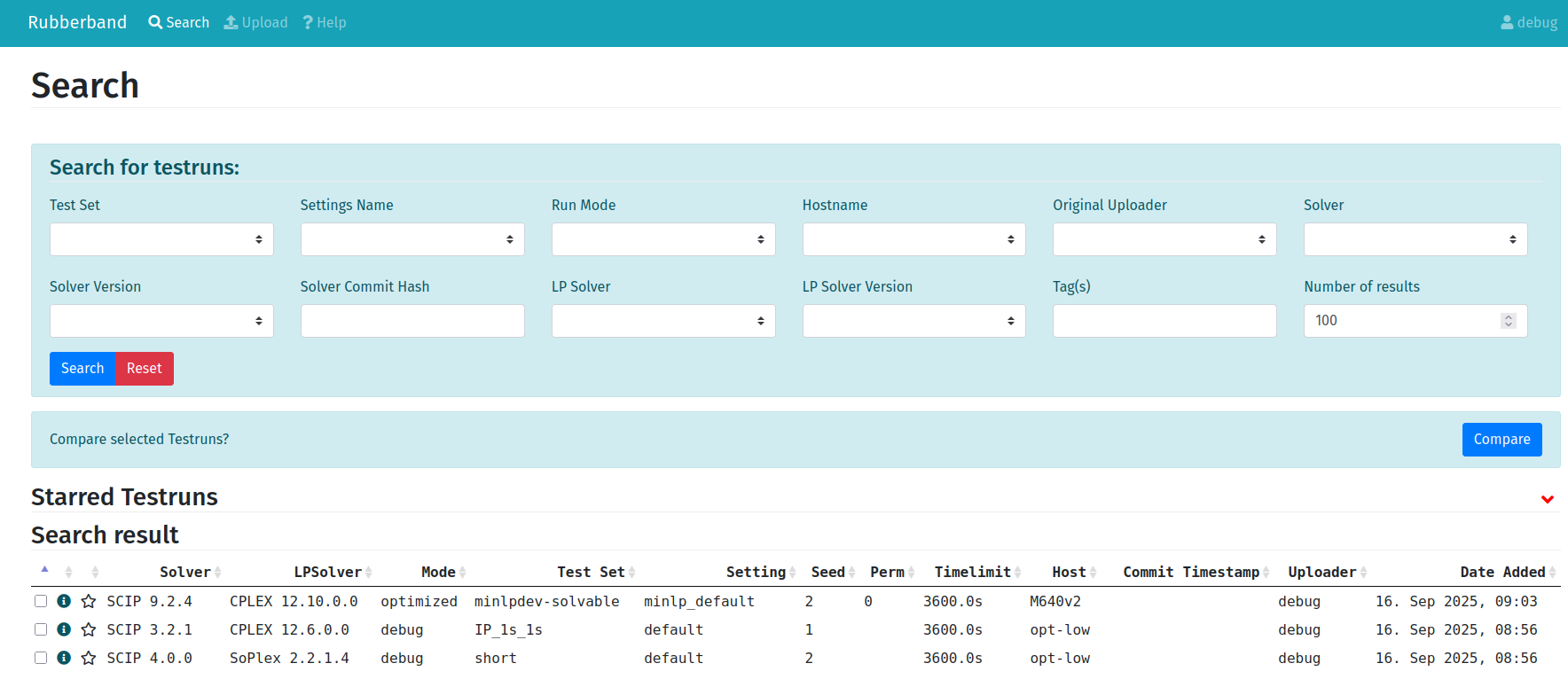
Continuous integration is configured with Github Actions, and is run on every pull request. For more information about the CI workflow, please see here.
To build the documentation run the following commands from inside the virtualenvironment:
cd doc
make doc
Now you can view the documentation by opening doc/build/html/index.html in your favorite webbrowser.
First, install Rubberband locally:
python -m pip install .
Then, run the test suite.
pytest
Tests will fail if Elasticsearch is not running, or if the indices are empty or if you didn't configure authentication correctly.
Rubberband currently requires a connection to an Elasticsearch 9.x instance and (optionally) a Gitlab instance to run. To configure a Gitlab connection, edit the configuration variables in /etc/rubberband/app.cfg beginning with gitlab_. The Gitlab connection is used to look up information from the code base that your test set log is linked to. Examples of this type of information are git commit date and last committer. The visualize tab is disabled if no Gitlab connection information is provided.
There is no authentication built into Rubberband, though rubberband will authorize requests to the frontend using the X-Forwarded-Email header. Request made to the API require this header, as well as an X-Api-Token header. This is to say that authentication and setting the appropriate headers is the responsibility of the user/deployer. oauth2_proxy is a convenient proxy that, when properly hooked up to an OAuth provider, will set this header for you. See config/oauth2-proxy.cfg for a sample configuration when deployed behind nginx.
Rubberband is meant to be deployed behind a production webserver, such as a nginx or apache. See config/rubberband-oauth for a sample nginx configuration. This example shows an HTTPS deployment configured with Let's Encrypt.
Supervisor is a process monitor and manager, and great way to make sure Rubberband keeps running reliably in production.
See CONTRIBUTING.md.