







release-scope shows what each of your GitLab services would ship if you released it now. For every service it
lists the merge requests and commits between production and the default branch, the tags you could release, their
pipelines, and the Jira issues they carry. Pick a tag per service, or tick Jira issues and let it pick the tags, then
copy the release post.
It writes a static page with a report.json, built to run on a schedule and publish with GitLab Pages.
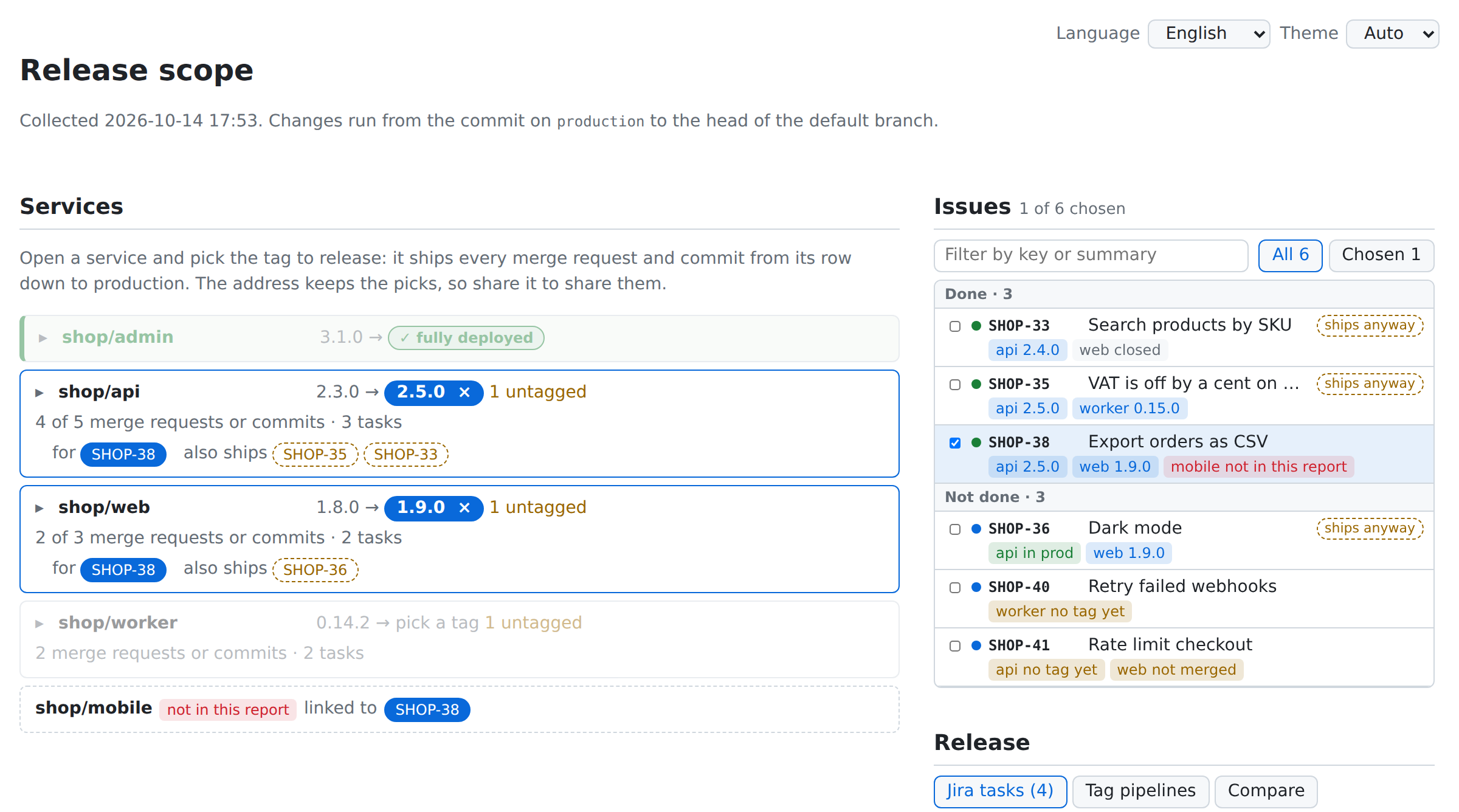
Try the demo: a made-up shop with four services and six Jira issues.
export RELEASE_SCOPE_GITLAB__ENDPOINT=https://gitlab.example.com
export RELEASE_SCOPE_GITLAB__TOKEN=glpat-...          # read_api scope
export RELEASE_SCOPE_ENVIRONMENTS='["prod", "preview"]'
export RELEASE_SCOPE_PRODUCTION_ENVIRONMENT=prod

uvx release-scope collect --group team/backend --output public --cache cache.json
python3 -m http.server --directory public
Then open http://localhost:8000. The page reads report.json over HTTP, so a file:// URL will not work.
--groupand--projectare repeatable and can be mixed.--include-subgroupsadds the projects of subgroups.--exclude(-x) skips every project whose path matches a glob liketeam/*-sandbox. It is repeatable, and*also matches/. A skipped project is never queried, including when a Jira issue links to it.--cachesaves requests between runs; see Cache.
Run collect from a scheduled pipeline in a project of its own, such as team/release-report. Pages serves only the
site of the project that runs the job, and that project's members are the ones who can view it. collect reads the
services through the API, so they need no change.
release-report:
  image: ghcr.io/astral-sh/uv:python3.13-trixie-slim
  rules:
    - if: $CI_PIPELINE_SOURCE == "schedule"
  script:
    - uvx --from 'release-scope>=0.9,<0.10' release-scope collect --group team/backend --output public || [ $? -eq 1 ]
  pages: true
|| [ $? -eq 1 ] keeps the job green when only some services failed, since GitLab deploys Pages only from a
successful job, and the page shows their errors. Any other failure still fails the job and keeps the previous site.
pages: true needs GitLab 17.6 and publishes public from 17.10. On older versions, name the job pages and add
artifacts: {paths: [public]}.
Set RELEASE_SCOPE_GITLAB__ENDPOINT, a masked RELEASE_SCOPE_GITLAB__TOKEN, and the other settings as CI/CD
variables of the project, then add a pipeline schedule.
A Pages site is public to anyone who can reach it, even for a private project, unless an administrator of a self-managed instance turns on Pages access control. With it on, set Settings > General > Visibility > Pages to Only project members.
Open a service and press pick on the tag to release. It ships every row from that tag down to production. Or tick Jira issues in the Issues list, and the page picks, in every service they touch, the nearest tag that ships them, and marks other issues those tags ship anyway. The address keeps the picks, so a link shares them.
The Release column turns the picks into the Jira task list, the tag pipelines, compare links, and a Markdown release post to copy. The page describes every label and rule.
Set RELEASE_SCOPE_JIRA_ENDPOINT and RELEASE_SCOPE_JIRA_TOKEN to add Jira. collect then reads the summary and
status of every key the rows mention, and the GitLab merge requests and commits linked to each issue through GitLab's
Jira integration.
--jira collects only the services some Jira issues link to, instead of a group or project:
uvx release-scope collect --jira SHOP-140 --jira SHOP-141 --output public --cache cache.jsonThe report then starts with each service's release tag picked: the nearest tag at or above the issues' latest
change. --jira is repeatable and cannot be combined with --group or --project.
How collection works has the details.
Every setting is an environment variable; nothing about a GitLab or Jira instance is built in.
| Variable | Default | Meaning |
|---|---|---|
RELEASE_SCOPE_GITLAB__ENDPOINT |
https://gitlab.com |
GitLab base URL |
RELEASE_SCOPE_GITLAB__TOKEN or GITLAB_TOKEN |
required | Token with read_api |
RELEASE_SCOPE_ENVIRONMENTS |
["production"] |
Environments shown per service, as a JSON list |
RELEASE_SCOPE_PRODUCTION_ENVIRONMENT |
production |
Environment whose deployed commit starts the range |
RELEASE_SCOPE_JIRA_ENDPOINT |
unset | When set, Jira keys link to <endpoint>/browse/<KEY> |
RELEASE_SCOPE_JIRA_TOKEN or JIRA_TOKEN |
unset | Jira Server/Data Center personal access token; when set, issues are fetched |
RELEASE_SCOPE_JIRA_PROJECT_KEYS |
[] |
Keep only keys of these Jira projects; empty keeps all |
RELEASE_SCOPE_MAX_COMMITS |
1000 |
Stop walking a service's range after this many commits |
RELEASE_SCOPE_REQUEST_TIMEOUT |
10 |
Per-request timeout in seconds |
One service failing does not stop the run. A service GitLab denies access to fails alone, and its error names the project settings and member page to check. A project with CI/CD or Environments disabled gets a warning and no rows, without being queried.
| Exit code | When |
|---|---|
0 |
Everything was collected |
1 |
Some services failed, the Jira search failed, or Jira has no issue passed to --jira. The report is still written and names each error |
2 |
A setting or option is invalid, or the GitLab token is missing |
3 |
GitLab rejected the token, or denied access to a group or project passed on the command line |
4 |
GitLab failed to return a group or project passed on the command line |
--cache names a JSON file that is read if present and rewritten atomically after the run. It holds only facts that do not
change once settled: which merge requests a commit belongs to, merged merge requests, and the failed jobs of finished
pipelines. A retried job changes its pipeline's updated_at, which invalidates the entry. Entries a run did not use
are dropped for the projects it collected, so one file serves both group and --jira runs. A missing, corrupt, or
older cache is ignored with a warning. The cache never changes the report.
skills/release-scope is an agent
skill that runs release-scope and answers release questions from the report. Ask your coding agent what in the
current repository has not reached production, what a group will ship with the next tag, or whether a Jira issue is
released and which services it touches. For the current repository it takes --project from the git remote,
and it keeps the report and cache outside the repository. Install it with skills:
npx skills add modern-python/release-scopeThe agent reads the same environment variables as the CLI, so set them first. The skill runs
release-scope>=0.9,<0.10, the range whose flags and report schema it describes.
- How collection works: the range,
rows, Jira links, and
--jirarelease states. - The page: every part of the page and what its labels mean.
- Report: the
report.jsonfields, for scripts and agents.