




PowerPlan decides when your home's big appliances run. It moves the car charger, water heater, floor heating, heat pump and home battery into the cheapest hours. It also keeps every hour under the capacity step on your grid bill, and the home under its main fuse.
I built it for my own house in Norway, where the grid fee follows the highest hours each month. It runs there every day, and the dashboard shows what it plans and why.
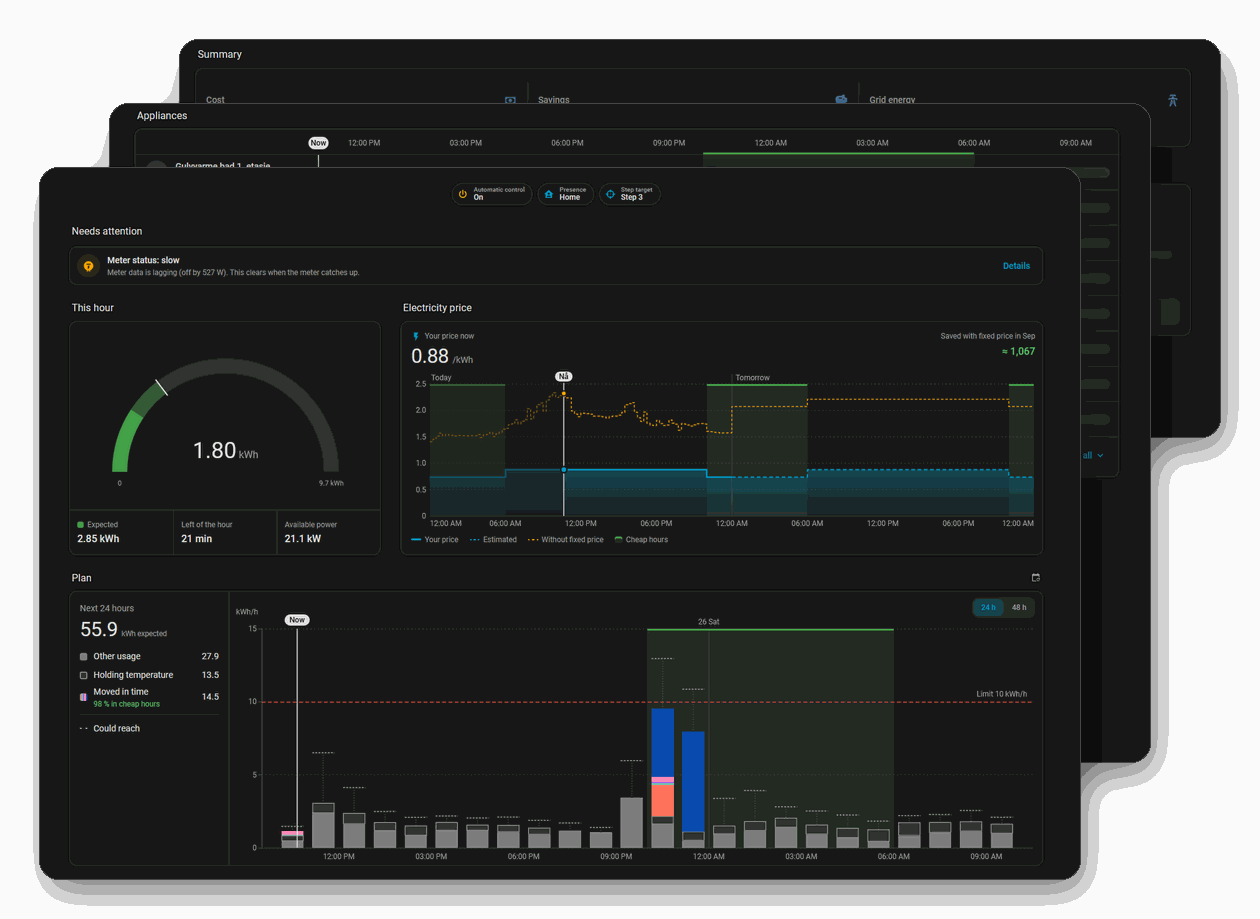
- Plans up to two days ahead. Each appliance gets the cheapest hours that still have it ready in time. Tomorrow's prices are used as soon as they are published.
- Keeps each hour under your capacity step. The meter is read every few seconds, and when the hour heads over your target, the least important appliance pauses first.
- Protects your fuses. The main fuse and each circuit's fuse come before any price or plan.
- Keeps your home comfortable. No room, floor or water tank drops below its lowest temperature, and the car is charged by the time it leaves.
- Fetches your grid tariff from the regulator or the grid companies in many countries, with VAT and taxes by date and region. Where no source covers yours, you type it in from your bill.
- Reads your electricity price from Nord Pool, ENTSO-e, Tibber, Octopus Energy, Energi Data Service and other integrations, and adds what your supplier charges on top.
- Uses your solar panels and home battery. Solar power you would otherwise sell can charge the car or heat water, and the battery can shave peaks or buy low and sell high.
- Saves only where you ask. Heating never lowers the temperature unless you turn on saving while nobody is home, or while you sleep, for that appliance.
- Counts cost and savings. The month's cost is split by grid company, supplier and state, and each appliance's savings are measured against running without PowerPlan.
- Works with your automations. Entities, actions, events and a calendar of planned runs, so a button or a script can start or pause an appliance.
It starts in trial mode, where it only shows what it would do. Nothing is switched until you turn on Automatic control.
Each appliance follows a plan, the way PowerPlan chooses its hours. Every kind of appliance starts on its default plan, and you can change it on the appliance. Plans explains each one.
| Plan | Default for | Also offered for |
|---|---|---|
| Always | – | Dishwasher, washer or dryer, Home battery, Car charger, Floor heating, Something else on a switch, Heat pump, Panel heater, Water heater |
| Arbitrage | – | Home battery |
| Best save | – | Floor heating, Something else on a switch, Heat pump, Panel heater, Water heater |
| Cheapest hours | Something else on a switch | Car charger, Heat pump, Panel heater, Water heater |
| Deadline fill | Car charger, Water heater | Dishwasher, washer or dryer, Home battery, Floor heating, Something else on a switch, Heat pump, Panel heater |
| Heat capacitor | Floor heating, Heat pump, Panel heater | Water heater |
| Hot water | – | Water heater |
| Peak shave | Home battery | – |
| Run once | Dishwasher, washer or dryer | – |
| Schedule | – | Floor heating, Something else on a switch, Heat pump, Panel heater, Water heater |
| Surplus | – | Car charger, Something else on a switch, Water heater |
PowerPlan recognizes these devices when you add an appliance, and steers each through its own Home Assistant integration. Anything else it steers through a thermostat, a switch or a power setting Home Assistant already has. Devices says what each one needs.
| Appliance | Devices |
|---|---|
| Dishwasher, washer or dryer | any switch |
| Home battery | anker_solix, e3dc_rscp, ecoflow_cloud, foxess_modbus, fronius, fronius_modbus, goodwe, growatt_server, homewizard, huawei_solar, marstek_local_api, marstek_modbus, saj_h2_modbus, sessy, sigen, solaredge_modbus_multi, solarman, solax_modbus, solax_modbus_sofar, solis_cloud_control, solis_modbus, sonnenbatterie, sungrow_modbus, tesla_custom, tesla_fleet, teslemetry, tessie, victron, victron_gx, victron_mqtt, zendure_ha, any power or current setting |
| Car charger | easee_ble, easee_cloud, goecharger_api2, ocpp, peblar, v2c, wallbox, zaptec, any power or current setting |
| Floor heating | any thermostat |
| Something else on a switch | any power or current setting, any switch |
| Heat pump | any thermostat |
| Panel heater | any thermostat, any switch |
| Water heater | any thermostat |
- Home Assistant 2026.3 or newer.
- A power reading from your electricity meter, for example a HAN or P1 reader.
- Electricity prices in Home Assistant, for example the Nord Pool integration.
- Appliances Home Assistant can already switch or set.

- Select the button above. Or open HACS, open the menu at the top right, and select Custom repositories.
- If HACS asks, add
https://github.com/jkaberg/hass-powerplanas type Integration. - Select PowerPlan, then Download.
- Restart Home Assistant.
- Download the source code (zip) from the latest release and unpack it.
- Copy
custom_components/powerplan/into thecustom_components/folder of your Home Assistant configuration. Create the folder if it's missing. - Restart Home Assistant.
A manual install doesn't update itself, repeat this for every release.

- Select the button above. Or go to Settings > Devices & services, select Add integration, and search for PowerPlan.
- Answer the questions about your home. Each one links to where you find the answer.
- Leave Start in trial mode on at the last screen.
Most questions have Don't know or a default, and Reconfigure on the home changes any answer later. Set up a home explains every question.
- Open PowerPlan under Settings > Devices & services, and select Add appliance on your home. Start with what draws the most: the car charger, the water heater, the floors and the heat pump.
- Add the dashboard: go to Settings > Dashboards, select Add dashboard, and choose PowerPlan. Home Assistant 2026.3 and 2026.4 need one extra step, see Dashboard.
- Watch the plans for a day or two, trial mode changes nothing.
- When the plans look right, switch on Automatic control on your home.
- Get started: from installed to the first plan
- Set up a home: every setup question and where to find the answer
- Appliances and Devices: what PowerPlan can steer
- Dashboard: what each card shows
- Troubleshooting: repairs and problems
- All documentation
- Questions, setup help and ideas: Discussions. Check Troubleshooting first.
- Bugs and feature requests: Issues. A bug report without a debug log and the diagnostics gets closed, see Diagnostics and reporting a problem for how to get them.
PowerPlan is a spare time project. PRs are the best way to help, see CONTRIBUTING.md. If you want to buy me a coffee that's appreciated aswell :-)