
Export your Anki decks to standalone HTML files with custom styling and formatting.
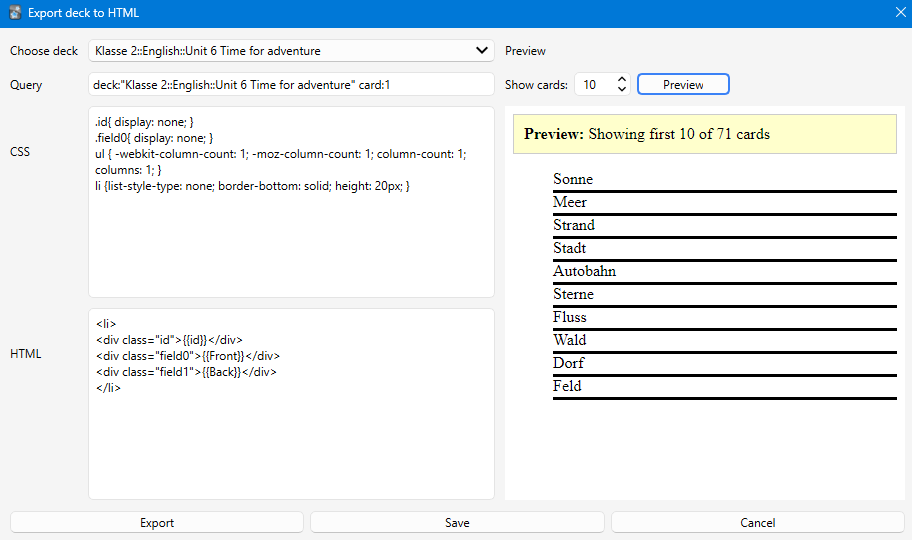
This addon allows you to export Anki cards to a single HTML file with full control over the layout and styling. Based on the original "Export cards to Html" addon, this version has been updated with modern features and support for newer Anki versions.
- Export entire decks to standalone HTML files with embedded images
- Custom HTML templates - Full control over card layout and structure
- Custom CSS styling - Style your exported cards exactly how you want
- Flexible queries - Use Anki's search syntax to filter which cards to export
- Image support - Images are automatically embedded as base64 data
- ✨ Live Preview - See how your cards will look before exporting
- Adjustable preview count - Choose how many sample cards to preview (1-100)
- Modern UI - Split-panel interface with controls on the left and preview on the right
- Full CSS support - Preview uses modern web engine for accurate rendering
- Updated for modern Anki - Compatible with current Anki versions
- Download the addon from AnkiWeb
- Open Anki and go to Tools → Add-ons → Get Add-ons
- Enter the addon code or install from file
- Restart Anki
- Go to Tools → Export deck to html (or press Ctrl+M)
- Select your deck from the dropdown
- Customize the query if you want to filter specific cards
- Modify the CSS and HTML template as needed
- Click Preview to see how your cards will look
- Click Export to save the HTML file
The addon uses a simple template system with placeholders:
Use {{fieldName}} to insert card fields:
<li>
  <div class="id">{{id}}</div>
  <div class="field0">{{Front}}</div>
  <div class="field1">{{Back}}</div>
</li>{{id}}- Card number (1, 2, 3, etc.){{Front}},{{Back}}, etc. - Your card fields{{Front//Text}}- Fallback syntax for multiple card types
Add any CSS to style your cards:
.id { display: none; }
li { border-bottom: solid; height: 20px; }
ul { column-count: 3; }Use Anki's search syntax to filter cards:
deck:"Deck Name"- All cards in a deckdeck:"Deck Name" card:1- Only specific card typetag:important- Cards with specific tag- Combine with AND, OR, etc.
Click Save to store your current template, CSS, and query for the selected deck. The next time you open the dialog, your settings will be restored.
The preview panel shows how your exported HTML will look:
- Set the number of cards to preview (default: 10)
- Click Preview to generate
- The preview shows the first N cards with your CSS applied
- Adjust your template/CSS and preview again until satisfied
- Start with a small preview count (5-10) while designing your layout
- Use the preview to test your CSS before exporting large decks
- Save your templates for each deck to reuse them later
- Images are automatically embedded, so the HTML file is completely standalone
- The exported HTML file can be opened in any web browser
Based on the original "Export cards to Html" addon. Updated and enhanced with modern features including live preview, better UI, and support for current Anki versions.
If you encounter any issues or have suggestions, please report them on the addon's GitHub page or AnkiWeb reviews.
- Ctrl+M - Open the Export deck to HTML dialog