

Prevent keyboard sliding up and covering inputs on React Native iOS projects. Powered by IQKeyboardManager.
React Native Keyboard Manager prevents the iOS keyboard from sliding up and covering text inputs, bringing the battle-tested power of IQKeyboardManager to React Native with zero boilerplate, native smoothness, and complete toolbar control.


Quick Start · Why · Screenshots · Compatibility · Installation · Post Install · Usage · API · Known Issues · Contributing
Warning
This library was created to address iOS-only keyboard issues (e.g., the keyboard covering inputs) by integrating IQKeyboardManager.
With Android moving to edge-to-edge by default, similar "keyboard covering inputs" problems can now happen on Android as well. Because of that, maintaining a library that only targets iOS no longer makes sense.
For this reason, this project is now in maintenance mode: bug fixes and small PRs are welcome, but no new features are planned.
Thank you for all the partnership and collaboration over these 9 years of this project's journey, it truly made a difference. ❤️
Recommended alternatives:
- KeyboardAvoidingView (React Native built-in)
- An edge-to-edge approach with react-native-keyboard-controller (cross-platform)
- ⚛️ Zero UI boilerplate. No need to manually wrap every view in nested avoiding views or calculate keyboard height offsets by hand.
- 🍎 Powered by IQKeyboardManager. Relies on the most mature, battle-tested native iOS keyboard framework.
- ⌨️ Native input toolbar. Provides Done button dismissal and active placeholder display, with opt-in previous (
<) / next (>) navigation buttons. - 👆 Dismiss on touch outside. Tap anywhere outside active text fields to dismiss the keyboard cleanly.
- 🎛️ Fully customizable. Adjust keyboard distances, colors, dark/light appearance modes, and toolbar behaviors with simple JS/TS calls.
- 🪟 Modal-friendly. Includes native
<PreviousNextView>support to preserve field traversal even inside complex modals. - 🧪 Mock included. Comes with a pre-configured Jest mock ready for testing suites.
| Feature | Enabled (with Keyboard Manager) | Disabled (default iOS behavior) |
|---|---|---|
| Inputs Lifted | 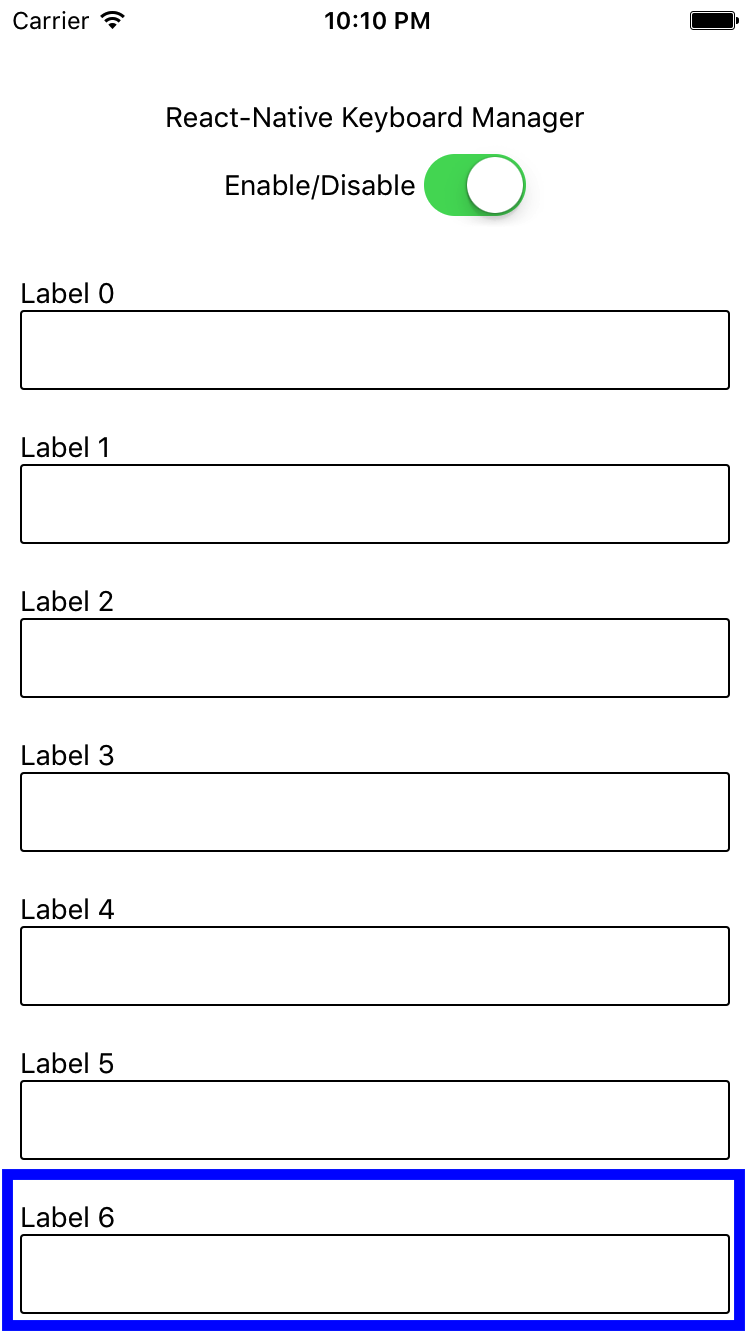 |
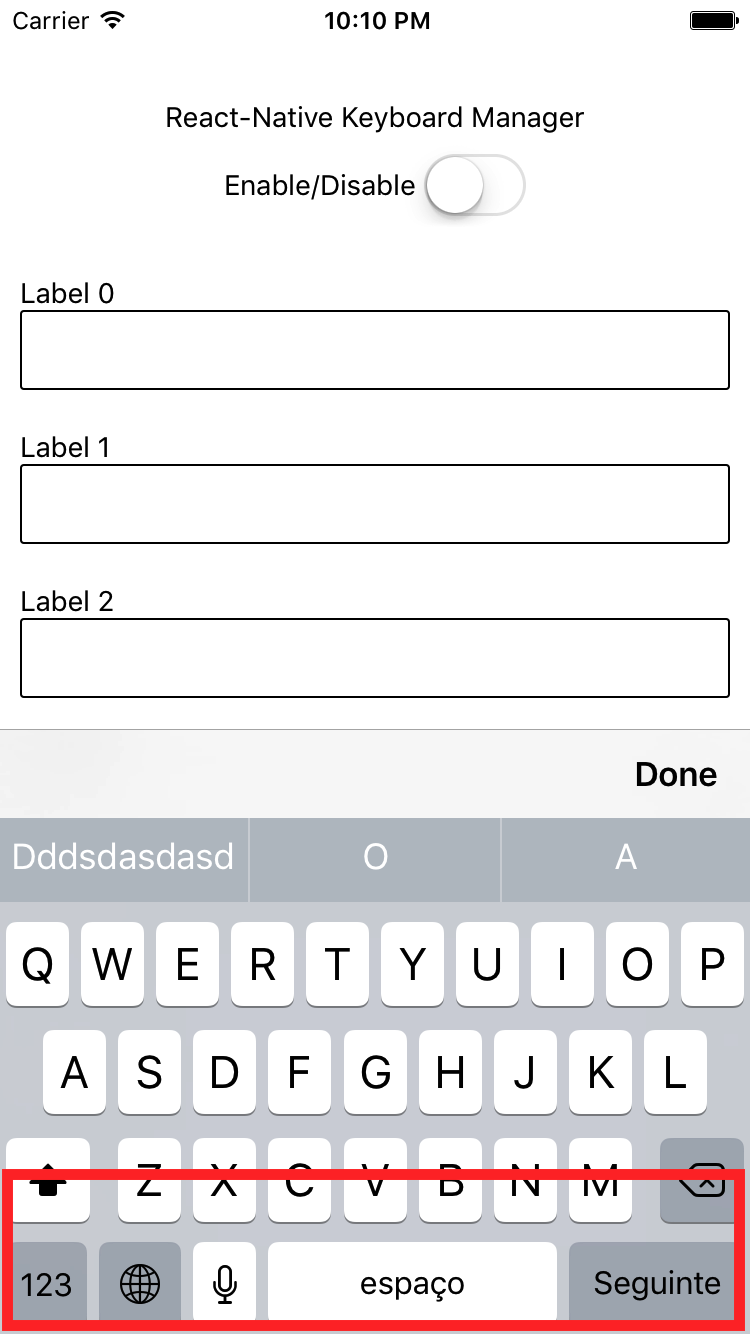 |
| Native Toolbar | 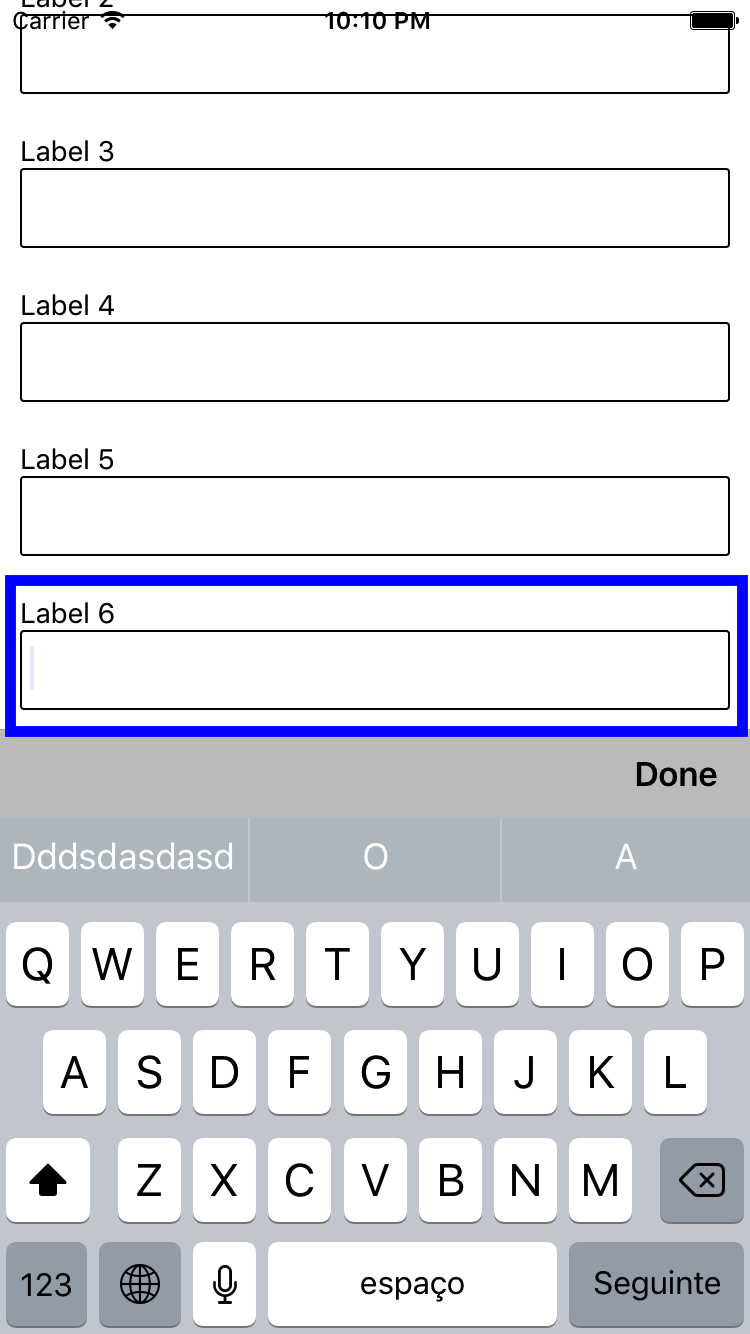 |
Input covered beneath keyboard |
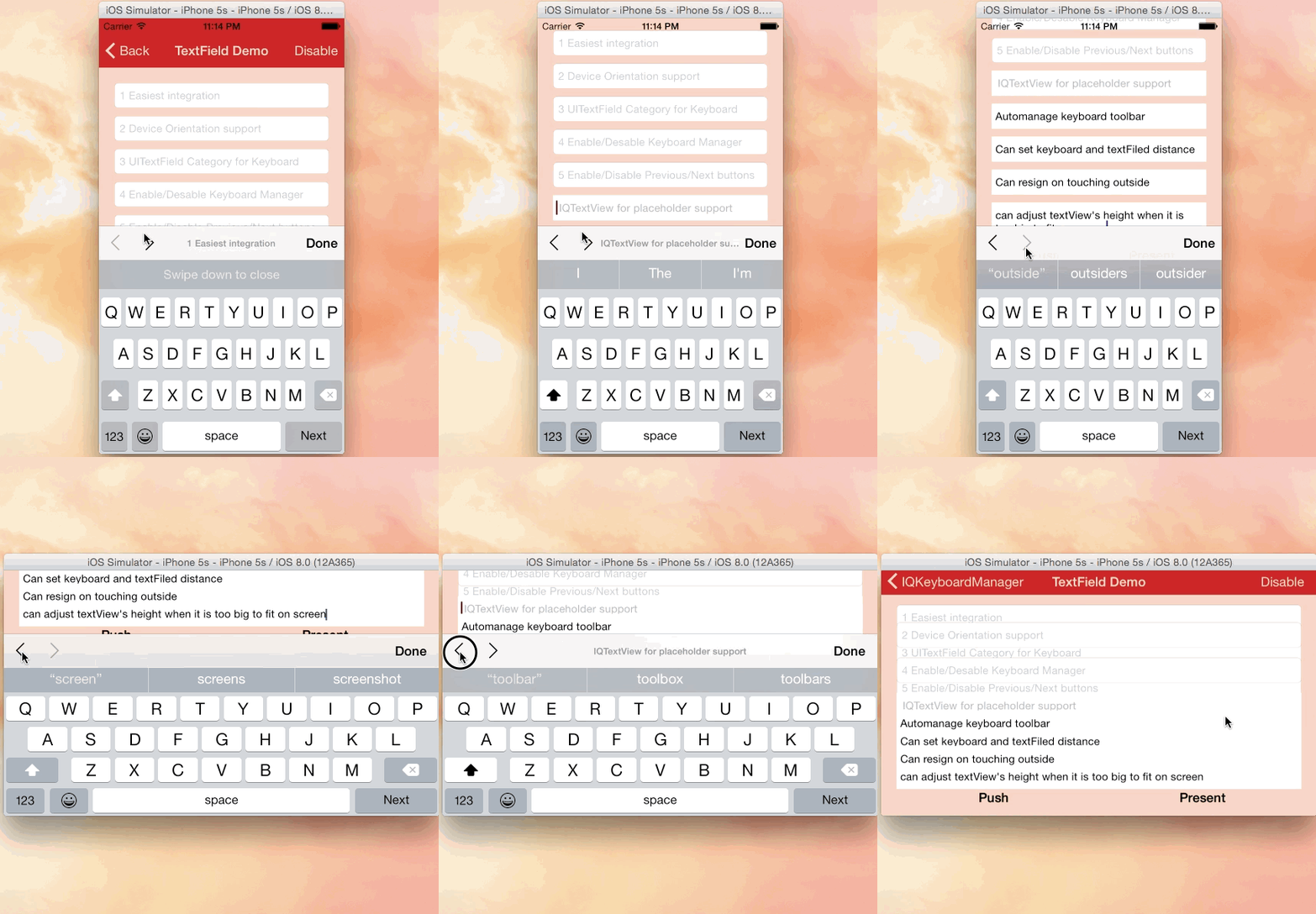
Credits: IQKeyboardManager
| React Native Version | Recommended Library Version |
|---|---|
RN >= 0.72.0 |
react-native-keyboard-manager@latest |
RN 0.60.0 ... 0.71.x |
react-native-keyboard-manager@6.5.11-2 |
RN 0.53.0 ... 0.59.10 |
react-native-keyboard-manager@4.0.13-12 |
RN 0.47.0 ... 0.52.2 |
react-native-keyboard-manager@4.0.13-5 |
RN 0.40.0 ... 0.46.4 |
react-native-keyboard-manager@4.0.13-1 |
# 1. Install dependency
yarn add react-native-keyboard-manager
# or: npm i -S react-native-keyboard-manager

# 2. Install native CocoaPods dependencies
cd ios && pod install
Note
Because IQKeyboardManager is written in Swift, ensure Swift is enabled in your Xcode project (see Post Install for the required one-time bridging header setup).
import { Platform } from 'react-native';
import KeyboardManager from 'react-native-keyboard-manager';

if (Platform.OS === 'ios') {
  KeyboardManager.setEnable(true);
  KeyboardManager.setEnableAutoToolbar(true);
  KeyboardManager.setToolbarDoneBarButtonItemText('Done');
  KeyboardManager.setToolbarPreviousNextButtonEnable(true);
  KeyboardManager.setShouldResignOnTouchOutside(true);
}Using yarn:
yarn add react-native-keyboard-managerUsing npm:
npm i -S react-native-keyboard-managerAdd the CocoaPods dependency to your ios/Podfile:
# Add temporary IQKeyboardManagerSwift fork to solve problems with PrivacyInfo.xcprivacy
pod 'IQKeyboardManagerSwift', :git => 'https://github.com/douglasjunior/IQKeyboardManager.git', :branch => 'react-native-keyboard-manager'
Note
For Expo managed workflows, you may need a config plugin to configure this pod dependency automatically. Refer to Issue #111 discussion.
cd ios
pod install
(Optional) To force IQKeyboardManagerSwift to update with the latest commit from the repository:
cd ios
pod update IQKeyboardManagerSwift
Because IQKeyboardManager is written in Swift, you must ensure Swift is enabled in your native Xcode project:
- Open
ios/YourAppName.xcworkspacein Xcode. - In the Project Navigator on the left, right-click on
YourAppNameand select New File. - Choose Swift File, click Next, name it (e.g.
File.swift), and ensure theYourAppNametarget is selected. - When Xcode prompts "Would you like to configure an Objective-C bridging header?", click Create Bridging Header.
- Do not delete the created Swift file.
- Rebuild your application.
The library operates automatically once enabled. Simply install and go!
Customize behaviors at app startup (e.g., in your root component or App.tsx):
import { Platform } from 'react-native';
import KeyboardManager from 'react-native-keyboard-manager';

if (Platform.OS === 'ios') {
  KeyboardManager.setEnable(true);
  KeyboardManager.setEnableDebugging(false);
  KeyboardManager.setKeyboardDistanceFromTextField(10);
  KeyboardManager.setLayoutIfNeededOnUpdate(true);
  KeyboardManager.setEnableAutoToolbar(true);
  KeyboardManager.setToolbarDoneBarButtonItemText("Done");
  KeyboardManager.setToolbarManageBehaviourBy("subviews"); // "subviews" | "tag" | "position"
  KeyboardManager.setToolbarPreviousNextButtonEnable(false);
  KeyboardManager.setToolbarTintColor('#0000FF'); // Only #000000 hex format supported
  KeyboardManager.setToolbarBarTintColor('#FFFFFF'); // Only #000000 hex format supported
  KeyboardManager.setShouldShowToolbarPlaceholder(true);
  KeyboardManager.setOverrideKeyboardAppearance(false);
  KeyboardManager.setKeyboardAppearance("default"); // "default" | "light" | "dark"
  KeyboardManager.setShouldResignOnTouchOutside(true);
  KeyboardManager.setShouldPlayInputClicks(true);
  KeyboardManager.resignFirstResponder();

  KeyboardManager.isKeyboardShowing().then((isShowing) => {
    console.log('Is keyboard visible:', isShowing);
  });
}
For a comprehensive real-world example, explore the Sample FormScreen.
To use previous and next navigation buttons:
if (Platform.OS === 'ios') {
  KeyboardManager.setToolbarPreviousNextButtonEnable(true);
}
When text inputs live inside a native <Modal>, wrap them with <PreviousNextView> so the native hierarchy allows traversal between inputs:
import React, { Component } from 'react';
import { View, Modal, TextInput } from 'react-native';
import { PreviousNextView } from 'react-native-keyboard-manager';

class App extends Component {
  render() {
    return (
      <View style={{ flex: 1 }}>
        <Modal visible={this.state.modalVisible}>
          <PreviousNextView style={{ flex: 1 }}>
            <TextInput placeholder="Input 1" />
            <TextInput placeholder="Input 2" />
            <TextInput placeholder="Input 3" />
          </PreviousNextView>
        </Modal>
      </View>
    );
  }
}When a multiline TextInput dynamically expands its height, notify Keyboard Manager to recalculate the offset:
<TextInput
  multiline
  onLayout={() => {
    KeyboardManager.reloadLayoutIfNeeded();
  }}
/>Add the built-in mock to your Jest test setup or test file:
jest.mock('react-native-keyboard-manager', () => require('react-native-keyboard-manager/jest/mock'));All methods and views are exported from 'react-native-keyboard-manager'.
| Method | Parameters / Type | Default | Description |
|---|---|---|---|
setEnable(enable) |
boolean |
pod-dependent | Enable or disable the entire keyboard management functionality (call explicitly in JS to ensure activation). |
setEnableDebugging(enable) |
boolean |
false |
Enable or disable native debugging logs in the Xcode console. |
setLayoutIfNeededOnUpdate(enable) |
boolean |
true |
Force layout updates when the keyboard frame changes. |
setKeyboardDistanceFromTextField(distance) |
number |
10 |
Distance between the active text field and the top of the keyboard. |
setEnableAutoToolbar(enable) |
boolean |
true |
Enable or disable the automatic accessory toolbar above the keyboard. |
setToolbarDoneBarButtonItemText(text) |
string |
'Done' |
Custom label for the toolbar's "Done" bar button item. |
setToolbarManageBehaviourBy(behaviour) |
'subviews' | 'tag' | 'position' |
'subviews' |
How previous/next navigation manages the order of input fields. |
setToolbarPreviousNextButtonEnable(enable) |
boolean |
false |
Show or hide previous (<) and next (>) navigation buttons on the toolbar. |
setToolbarTintColor(hexColor) |
string (#000000 format) |
system | Tint color for toolbar action buttons (Done, Previous, Next). |
setToolbarBarTintColor(hexColor) |
string (#000000 format) |
system | Background color of the toolbar bar itself. |
setShouldShowToolbarPlaceholder(enable) |
boolean |
true |
Show the current text input's placeholder text centered in the toolbar. |
setShouldToolbarUsesTextFieldTintColor(enable) |
boolean |
false |
Automatically match toolbar tint color with the active text field's tint. |
setOverrideKeyboardAppearance(enable) |
boolean |
false |
Override the keyboard appearance mode globally. |
setKeyboardAppearance(appearance) |
'default' | 'light' | 'dark' |
'default' |
Set the keyboard theme appearance. |
setShouldResignOnTouchOutside(enable) |
boolean |
false |
Dismiss the keyboard automatically when touching outside of inputs. |
setShouldPlayInputClicks(enable) |
boolean |
true |
Enable or disable native sound clicks when tapping inputs or buttons. |
resignFirstResponder() |
none | — | Programmatically dismiss the active keyboard and resign first responder. |
reloadLayoutIfNeeded() |
none | — | Request layout refresh, helpful when multiline inputs dynamically change height. |
isKeyboardShowing() |
none | — | Returns a Promise<boolean> indicating whether the keyboard is currently visible. |
| Export | Platform | Description |
|---|---|---|
<PreviousNextView> |
iOS (RNKMPreviousNextView), Android (View) |
Special container view that groups input fields inside a native <Modal> for proper next/previous toolbar navigation. Falls back to standard <View> on Android. |
- iOS Only: This library is specifically designed for iOS. On Android, keyboard avoidance is handled automatically by the operating system: simply add
android:windowSoftInputMode="adjustResize"to yourMainActivityinAndroidManifest.xml. - Expo Projects: If your project is managed by Expo, you may need to eject to the bare workflow or create a custom config plugin to apply the CocoaPods changes.
- Apple Silicon (M1 / M2 / M3) Pod Install: If CocoaPods installation fails on ARM-based machines, refer to Issue #104.
- React Navigation Native Stack: Compatibility issues with
@react-navigation/native-stackreported in Issue #89 are resolved in version6.5.16-0.
Bug fixes, feedback, and small maintenance improvements are welcome!
- Fork the repository and create a descriptive topic branch.
- Open a pull request describing your changes.
For questions and suggestions, please open an issue.
If this project saved you time over the years, consider supporting the maintainer:


The MIT License (MIT)

Copyright (c) 2017 Douglas Nassif Roma Junior
See the full license file.
The MIT License (MIT)

Copyright (c) 2013-16 Iftekhar Qurashi
See the full IQKeyboardManager license file.

Discover more open-source libraries, creative animation engines, and developer tools at douglasjunior.work.