







mpv_audio_kit is the audio engine for Flutter apps that play from your own server. It talks to Jellyfin, Plex and Samba, and puts everything mpv and ffmpeg can do behind a typed Dart API.
 |
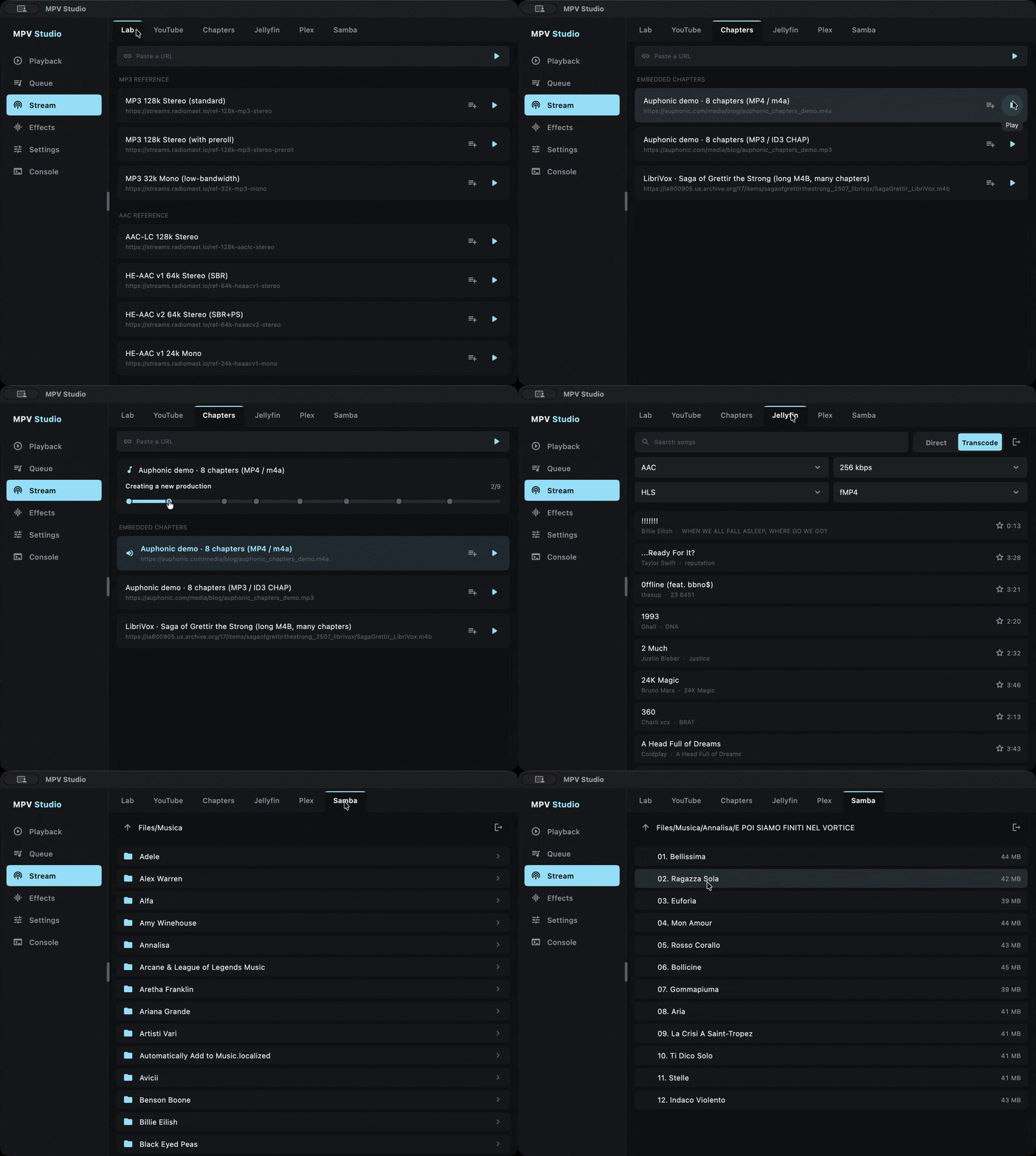
Jellyfin Stream your library direct or transcoded. Transcoded streams (HLS) stay seekable, so the seek bar works while the server converts the file. |
 |
Plex Play tracks and playlists from Plex. Each track asks the server for its stream (HLS or DASH) only when it loads, through the source resolver, so a long queue starts at once and the server is never flooded with requests. |
 |
Samba Play straight from a NAS or any network share over SMB2 and SMB3, as if the files were on the device. |
 |
Total control Tune the cache and the network, shape the sound with a chain of ffmpeg effects, and watch it with a live spectrum, waveform and loudness meter. |
Add mpv_audio_kit to your pubspec.yaml:
dependencies:
mpv_audio_kit: ^0.5.1| Platform | Minimum | Architecture | Size | Device | Emulator |
|---|---|---|---|---|---|
| Android | 7.0 (SDK 24) | arm64-v8a, armeabi-v7a, x86_64 | 8.3, 8.2, 8.9 MB | Yes | Yes |
| iOS | 15.0 | arm64, x86_64 | 7.5, 8.0 MB | Yes | Yes |
| macOS | 12.0 | arm64, x86_64 | 7.5, 8.0 MB | Yes | - |
| Windows | 10 | arm64, x86_64 | 8.1, 9.1 MB | Yes | - |
| Linux | glibc 2.31 (Ubuntu 20.04, Debian 11) | aarch64, x86_64 | 8.8, 8.6 MB | Yes | - |
The package needs Dart 3.10 and Flutter 3.38, and Flutter 3.47.4 or later to build for iOS: older releases mark the bundled framework for an iOS version below the library's 15.0, which App Store validation rejects. On Linux, libmpv needs ALSA (libasound.so.2) and uses PipeWire (0.3.57 or later) or PulseAudio when installed.
-
9. State and streams
- 9.1 Playback state
- 9.2 State snapshot
- 9.3 Core streams
- 9.4 Playlist and track streams
- 9.5 Audio hardware streams
- 9.6 Effects streams
- 9.7 Network and cache streams
- 9.8 File metadata and path streams
- 9.9 Playback timing streams
- 9.10 A-B loop streams
- 9.11 Cover art streams
- 9.12 Runtime diagnostics
- 9.13 Prefetch lifecycle stream
- 9.14 Visualizer and analysis streams
- 9.15 Media session streams
- 9.16 Event streams
 |
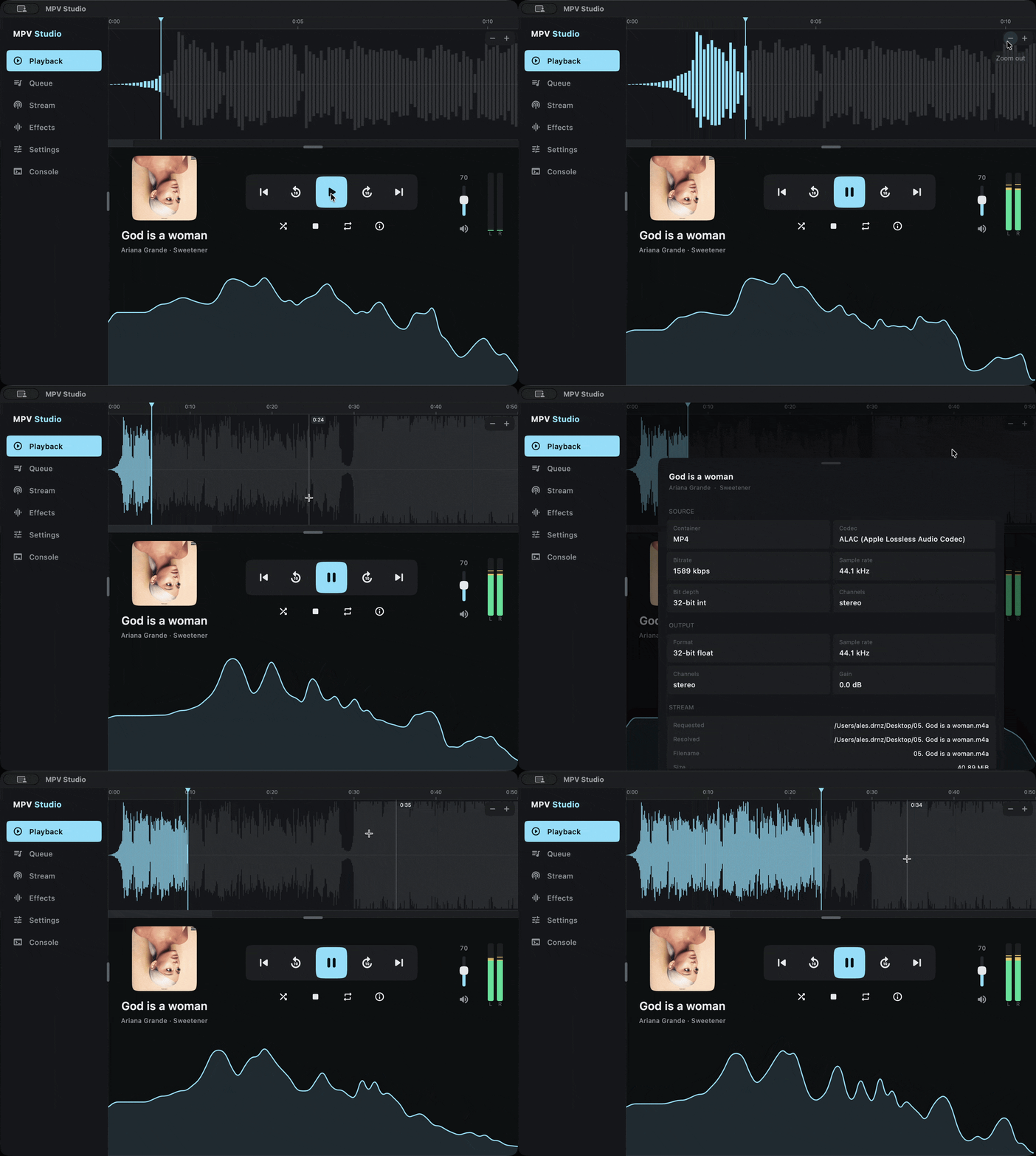
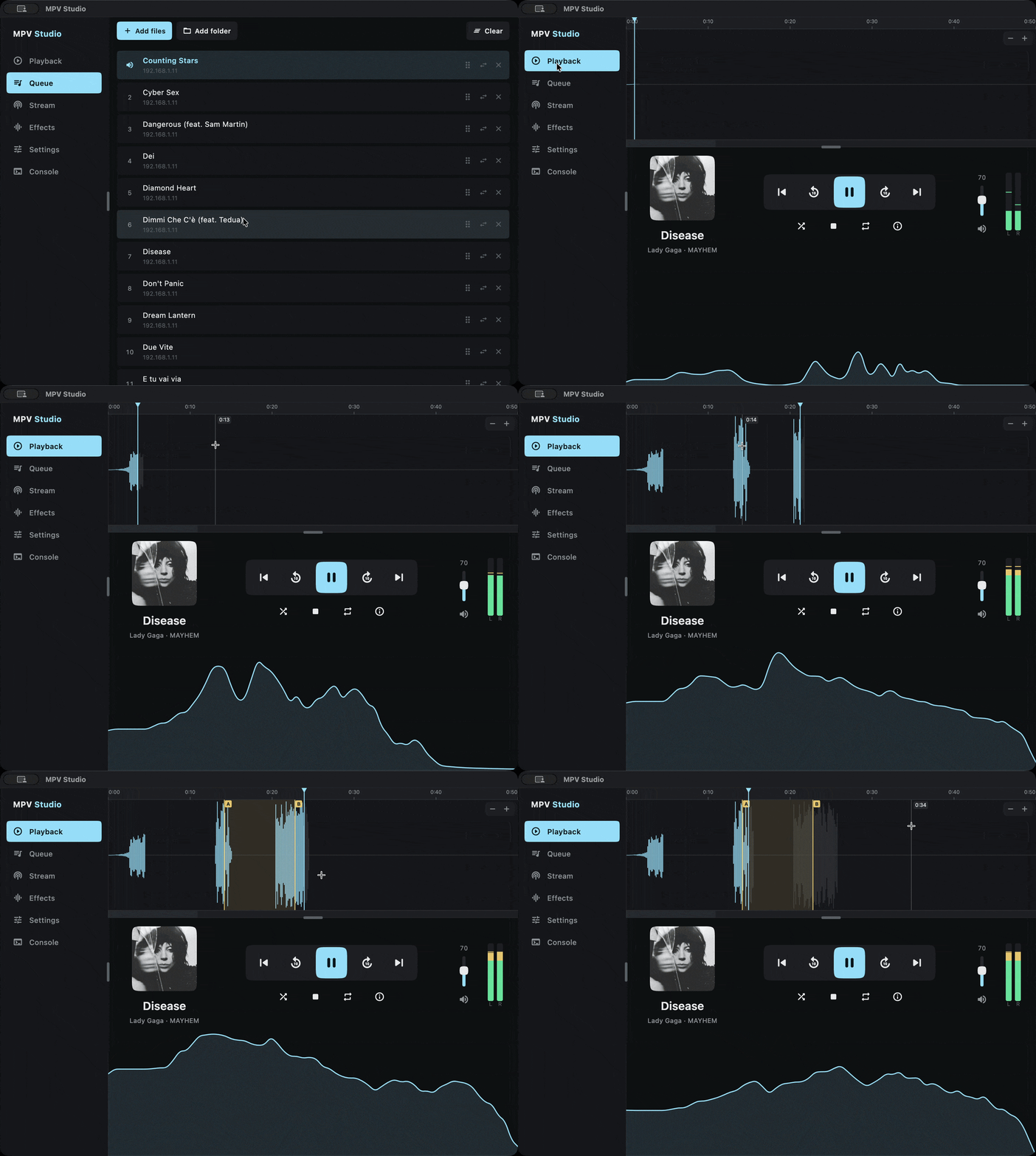
The screenshots below come from MPV Studio, a separate app built on mpv_audio_kit. The example/ folder in this repository is a single-file demo. |
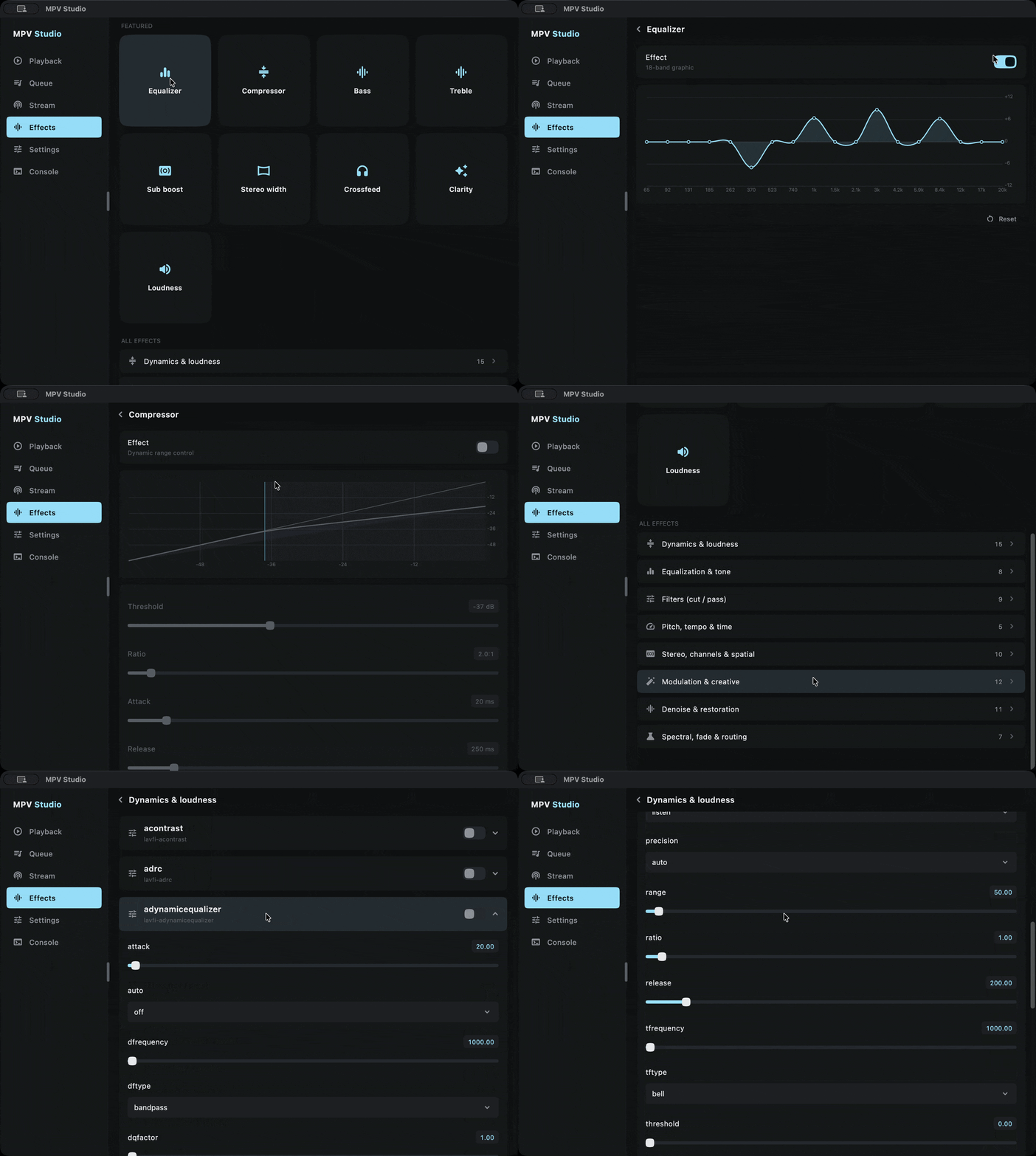
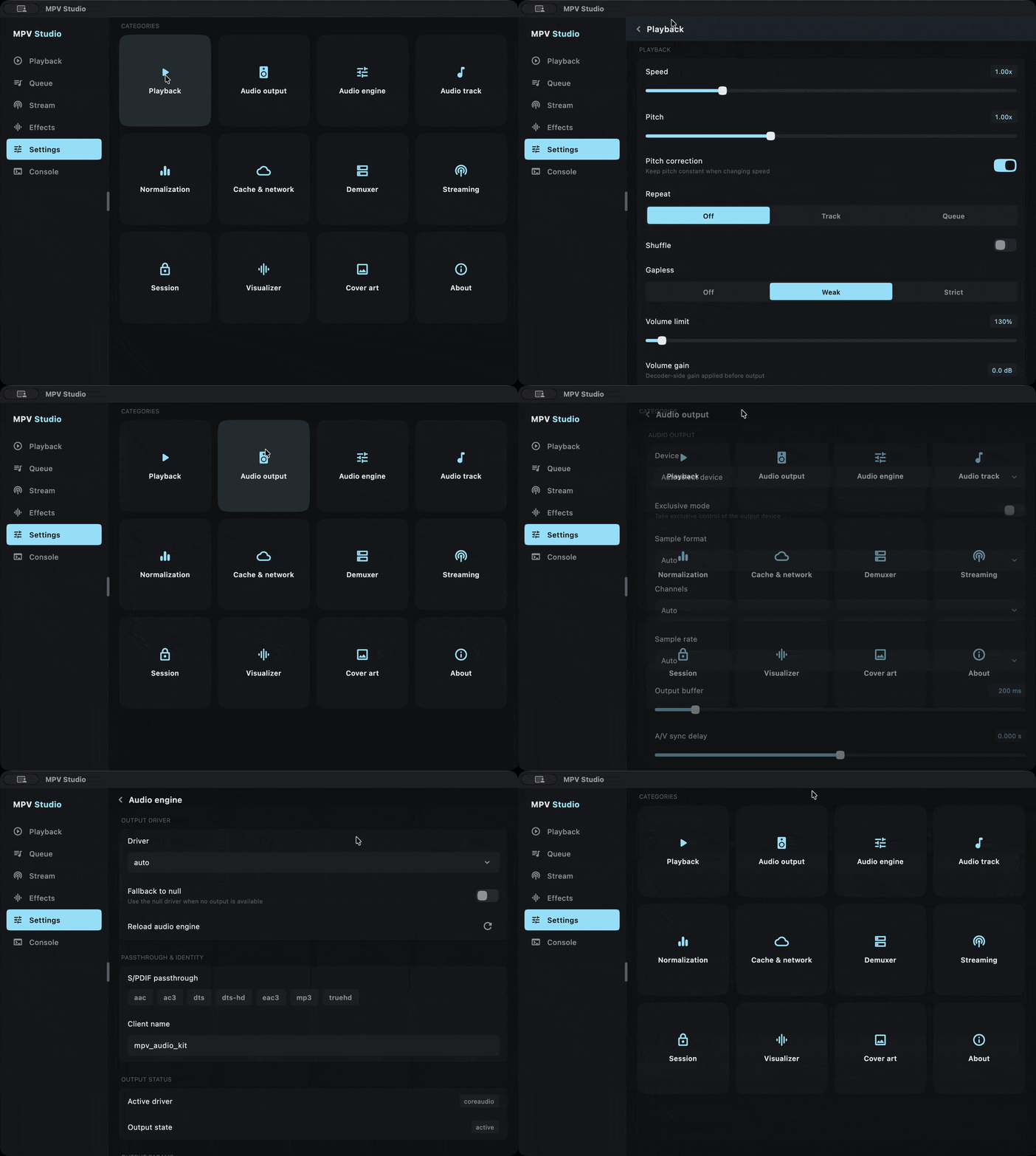
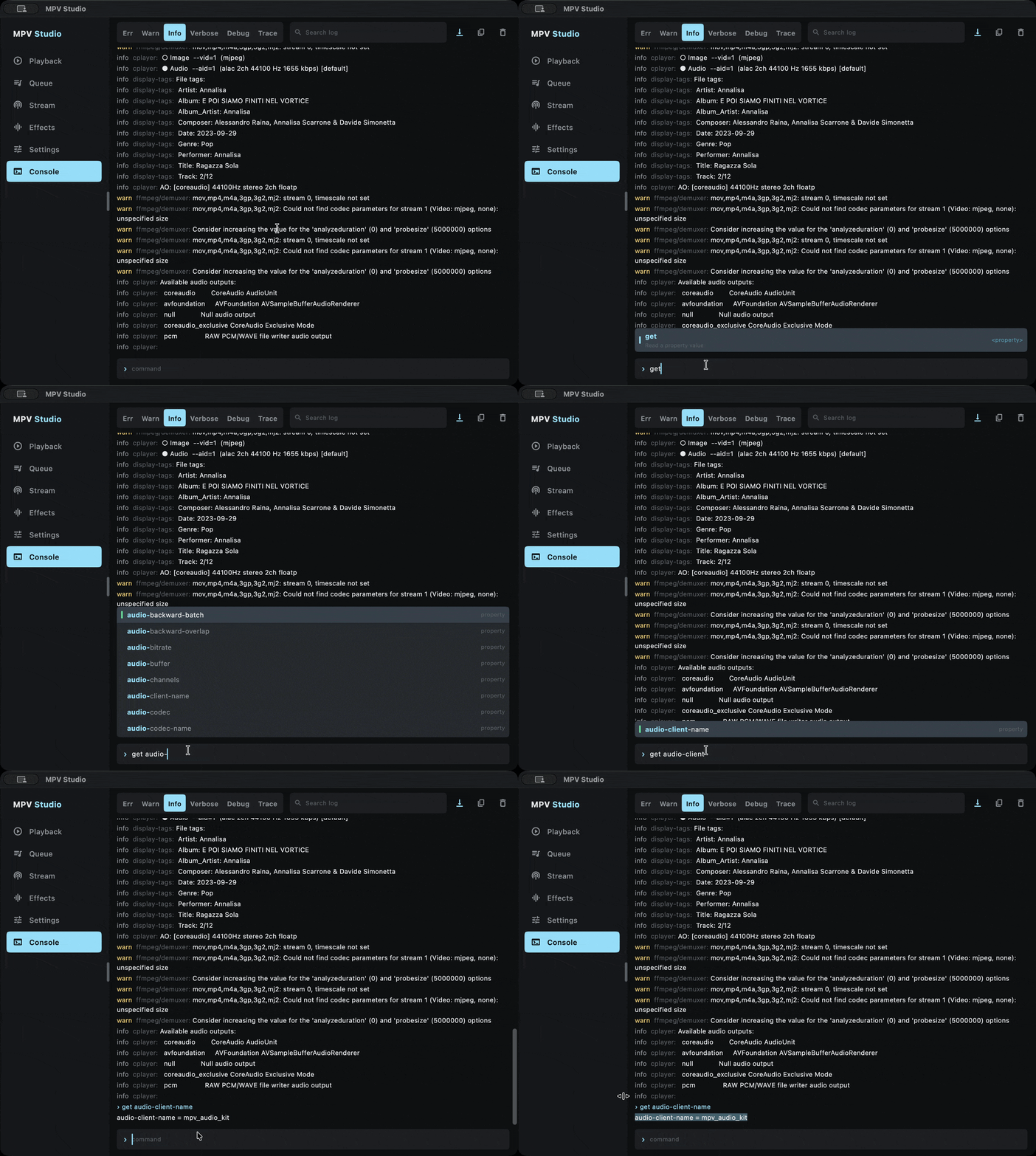
 |
Non-blocking mpv events run in a background isolate, so the UI thread stays free. |
 |
Type-safe API typed enums, sealed selectors and *Effect stages. |
 |
Reactive state a synchronous state snapshot and more than 100 streams. |
 |
Gapless playback track changes without a gap, with an observable prefetch lifecycle. |
 |
Effects chain an ordered list of typed effects: 18-band graphic EQ, compressor, loudness, pitch and tempo, bass and treble, stereo width, headphone crossfeed, silence trim, and any lavfi filter as a raw stage. |
 |
Visualizer real-time FFT spectrum and PCM streams, a waveform overview and loudness measurement. |
 |
ReplayGain track and album gain, preamp and fallback gain. |
 |
Dynamic playlist add, remove, move and replace entries during playback, plus chapters and A-B loop. |
 |
Multi-track audio typed track selection in containers with several audio tracks (MKV, MP4), with codec, language and gain for each track. |
 |
Hardware control exclusive mode, device selection, SPDIF passthrough, output sample rate and format. |
 |
Metadata and cover art tags, and embedded artwork as raw bytes with a Flutter ImageProvider. |
 |
Network streams HLS, DASH, SMB, HTTP and HTTPS. |
 |
Cache controlCacheSettings sets the cache size, where it is kept and the pause on an empty cache in one call. |
 |
Hooks run your code while a file loads, prefetch included, to resolve URLs, redirect or add headers. |
 |
Typed errors a sealed PlayerError type, plus streams for end-of-file events, audio output failures and logs. |
 |
Raw access read and write mpv properties and send commands, except writes to af and pause; a rejection throws MpvCommandException. |
 |
OS media session publish the player to the system media controls: Now Playing, Control Center and the lock screen on Apple, MPRIS on Linux, SMTC on Windows and the Android media notification. |
import 'package:flutter/material.dart';
import 'package:mpv_audio_kit/mpv_audio_kit.dart';

void main() {
  WidgetsFlutterBinding.ensureInitialized();
  MpvAudioKit.ensureInitialized();
  runApp(const MaterialApp(home: AudioPlayerScreen()));
}

class AudioPlayerScreen extends StatefulWidget {
  const AudioPlayerScreen({super.key});
  @override
  State<AudioPlayerScreen> createState() => _AudioPlayerScreenState();
}

class _AudioPlayerScreenState extends State<AudioPlayerScreen> {
  late final Player player = Player();

  @override
  void initState() {
    super.initState();
    player.open(Media('https://example.com/audio.mp3'));
  }

  @override
  void dispose() {
    player.dispose(); // fire and forget is fine inside Flutter's synchronous dispose()
    super.dispose();
  }

  @override
  Widget build(BuildContext context) {
    return Scaffold(
      body: Center(
        child: StreamBuilder<Duration>(
          stream: player.stream.position,
          builder: (context, snap) => Text('Position: ${snap.data}'),
        ),
      ),
      floatingActionButton: FloatingActionButton(
        // `playing` flips during seeks and buffering, `playWhenReady` does not.
        onPressed: () =>
            player.state.playWhenReady ? player.pause() : player.play(),
        child: const Icon(Icons.play_arrow),
      ),
    );
  }
}The player lives on your main isolate and talks to libmpv without blocking it: commands go out asynchronously, and a background isolate brings events and state back.
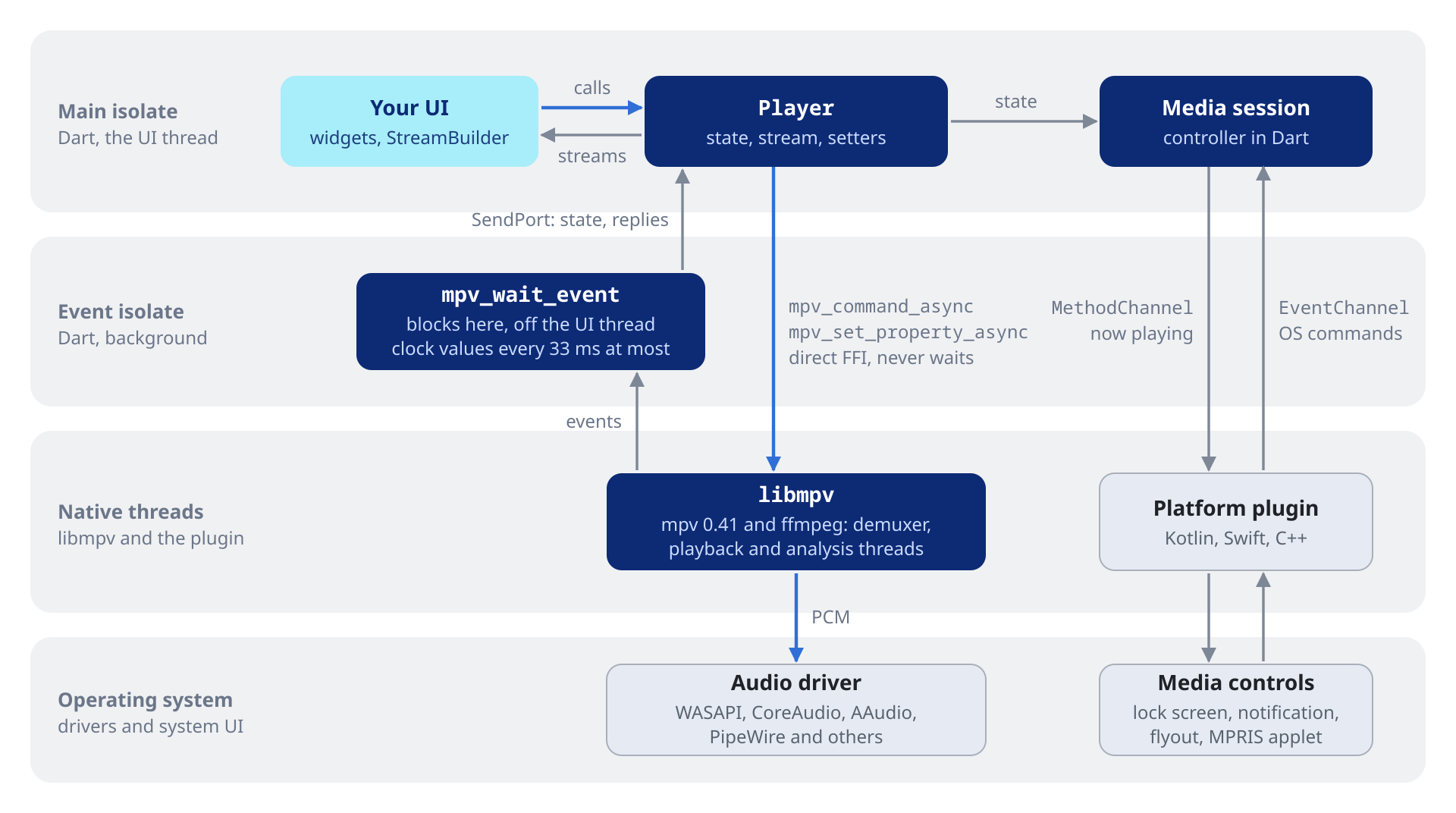

Call MpvAudioKit.ensureInitialized() once at startup, before you create a Player. It sets up the native side and releases the handles a hot restart left behind.
void main() async {
  WidgetsFlutterBinding.ensureInitialized();
  MpvAudioKit.ensureInitialized();
  runApp(const MyApp());
}final player = Player(
configuration: const PlayerConfiguration(
logLevel: LogLevel.info,
initialVolume: 100.0, // 0 to 100
autoPlay: true,
),
);All PlayerConfiguration fields are optional. Their defaults:
9 configuration fields (click to expand)
| Field | Default | Description |
|---|---|---|
autoPlay |
false |
Whether open() starts playback |
initialVolume |
100.0 |
Volume at startup |
logLevel |
LogLevel.warn |
Lowest level that reaches player.stream.log: off, fatal, error, warn, info, v, debug or trace |
resumePlayback |
true |
Restore the saved position when a file is opened again. Nothing is saved on its own: call writeResumeConfig() (see 4.7) |
watchLaterDir |
null |
Directory for resume points. mpv's default is often not writable on mobile |
forceSeekable |
false |
Allow seeking within the cache on streams mpv reports as not seekable (direct HTTP or HLS audio) |
hlsBitrate |
HlsBitrate.max |
Which variant mpv selects from an adaptive HLS playlist (HlsBitrate.no, .min, or .max). Use .min to save bandwidth on metered links. Change it later with setHlsBitrate |
normalizeDownmix |
false |
Scale down surround audio downmixed to fewer channels so it cannot clip, at the cost of a quieter result |
demuxerCacheDir |
null |
Directory for the disk cache of CacheSettings.onDisk. mpv's default is often not writable on mobile |
dispose() releases libmpv and the media session. Call it when you are done with the player.
await player.dispose();Media holds a URI plus optional data and HTTP options for that track.
// HTTPS stream
final track = Media('https://cdn.example.com/audio.flac');

// Local file
final local = Media('file:///home/user/music/song.flac');

// Flutter asset
final asset = Media('asset:///assets/audio/sample.mp3');

// Android content URI (e.g. from file picker)
final content = Media('content://com.android.externalstorage.documents/...');| Scheme | Description | |
|---|---|---|
 |
file:// |
Local files, by absolute path |
 |
asset:/// |
Flutter assets bundled in the app |
 |
content:// |
Android content provider URIs (file picker, media store) |
| Scheme | Description | |
|---|---|---|
 |
https://, http:// |
Files and live streams over HTTP |
|
https://…/*.m3u8 |
HTTP Live Streaming (HLS) manifest, as used by Jellyfin transcoding |
|
https://…/*.mpd |
Dynamic Adaptive Streaming over HTTP (DASH) manifest, as used by Plex transcoding |
|
smb2:// |
SMB2 and SMB3 network shares |
Media.httpHeaders sends headers with every request for that entry, HLS segments included, with no local proxy. mpv gets them as options of that playlist entry, so they never reach other entries:
final media = Media(
  'https://api.example.com/stream/episode-42.mp3',
  httpHeaders: {
    'Authorization': 'Bearer my_token',
    'User-Agent': 'MyApp/1.0',
    'X-Custom-Header': 'value',
  },
);
await player.open(media);
For a URL that has to be resolved or refreshed when the track opens, use the source resolver.
extras attaches your own data to a track. It stays with the entry in
the playlist, so the UI can read it back without a separate lookup.
Playback ignores it. The OS media session reads title, artist,
album and art (a cover URL) as a fallback for files without tags, see
14.2:
final media = Media(
  'https://cdn.example.com/track.mp3',
  extras: {
    'title': 'Track Title',
    'artist': 'Artist Name',
    'album': 'Album Name',
    'duration': const Duration(minutes: 4, seconds: 12),
    'isPodcast': true,
  },
);
final extras = player.state.playlist.items[index].extras;Media.demuxerLavfOptions passes options to ffmpeg's demuxer for that
entry only (mpv's demuxer-lavf-o). For example, the HLS demuxer forwards
seg_format_options to the demuxer of each segment:
final media = Media(
  'https://server/Audio/123/main.m3u8?…',
  demuxerLavfOptions: {
    'seg_format_options': 'advanced_editlist=0',
  },
);
Keys must not be empty, and values must not contain a comma.
A PcmSource plays raw PCM chunks while they arrive, such as speech
generated piece by piece or samples sent over a socket. There is no file,
no local server and no header: the chunks go straight to mpv.
final socket = await WebSocket.connect('wss://example.com/speech');
final source = await player.openPcmStream(
  const PcmFormat(sampleRate: 24000, channels: 1), // s16le by default
);
await source.addStream(
  socket.where((m) => m is List<int>).map(
    (m) => m is Uint8List ? m : Uint8List.fromList(m as List<int>),
  ),
);
await source.close();- Playback starts up to about 0.2 s after the first chunk, or about 0.1 s
with
lowLatency: true, which halves the output buffer of that entry. It starts sooner when the input arrives faster than real time. A gap in the input adds up to one buffer of delay, which stays. addnever blocks.addStreampauses its stream while more thanmaxBuffered(30 s by default) waits, andreadydoes the same for a loop ofaddcalls.- A chunk may end in the middle of a frame: the rest is joined to the next chunk.
closeplays out what is buffered, then the entry ends after its last sample (completed).abortcuts it at once: the player moves to the next entry, or stops at the last one.donecompletes once the player has read everything, or when the source is aborted, or stopped:stop,next, anotheropen, a removal from the playlist or a dispose.- Encodings:
u8,s16le,s24le,s32leandf32le, 1 to 8 channels.
A source plays once and cannot seek, and state.duration follows the
audio received so far. To queue several sources, create them with
PcmSource.create and pass source.toMedia() to openAll or add: each
starts when the previous one ends. The player keeps each queued source
while its entry is in the playlist, so the app need not. Prefetch skips
live entries: a queued source opens when its entry starts.
// Respects PlayerConfiguration.autoPlay
await player.open(media);

// Override auto-play for this call
await player.open(media, play: true);
await player.open(media, play: false); // Load but do not startawait player.openAll([track1, track2, track3]);
// Start at a specific index
await player.openAll([track1, track2, track3], index: 1);
// Override auto-play
await player.openAll([track1, track2], play: false);
// A playlist file or URL (.m3u, .m3u8, .pls, .cue), such as a list of
// radio stations: its entries fill player.stream.playlist. open() would
// keep it as a single entry.
await player.openPlaylistFile(Media('https://example.com/stations.m3u'));await player.add(newTrack); // Append to end
await player.remove(0); // Remove track at index 0
await player.move(5, 0); // Move track from index 5 to index 0
await player.replace(2, newTrack); // Replace track at index 2
// An index out of range throws RangeError.
await player.clearPlaylist(); // Remove all tracks (stops playback)await player.next(); // Skip to the next track
await player.previous(); // Skip to the previous track
// Both return false when there is nowhere to go.
final moved = await player.next();
await player.jump(2); // Jump to track at index 2 (0-indexed)
await player.next(force: true); // Past the last entry: stop playback (returns true)
await player.nextPlaylist(); // Jump to the next source playlist
await player.previousPlaylist(); // Back to the previous source playlist// Repeat modes
await player.setLoop(Loop.off); // No repeat (default)
await player.setLoop(Loop.file); // Loop the current track
await player.setLoop(Loop.playlist); // Loop the entire playlist
// Shuffle
await player.setShuffle(true); // Shuffle the queue
await player.setShuffle(false); // Restore original orderLoop sets mpv's loop-file and loop-playlist as one choice.
player.stream.loop follows it.
For files with chapter markers, such as audiobooks and podcasts:
// Subscribe to the chapter list (populated after each load)
player.stream.chapters.listen((chapters) {
  for (var i = 0; i < chapters.length; i++) {
    print('${i}. ${chapters[i].title} @ ${chapters[i].time}');
  }
});

// Active chapter index (0-based; null when no chapter is active)
player.stream.currentChapter.listen((idx) => print('chapter: $idx'));

// Per-chapter metadata (mpv `chapter-metadata`)
player.stream.chapterMetadata.listen((tags) => print(tags));

// Jump to a chapter by index
await player.setChapter(2);
Chapter exposes time and an optional title. Chapter times count from the start of playback; add state.demuxerStartTime to get the source's own timestamps.
await player.play();    // Start or resume
await player.pause();   // Pause
await player.stop();    // Stop and unload current file

// Toggle on playWhenReady: playing flips during seeks and buffering.
player.state.playWhenReady ? await player.pause() : await player.play();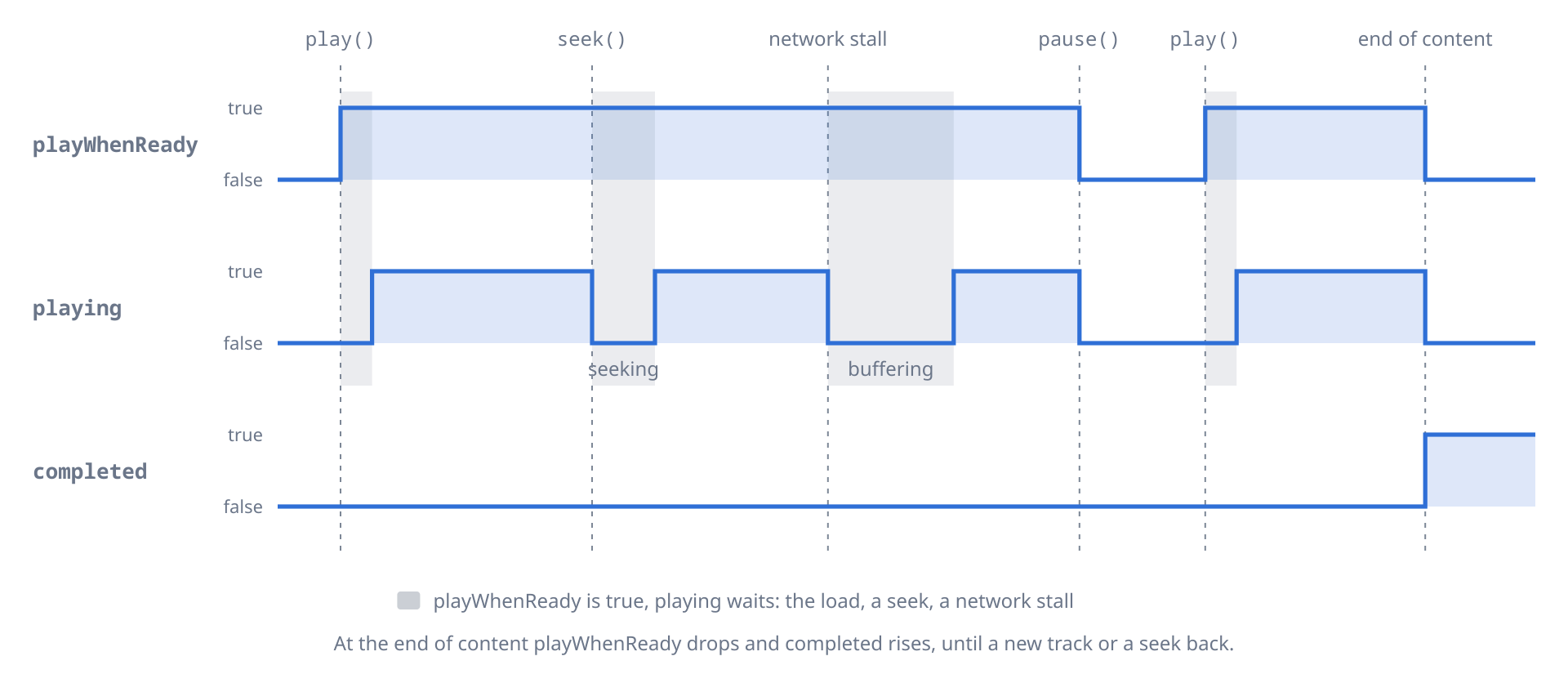
// Seek to an absolute position
await player.seek(const Duration(seconds: 30));

// Seek forward or backward relative to current position
await player.seek(const Duration(seconds: 10), relative: true);
await player.seek(const Duration(seconds: -5), relative: true);

// Sample-accurate instead of keyframe seeking, slower on some formats
await player.seek(const Duration(seconds: 30), exact: true);

// Percentage-based seeking (for progress-bar scrubbing)
await player.seekToPercent(50); // jump to the half-way point (0 to 100)

// Undo the last seek
await player.revertSeek();Loop between two points of the current track, for example to practice a passage or replay a sentence.
// Set the A and B markers (null disables the marker)
await player.setAbLoopA(const Duration(seconds: 30));
await player.setAbLoopB(const Duration(seconds: 45));

// Limit the number of repetitions; null = infinite
await player.setAbLoopCount(3);

// Read remaining iterations (null = no loop or infinite)
player.stream.remainingAbLoops.listen((n) => print('left: $n'));

// Disable
await player.setAbLoopA(null);
await player.setAbLoopB(null);await player.setRate(1.5); // 0.01 to 100
await player.setPitch(0.9); // Lower pitch, same speed
await player.setPitchCorrection(true); // On by defaultPitch correction is on by default: at a rate other than 1.0, mpv adds
scaletempo2 to keep the original pitch. With setPitchCorrection(false)
the pitch follows the speed.
RubberbandEffect in the effects chain changes pitch and tempo
separately (see 5.2).
There are two volume controls: the soft volume, mpv's own gain, and the system volume, the OS per-app mixer.
// Soft volume and mute, always available
await player.setVolume(80.0);     // 0 to 100 (values above 100 amplify)
await player.setMute(true);
await player.setMute(false);

await player.setVolumeMax(150.0); // Raise the software volume ceiling
await player.setVolumeGain(6.0);  // Decoder-side pre-amp, in dB

// Clamp the dB range setVolumeGain accepts (defaults -96 and +12)
await player.setVolumeGainMin(-60.0);
await player.setVolumeGainMax(6.0);
setSystemVolume and setSystemMute drive the OS per-app mixer (mpv's
ao-volume and ao-mute). When the driver has no such mixer the calls do
nothing, without throwing, and state.systemVolume and state.systemMute
stay null.
if (player.state.systemVolume != null) {        // the driver has a per-app mixer
  await player.setSystemVolume(70.0);
  await player.setSystemMute(false);
}// Shift audio forward by 50 ms (useful for Bluetooth A2DP sync)
await player.setAudioDelay(const Duration(milliseconds: 50));
// Shift backward by 200 ms
await player.setAudioDelay(const Duration(milliseconds: -200));For audiobooks and podcasts, the player can save a resume point for the current file and restore it the next time that file is opened. Only audio-relevant properties are persisted (position, speed, pitch, volume, mute, audio delay, the effects chain and the selected track).
PlayerConfiguration.resumePlayback (default true), set when you
create the player, restores a saved point when the file is opened again.
The player never saves one on its own: call writeResumeConfig(), for
example when the app goes to the background or the user pauses. Point
watchLaterDir at an app-writable directory on mobile; the platform
default is often not writable.
final player = Player(
  configuration: const PlayerConfiguration(
    resumePlayback: true,                 // restore on reopen (default)
    watchLaterDir: '/path/to/app/support/watch_later',
  ),
);

// Save a resume point for the current file, e.g. on pause
await player.writeResumeConfig();

// Clear it: for the current file, or a specific one by filename
await player.deleteResumeConfig();
await player.deleteResumeConfig(filename: '/music/audiobook.m4b');Everything in this section runs as ffmpeg filters, the same on every platform.
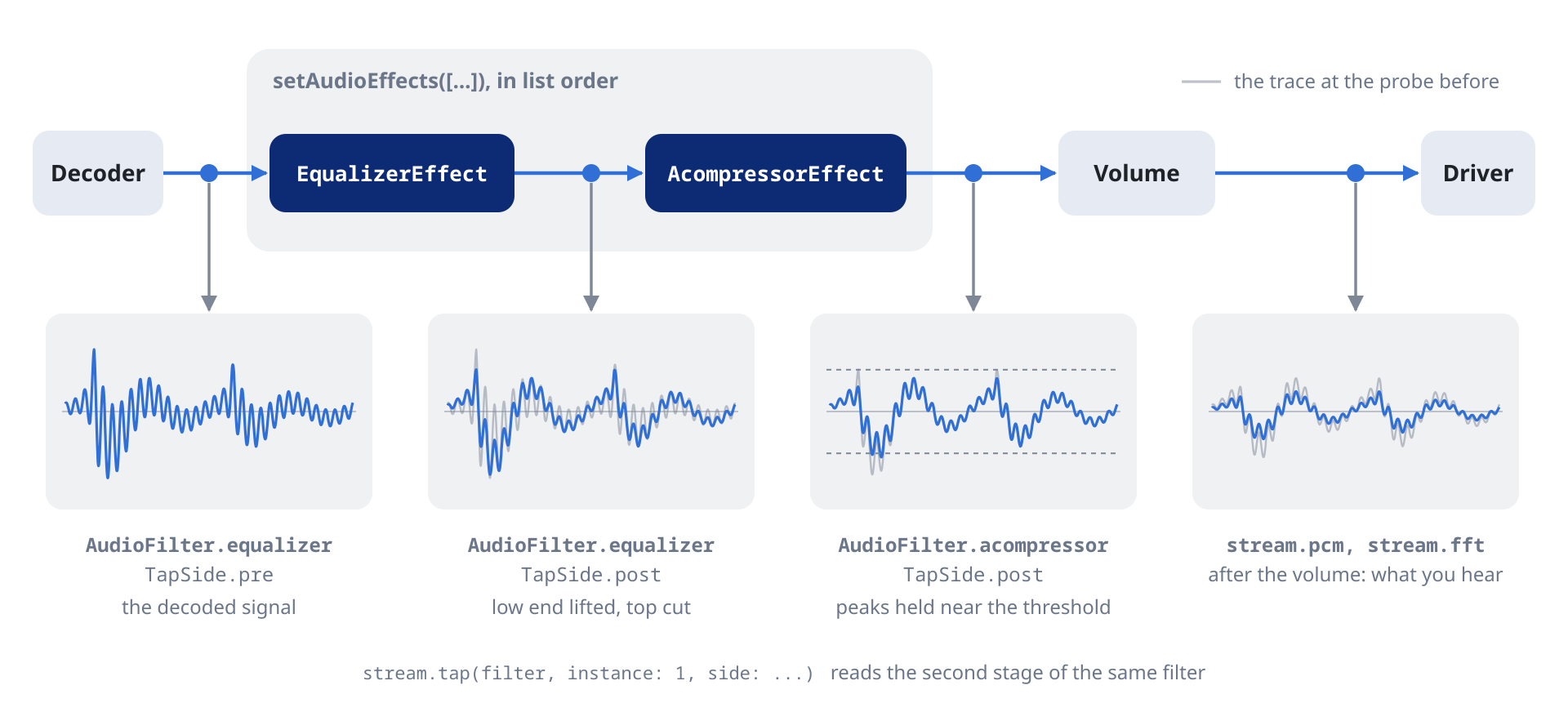
The effects chain is an ordered list of stages. Each filter has an
XxxEffect class (EqualizerEffect, AcompressorEffect and so on), all
subclasses of AudioEffect. Stages run in list order, a filter can appear
more than once, and one call applies the whole list:
// Replace the whole chain (presets, factory defaults, JSON restore):
Future<void> setAudioEffects(List<AudioEffect> effects);

// Change it through a mapper from the current list to the new one:
Future<void> updateAudioEffects(
  List<AudioEffect> Function(List<AudioEffect>) f,
);
await player.setAudioEffects([
// +3 dB around 100 Hz, 50 Hz wide
EqualizerEffect(frequency: 100, width: 50, widthType: EqualizerWidthType.h, gain: 3),
// -2 dB around 8 kHz, 1 kHz wide
EqualizerEffect(frequency: 8000, width: 1000, widthType: EqualizerWidthType.h, gain: -2),
AcompressorEffect(threshold: 0.1, ratio: 4), // then compress
AlimiterEffect(limit: 0.9), // and limit last
]);Each effect carries an enabled flag, true by default. Setting it to
false keeps the stage in the list, with its settings, but leaves it
out of the chain until you turn it back on:
// Bypass every compressor without losing its settings
await player.updateAudioEffects((fx) => [
  for (final e in fx)
    e is AcompressorEffect ? e.copyWith(enabled: false) : e,
]);
Read the live chain synchronously, or follow it as a stream:
final fx = player.state.audioEffects;
final comp = fx.whereType<AcompressorEffect>().firstOrNull;
print('compressor: ${comp?.threshold}');

player.stream.audioEffects.listen((fx) => print('${fx.length} stages'));
A slider drag that only changes the parameters of a stage, keeping the list's shape, is applied to the running filter graph in place, with no audible rebuild. Adding, removing, reordering or toggling a stage rebuilds the chain. Reset everything with:
await player.setAudioEffects(const []);The chain owns mpv's af property, so setRawProperty('af', ...)
throws. For a filter or option form the typed effects do not cover, put a
RawAudioEffect in the list. It runs in order like any other stage:
await player.setAudioEffects(const [
  RawAudioEffect('lavfi-aeval=val(0)*0.5|val(1)*0.5'),
  AcompressorEffect(threshold: 0.1),
]);Some effects with typical settings. Every effect works the same way: a
class with a const constructor and copyWith, whose parameters are
ffmpeg's options in camelCase (level_in is levelIn).
await player.setAudioEffects(const [
  // Dynamic-range compressor
  AcompressorEffect(
    threshold: 0.1,    // linear, 0 to 1
    ratio: 4.0,
    attack: 20.0,      // ms
    release: 250.0,    // ms
  ),

  // EBU R128 loudness normalization
  LoudnormEffect(i: -16, tp: -1.5, lra: 11),

  // Pitch and tempo (librubberband)
  RubberbandEffect(
    pitch: 1.0594, tempo: 1.0,
    pitchq: RubberbandPitch.quality,
  ),

  // 18-band graphic EQ, bands keyed `1b` to `18b`
  SuperequalizerEffect(
    params: {'4b': 1.5, '5b': 2.0, '8b': 0.5, '13b': 1.0},
  ),

  // Bass and treble shelves
  BassEffect(gain: 4, frequency: 100),
  TrebleEffect(gain: -2, frequency: 3000),
]);
Parameters with a fixed set of choices, such as rubberband's pitch
quality or the equalizer's width type, are Dart enums. Every numeric
parameter has static const bounds and a default on its class
(AcompressorEffect.thresholdMin, thresholdMax, thresholdDefault)
for building sliders.
The library has 87 typed effects. Each row below is one class, named
after the filter with an Effect suffix (acompressor is
AcompressorEffect). For other lavfi-* filters, or to experiment, use
RawAudioEffect.
All effects (click to expand)
| Effect | Description |
|---|---|
acompressor |
Dynamic-range compressor |
acontrast |
Simple dynamic-range compression |
adrc |
Spectral dynamic-range controller |
adynamicequalizer |
Signal-driven dynamic equalization |
adynamicsmooth |
Dynamic smoothing of audio levels |
agate |
Noise gate; silences signal below a threshold |
alimiter |
Brick-wall limiter; caps the output level |
apsyclip |
Psychoacoustic clipper |
asoftclip |
Smooth soft-knee clipping |
compand |
Compander (compress on input, expand on output) |
deesser |
De-essing for sibilance reduction |
drmeter |
Dynamic-range meter |
dynaudnorm |
Adaptive loudness normalization |
ebur128 |
EBU R128 loudness scanner |
loudnorm |
EBU R128 loudness normalization |
mcompand |
Multiband compander |
speechnorm |
Adaptive speech-loudness normalizer |
| Effect | Description |
|---|---|
anequalizer |
High-order parametric multiband equalizer |
asubboost |
Subwoofer-frequency boost |
atilt |
Spectral tilt across the frequency range |
bass |
Low-shelf filter (boost, cut bass) |
biquad |
Generic biquad IIR filter |
equalizer |
Two-pole peaking EQ band |
firequalizer |
FIR equalizer with arbitrary frequency response |
highshelf |
High-shelf filter |
lowshelf |
Low-shelf filter |
superequalizer |
18-band ISO graphic EQ |
tiltshelf |
Tilt shelf (combined low plus high shelf) |
treble |
High-shelf filter (boost, cut treble) |
| Effect | Description |
|---|---|
allpass |
Two-pole all-pass filter |
asubcut |
Subwoofer-frequency cut |
asupercut |
High-frequency Butterworth cut |
asuperpass |
High-order Butterworth band-pass |
asuperstop |
High-order Butterworth band-stop |
bandpass |
Two-pole Butterworth band-pass |
bandreject |
Two-pole Butterworth band-reject |
highpass |
High-pass at a given frequency |
lowpass |
Low-pass at a given frequency |
| Effect | Description |
|---|---|
afreqshift |
Shift the spectrum by a fixed offset |
aphaseshift |
Shift the phase of every spectral bin |
aresample |
Resample to a target sample rate and format |
atempo |
Adjust tempo without changing pitch |
asetrate |
Change the sample rate tag, shifting pitch and speed together (varispeed) |
rubberband |
High-quality independent pitch and tempo |
| Effect | Description |
|---|---|
crossfeed |
Headphone crossfeed |
dialoguenhance |
Center-channel dialogue enhancement |
earwax |
Headphone listening enhancement |
extrastereo |
Increase the left-right difference signal |
haas |
Haas effect (precedence-based stereo widening) |
stereotools |
Stereo image tools |
stereowiden |
Stereo widening by reducing common signal |
surround |
Stereo-to-surround upmix |
virtualbass |
Psychoacoustic bass enhancement |
| Effect | Description |
|---|---|
acrusher |
Bit-crusher (resolution and rate reduction) |
aecho |
Single-tap echo and multi-tap delay |
aemphasis |
RIAA, FM, disc emphasis curves |
aexciter |
Harmonic exciter |
aphaser |
Phaser |
apulsator |
Auto-panner, tremolo hybrid |
crystalizer |
Audio sharpening and brightener |
dcshift |
DC offset shift |
flanger |
Flanger |
hdcd |
HDCD decoder |
tremolo |
Sinusoidal amplitude modulation |
vibrato |
Sinusoidal pitch modulation |
| Effect | Description |
|---|---|
adeclick |
Click and impulse-noise removal |
adeclip |
Clip-restoration |
adecorrelate |
Channel decorrelation |
adelay |
Per-channel delay |
adenorm |
Add low-level dither to fix denormals |
aderivative |
Compute the derivative of the signal |
aintegral |
Compute the integral of the signal |
afftdn |
FFT-based broadband noise reduction |
afwtdn |
Wavelet-based broadband noise reduction |
anlmdn |
Non-local-means denoiser |
compensationdelay |
Speaker and microphone delay compensation |
Spectral
| Effect | Description |
|---|---|
afftfilt |
Apply expressions in the frequency domain |
aiir |
Apply an arbitrary IIR filter |
Fade, silence and padding
| Effect | Description |
|---|---|
afade |
Fade in and out |
apad |
Pad with trailing silence |
silenceremove |
Trim leading, trailing, inline silence |
Routing
| Effect | Description |
|---|---|
aformat |
Constrain output format |
These five need a free-form value with no sensible default, so their constructors make it required. Without a valid value the filter fails to start.
| Effect | Description | Required |
|---|---|---|
chorus |
Chorus | delays, decays, speeds, depths |
pan |
Mix channels with explicit per-channel gains | args |
channelmap |
Remap input channels to new positions | map |
aeval |
Per-channel expression-based filter | exprs |
arnndn |
RNN-based speech denoiser | model (a .rnnn file) |
await player.setReplayGain(const ReplayGainSettings(
  mode: ReplayGain.track,     // .no, .track, .album
  preamp: 2.0,                // +2 dB on top of the RG value
  fallback: -6.0,             // -6 dB on files without RG tags
  clip: false,                // false = peak-limit; true = allow clipping
));

// Change one field
await player.setReplayGain(
  player.state.replayGain.copyWith(mode: ReplayGain.album),
);await player.setGapless(Gapless.yes); // Keep the output open, resample to the first track's format
await player.setGapless(Gapless.weak); // Gapless only on compatible formats (default)
await player.setGapless(Gapless.no); // OffOn network playlists, setPrefetchPlaylist(true) makes mpv open the next
entry before the current one ends, so the track change does not wait for
the network. The prefetch lifecycle
shows its progress.
await player.setPrefetchPlaylist(true);setAudioDriver picks the driver mpv uses for audio output:
await player.setAudioDriver('wasapi');    // Windows
await player.setAudioDriver('coreaudio'); // macOS
await player.setAudioDriver('audiounit'); // iOS
await player.setAudioDriver('aaudio');    // Android, also 'audiotrack' and 'opensles'
await player.setAudioDriver('pipewire');  // Linux, also 'pulse' and 'alsa'
await player.setAudioDriver('auto'); // mpv picks (default)Asks the driver for exclusive use of the device, so the system mixer does not resample the audio or apply its volume. WASAPI (Windows), CoreAudio (macOS), AAudio (Android) and PipeWire (Linux) honor it; other drivers ignore it. On iOS (AudioUnit) it only stops your audio from mixing with other apps:
await player.setAudioExclusive(true);
await player.setAudioExclusive(false);  // back to shared mode
While the player holds the device, other apps have no sound. Turn exclusive mode off or call dispose() when you are done.
// Available devices
player.stream.audioDevices.listen((devices) {
  for (final d in devices) {
    print('${d.name}: ${d.description}');
  }
});

// Switch to a specific device
final devices = player.state.audioDevices;
await player.setAudioDevice(devices.first);
mpv fills the list when the player starts. name is mpv's device id and description the label to show.
Force the output sample rate, sample format or channel layout, for example to match what a DAC accepts:
// Sample rate
await player.setAudioSampleRate(0);       // Auto
await player.setAudioSampleRate(44100);   // 44.1 kHz (CD)
await player.setAudioSampleRate(48000);   // 48 kHz (DVD, broadcast)
await player.setAudioSampleRate(88200);   // 88.2 kHz (hi-res)
await player.setAudioSampleRate(96000);   // 96 kHz (hi-res)
await player.setAudioSampleRate(192000);  // 192 kHz (studio)
await player.setAudioSampleRate(384000);  // 384 kHz (DXD)

// Sample format
await player.setAudioFormat(Format.auto);          // mpv picks (default)
await player.setAudioFormat(Format.u8);            // 8-bit unsigned, interleaved
await player.setAudioFormat(Format.u8Planar);      // 8-bit unsigned, planar
await player.setAudioFormat(Format.s16);           // 16-bit signed, interleaved
await player.setAudioFormat(Format.s16Planar);     // 16-bit signed, planar
await player.setAudioFormat(Format.s32);           // 32-bit signed, interleaved
await player.setAudioFormat(Format.s32Planar);     // 32-bit signed, planar
await player.setAudioFormat(Format.s64);           // 64-bit signed, interleaved
await player.setAudioFormat(Format.s64Planar);     // 64-bit signed, planar
await player.setAudioFormat(Format.float32);       // 32-bit float, interleaved
await player.setAudioFormat(Format.float32Planar); // 32-bit float, planar
await player.setAudioFormat(Format.float64);       // 64-bit float, interleaved
await player.setAudioFormat(Format.float64Planar); // 64-bit float, planar

// Channel layout
await player.setAudioChannels(Channels.auto);             // whatever the device accepts, keeping the source layout when it can
await player.setAudioChannels(Channels.autoSafe);         // the system's preferred layout, or stereo when there is none

// 1 channel
await player.setAudioChannels(Channels.mono);             // mono
await player.setAudioChannels(Channels.oneZero);          // 1.0 (alias of mono)

// 2 channels
await player.setAudioChannels(Channels.stereo);           // stereo
await player.setAudioChannels(Channels.twoZero);          // 2.0 (alias of stereo)
await player.setAudioChannels(Channels.downmix);          // stereo, named for a downmix

// ...                                                    // ...

// 8 channels
await player.setAudioChannels(Channels.sevenOne);         // 7.1
await player.setAudioChannels(Channels.sevenOneAlsa);     // 7.1(alsa)
await player.setAudioChannels(Channels.sevenOneWide);     // 7.1(wide)
await player.setAudioChannels(Channels.sevenOneWideSide); // 7.1(wide-side)
await player.setAudioChannels(Channels.sevenOneTop);      // 7.1(top)
await player.setAudioChannels(Channels.sevenOneRear);     // 7.1(rear)
await player.setAudioChannels(Channels.octagonal);        // octagonal
await player.setAudioChannels(Channels.cube);             // cube

// Immersive
await player.setAudioChannels(Channels.hexadecagonal);    // hexadecagonal (16ch)
await player.setAudioChannels(Channels.surround222);      // 22.2 (NHK, ITU-R BS.2051 System H)

// Any other layout mpv accepts
await player.setAudioChannels(
  const Channels.custom('fl-fr-fc-bl-br-sl-sr-lfe'),
);
When you force a downmix, for example 5.1 to stereo, set
PlayerConfiguration.normalizeDownmix: true when you create the player,
so the result is scaled down and cannot clip.
setAudioSpdif passes compressed audio (AC3, DTS, TrueHD and others)
through to an AV receiver over SPDIF or HDMI:
// Dolby and DTS-HD
await player.setAudioSpdif({Spdif.ac3, Spdif.eac3, Spdif.trueHd, Spdif.dtsHd});

// Dolby only
await player.setAudioSpdif({Spdif.ac3, Spdif.eac3, Spdif.trueHd});

// Off
await player.setAudioSpdif({});setAudioClientName sets the name system mixers show for the app:
await player.setAudioClientName('MyMusicApp');For files with several audio tracks, such as an MKV or MP4 with one track
per language, state.tracks lists them and stream.currentAudioTrack
follows the selected one:
// List the audio tracks
for (final t in player.state.tracks.where((tr) => tr.type == 'audio')) {
  print('${t.id}: ${t.title ?? t.lang ?? "audio"} '
        '(${t.codec} ${t.sampleRate} Hz ${t.channelCount}ch)');
}

// Selected track
player.stream.currentAudioTrack.listen((track) {
  if (track == null) return;
  print('Now decoding track #${track.id}: ${track.title}');
});

// Switch by id
await player.setAudioTrack(const Track.id(2));

// Let mpv choose: the file's default or the first audio track
await player.setAudioTrack(Track.auto);

// No audio track
await player.setAudioTrack(Track.off);

// Add an external audio file as a track of the current file, then remove it
await player.addAudioTrack(Media('commentary.mka'), title: 'Commentary');
await player.removeAudioTrack(const Track.id(3));

// Look again for audio and cover files next to the current file
await player.rescanExternalFiles();
MpvTrack carries the codec, codec profile, decoder, sample rate,
channel count, ReplayGain tags, language, and the default and forced
flags. external and externalFilename mark a track loaded from a
separate file, and image and albumArt let a track picker skip
picture tracks.
reloadAudio closes and reopens the audio output (mpv's ao-reload):
await player.reloadAudio();setAudioMediaRole(true) reports the stream as music. PulseAudio and
PipeWire use the role for routing and per-role volume, and so do the
aaudio and audiotrack drivers on Android. Other drivers ignore it.
await player.setAudioMediaRole(true);setAudioBuffer sets the size of the audio output buffer. A smaller buffer lowers latency; a larger one copes better with load:
await player.setAudioBuffer(const Duration(milliseconds: 100));  // low latency
await player.setAudioBuffer(const Duration(milliseconds: 500)); // for slow hardwaresetAudioStreamSilence(true) keeps the device open while paused, sending silence, so resuming does not click or pop:
await player.setAudioStreamSilence(true);On iOS the driver then never lets go of the device: after an interruption, such as a phone call or another app's audio, it stays suspended and playback cannot continue.
With the null driver, for example to process audio on a machine with no sound device, setAudioNullUntimed(true) makes it run as fast as possible instead of at real time. It also applies when mpv falls back to null because the device failed to open:
await player.setAudioNullUntimed(true);setCache sets mpv's six cache options (cache, cache-secs,
cache-on-disk, cache-pause, cache-pause-wait, cache-pause-initial)
in one call:
await player.setCache(const CacheSettings(
  mode: Cache.yes,                     // .auto (default), .yes, .no
  secs: Duration(seconds: 30),         // how much to cache ahead of the playhead
  onDisk: true,                        // keep the cache in a file instead of memory
  pause: true,                         // pause when the cache runs dry
  pauseWait: Duration(seconds: 3),     // cached time needed to resume
  pauseInitial: true,                  // also wait before starting and after a seek
));

// Change one field
await player.setCache(
  player.state.cache.copyWith(secs: const Duration(seconds: 60)),
);

player.stream.cache.listen((cfg) => print('cache: ${cfg.mode} ${cfg.secs}'));
pauseInitial gives network sources a smoother start. With onDisk,
set PlayerConfiguration.demuxerCacheDir when you create the player:
mpv's default location is often not writable on mobile.
The demuxer reads the container (MP4, MKV, Ogg) and hands its packets to the decoder. setDemuxer sets its three buffer options (demuxer-max-bytes, demuxer-max-back-bytes, demuxer-readahead-secs) in one call:
await player.setDemuxer(const DemuxerSettings(
  maxBytes: 50 * 1024 * 1024,          // ahead of the playhead, default 150 MiB
  maxBackBytes: 20 * 1024 * 1024,      // behind the playhead, default 50 MiB
  readahead: Duration(seconds: 5),     // default 1 s
));

// Change one field
await player.setDemuxer(
  player.state.demuxer.copyWith(maxBytes: 100 * 1024 * 1024),
);

player.stream.demuxer.listen((d) => print('demuxer: ${d.maxBytes} bytes'));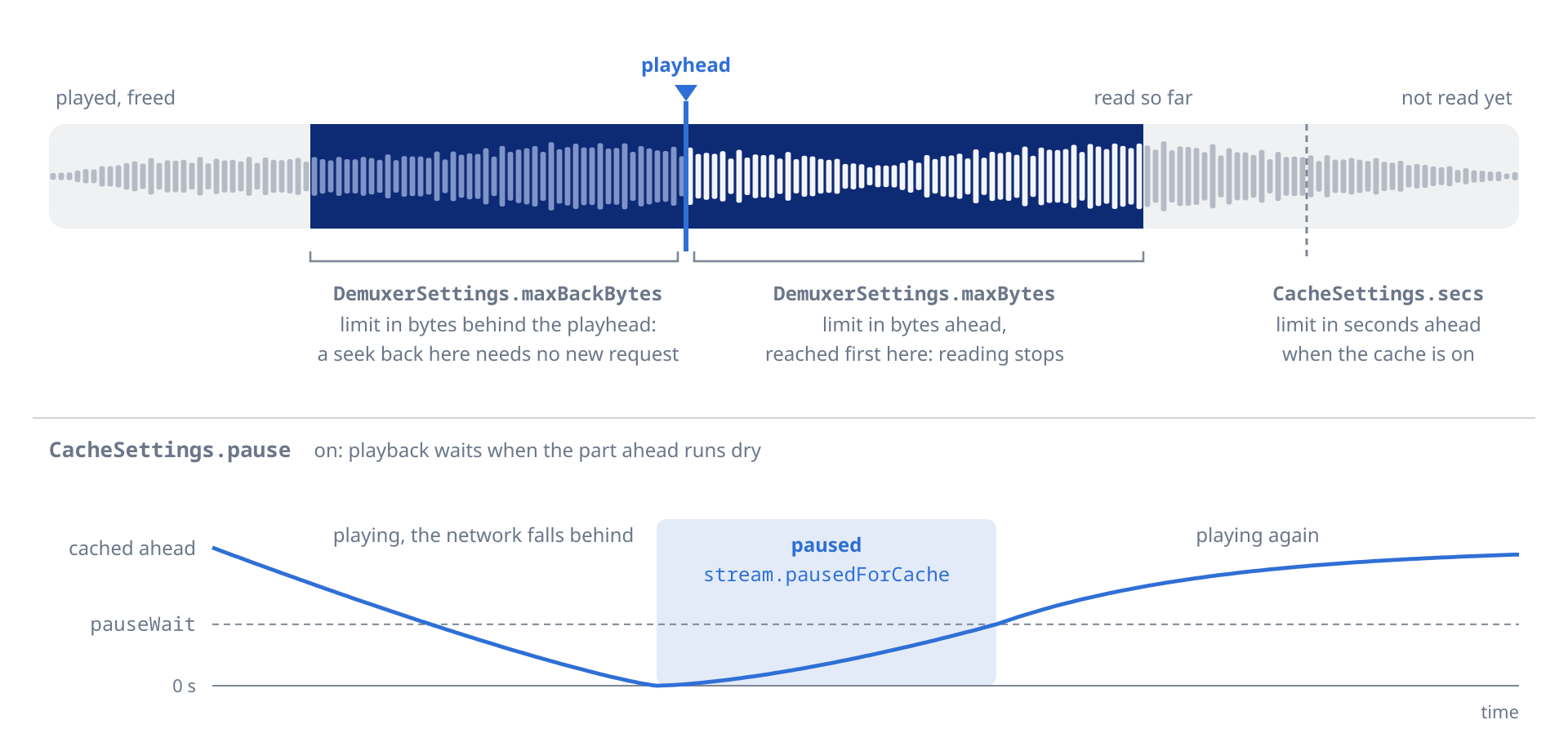
For live radio, where you do not seek back, set the back buffer to zero to save memory:
await player.setDemuxer(player.state.demuxer.copyWith(maxBackBytes: 0));await player.setNetworkTimeout(const Duration(seconds: 10)); // give up after 10 s without dataCertificate verification is off by default, as in mpv. Turn it on for
playback with setTlsVerify:
await player.setTlsVerify(true); // uses the CA roots built into libmpv

// Replace the built-in roots with your own bundle, e.g. a company CA
await player.setTlsCaFile('/path/to/corporate-ca.pem');Both take effect from the next load:
await player.setHttpProxy('http://proxy.example:8080');  // empty string clears it
await player.setCookies(true); // mpv's cookie jar, off by defaultFor live radio, turn off the cache and the cache pause to keep latency low:
await player.open(Media('https://stream.radio.example.com/live.mp3'));
await player.setCache(const CacheSettings(mode: Cache.no, pause: false));
await player.setNetworkTimeout(const Duration(seconds: 10));
HLS streams, such as Jellyfin's transcoded ones, work with the default cache settings:
await player.open(Media(
  'https://jellyfin.example.com/audio/stream.m3u8',
  httpHeaders: {'Authorization': 'MediaBrowser Token="..."'},
));
Two PlayerConfiguration fields, set when you create the player, affect streams:
final player = Player(
  configuration: const PlayerConfiguration(
    // Seek within the cache on streams mpv reports as not seekable
    forceSeekable: true,
    // Lowest-bitrate HLS variant, to save data (default .max)
    hlsBitrate: HlsBitrate.min,
  ),
);

// The HLS policy can change later too, from the next load.
await player.setHlsBitrate(HlsBitrate.max);Some CDNs, YouTube's googlevideo audio among them, slow a single open-ended HTTP range request (the rest of the file) to a crawl. Playback starts fine but stalls after a seek, once the buffered audio runs out and the slow connection cannot refill it.
Media.httpChunkSize splits the download into bounded range requests, as yt-dlp's --http-chunk-size does. Each request stays under the CDN's limit and is served at full speed:
await player.open(Media(
  googlevideoUrl,
  httpChunkSize: 8 * 1024 * 1024, // 8 MiB
));
It applies to that track only. Leave it null (the default) for servers that do not throttle, such as Plex, Jellyfin or your own: one large request buffers fastest there. When set, it must be a positive byte count.
player.stream.demuxerCacheState emits a DemuxerCacheState for
streaming sources: the buffered time ranges, the download rate, and the
eof-cached, bof-cached and underrun flags. It is empty for local files.
Draw seekableRanges as the buffered parts of a seek bar:
player.stream.demuxerCacheState.listen((cache) {
  for (final r in cache.seekableRanges) {
    print('buffered ${r.start} to ${r.end}');
  }
  if (cache.underrun) {
    // The cache ran dry: show a spinner
  }
});
player.stream.pausedForCache is true while playback waits for an empty cache to refill, the clearest sign of a network stall. player.stream.demuxerViaNetwork tells whether the current file comes over the network, which helps decide whether an error is likely a network one:
player.stream.pausedForCache.listen((paused) {
  if (paused) showBufferingIndicator();
});

player.stream.demuxerViaNetwork.listen((isNetwork) {
  print('Network stream: $isNetwork');
});player.stream.metadata.listen((tags) {
final title = tags['title'];
final artist = tags['artist'];
final album = tags['album'];
final date = tags['date'];
final trackNumber = tags['track'];
print('Now playing: $title, $artist');
});
// Synchronous access
final meta = player.state.metadata;mpv returns the keys in lowercase, whatever the tag format. Common keys: title, artist, album, album_artist, date, track, disc, genre, comment, composer.
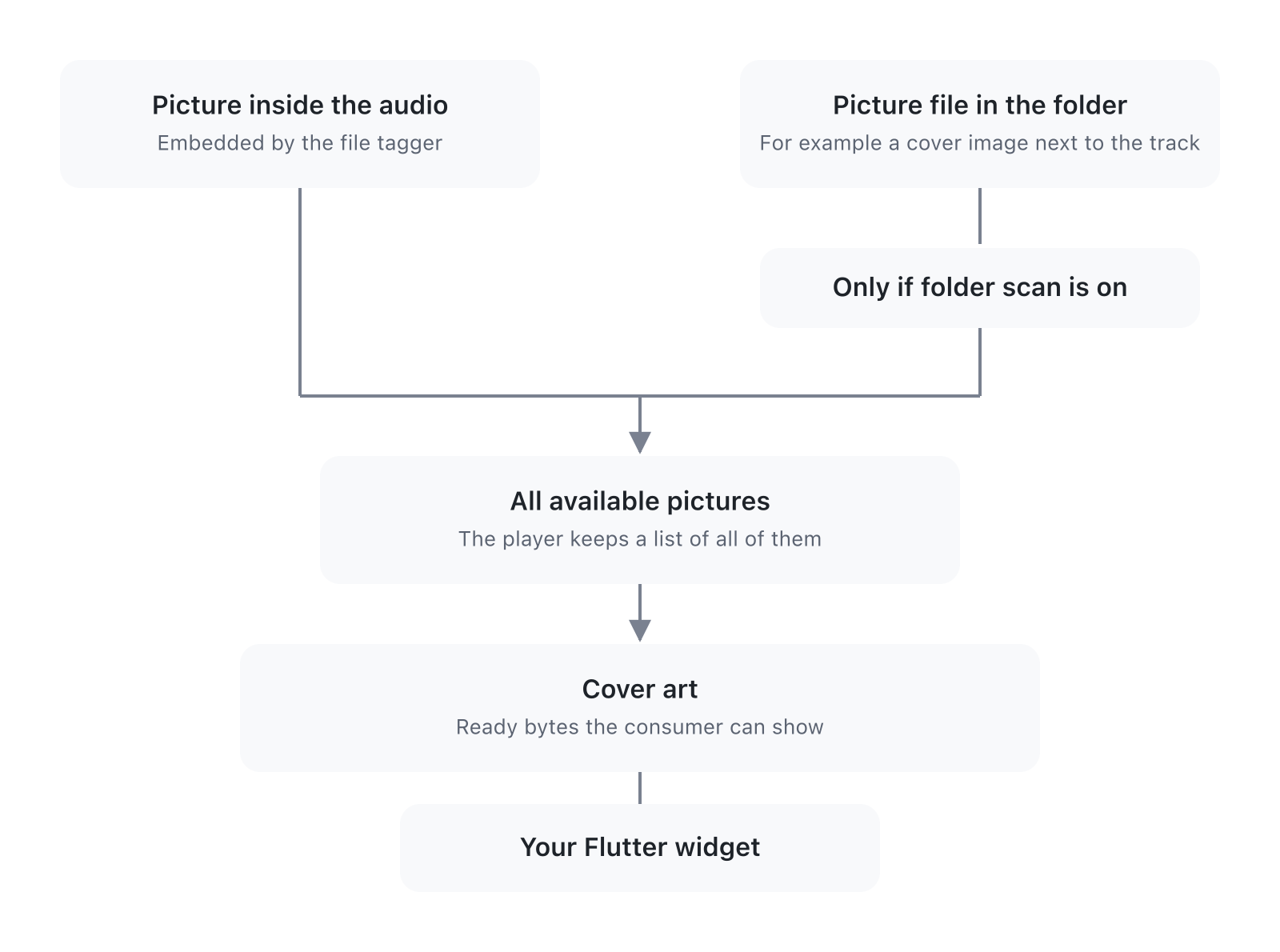
player.state.coverArt and player.stream.coverArt carry the embedded
cover as the original image bytes, with a few Flutter helpers:
// Current track's cover
final art = player.state.coverArt;
if (art != null) {
  print('Format: ${art.extension}, ${art.bytes.length} bytes');
}

// Emits on every file load, null when no cover is embedded
player.stream.coverArt.listen((art) {
  if (art != null) updateUi(art.image);
});
CoverArt has these members:
5 members (click to expand)
| Member | Kind | Description |
|---|---|---|
bytes |
final Uint8List |
Raw codec bytes |
mimeType |
final String |
'image/png', 'image/jpeg', 'image/webp', 'image/bmp', 'image/gif' |
image |
getter ImageProvider |
Ready to drop into Flutter Image(image: …) |
extension |
getter String |
'png', 'jpg', 'webp', 'bmp', 'gif' |
isPng, isJpeg, isWebp, isBmp, isGif |
getter bool |
MIME-type predicates |
StreamBuilder<CoverArt?>(
  stream: player.stream.coverArt,
  builder: (ctx, snap) {
    final art = snap.data;
    if (art == null) {
      return const Icon(Icons.music_note, size: 96);
    }
    return Image(
      image: art.image,         // a MemoryImage of the bytes
      fit: BoxFit.cover,
    );
  },
)final art = player.state.coverArt;
if (art != null) {
await File('${dir.path}/cover.${art.extension}').writeAsBytes(art.bytes);
}stream.coverArtemits on every file load, before playback starts: each playlist entry, and again when mpv reloads the same file.- It emits
nullfor a file without an embedded picture, so a UI bound to it clears the previous cover. state.coverArtholds the last value emitted.- The bytes are the image as stored in the file, with no re-encoding.
setCoverArtAuto makes mpv load an image sitting next to the audio
file as an extra track:
await player.setCoverArtAuto(Cover.no);     // library default (disabled)
await player.setCoverArtAuto(Cover.exact);  // same base name as the audio file, or cover.jpg, folder.jpg and the like
await player.setCoverArtAuto(Cover.fuzzy);  // also any image whose name contains the audio file's base name
await player.setCoverArtAuto(Cover.all);    // every image in the folder
The image does not reach stream.coverArt, which carries only embedded
pictures. Find it among the tracks and read the file yourself:
final path = player.state.tracks
    .where((t) => t.external && t.albumArt)
    .firstOrNull
    ?.externalFilename;
The library defaults to no (mpv's own default is exact) so
unrelated images can't sneak in.
The player exposes its state in two ways:
player.state: an immutable snapshot of the current state, read synchronously.player.stream: streams forStreamBuilderorlisten().
A state stream (volume, position, playlist, playbackState, coverArt, …) gives each new subscriber the current value first, then every change, so a StreamBuilder needs no initialData. To wait for the next change, skip the current value: player.stream.volume.skip(1).first. Event streams (seekCompleted, endFile, error, log, internalLog, hook, mediaSessionCommands, fft, pcm, loudnessMeter, taps) only deliver what happens after listen().
In the stream tables below, a dash under Set with marks a read-only stream.
player.stream.playbackState combines playing, buffering,
completed, pausedForCache and duration into one MpvPlaybackState,
for a UI that shows a single indicator.
player.stream.playbackState.listen((phase) {
  switch (phase) {
    case MpvPlaybackState.idle:       // No file loaded
    case MpvPlaybackState.loading:    // File opening
    case MpvPlaybackState.buffering:  // Waiting for the network during playback
    case MpvPlaybackState.playing:    // Producing audio
    case MpvPlaybackState.paused:     // File loaded, audio paused
    case MpvPlaybackState.completed:  // Reached the end of the last track
  }
});player.state holds the current value of the state streams below, for
one-shot reads inside event handlers and build() methods. playbackState,
prefetchState, prefetchCacheDuration, waveform and loudnessScan
exist only as streams, and state.tlsCaFile has no stream.
final s = player.state;
print(s.playing);                                // bool
print(s.position);                               // Duration
print(s.duration);                               // Duration
print(s.volume);                                 // double
print(s.buffer);                                 // Duration
print(s.metadata['title']);                      // String?
print(s.audioParams.codec);                      // String?
print(s.audioEffects.whereType<AcompressorEffect>().firstOrNull?.threshold); // double?
print(s.cache.secs);                             // Duration
print(s.replayGain.preamp);                      // double
print(s.tracks.where((t) => t.type == 'audio')); // Iterable<MpvTrack>
print(s.chapters);                               // List<Chapter>
print(s.audioOutputState);                       // AudioOutputState
print(s.mpvVersion);                             // e.g. 'mpv v0.41.0+r17'
print(s.ffmpegVersion);                          // e.g. '8.1.1'

// index is -1 while openAll is still building the queue.
final i = s.playlist.index;
if (i >= 0 && i < s.playlist.items.length) {
  print(s.playlist.items[i].uri);                // String
}| Stream | Type | Set with | Notes |
|---|---|---|---|
playWhenReady |
bool |
play, pause, open, stop |
Whether the user wants playback. Unchanged by seeks and buffering: bind the play-pause button to it, as the OS media controls do. |
playing |
bool |
- | true only while audio is produced (mpv's core-idle, inverted). It flips during seeks and buffering: use it for a spinner. Audio is playing when playWhenReady && playing. |
completed |
bool |
- | true once playback reaches the end of the last track in the queue, or of the only one. Stays false between tracks and while a loop is on; goes back to false when a new track starts or you seek back. |
eofReached |
bool |
- | mpv's eof-reached; true while paused at the end of a file with keep-open=yes. |
position |
Duration |
seek |
Current position, updated about 30 times a second. |
duration |
Duration |
- | Total duration of the current file; Duration.zero for live streams. |
seekCompleted |
void |
- | Fires after each load or seek, once mpv is ready to play. Use it as the signal that the file is ready. |
buffering |
bool |
- | true between start-file and file-loaded. |
buffer |
Duration |
- | Absolute timestamp the demuxer has buffered up to. |
bufferDuration |
Duration |
- | Headroom ahead of the playhead (demuxer-cache-duration). |
bufferingPercentage |
double (0-100) |
- | Cache fill as a percentage of state.cache.secs, computed by the player. Near 0 with mpv's default cache-secs of 1000 hours: for a buffering indicator use cacheBufferingState, or bufferDuration against your own target. |
volume |
double |
setVolume |
0-100; values above 100 amplify. |
mute |
bool |
setMute |
|
rate |
double |
setRate |
Playback speed multiplier. |
pitch |
double |
setPitch |
Pitch multiplier. |
pitchCorrection |
bool |
setPitchCorrection |
Whether mpv keeps the pitch with scaletempo2 when the rate changes. Default true. |
audioDelay |
Duration |
setAudioDelay |
Audio offset, rounded to the millisecond. |
| Stream | Type | Set with | Notes |
|---|---|---|---|
playlist |
Playlist |
open, openAll, add, remove, move, replace, clearPlaylist |
|
loop |
Loop |
setLoop |
|
shuffle |
bool |
setShuffle |
|
prefetchPlaylist |
bool |
setPrefetchPlaylist |
|
tracks |
List<MpvTrack> |
- | Filled by the demuxer |
currentAudioTrack |
MpvTrack? |
setAudioTrack |
|
chapters |
List<Chapter> |
- | Filled by the demuxer |
currentChapter |
int? |
setChapter |
| Stream | Type | Set with | Notes |
|---|---|---|---|
audioDevice |
Device |
setAudioDevice |
|
audioDevices |
List<Device> |
- | |
audioParams |
AudioParams |
- | From the decoder |
audioOutParams |
AudioParams |
- | Sent to the output |
audioBitrate |
double? |
- | |
audioOutputState |
AudioOutputState |
- | See 11.3 |
audioDriver |
String |
setAudioDriver |
|
audioExclusive |
bool |
setAudioExclusive |
|
audioBuffer |
Duration |
setAudioBuffer |
|
audioStreamSilence |
bool |
setAudioStreamSilence |
|
audioNullUntimed |
bool |
setAudioNullUntimed |
|
audioSpdif |
Set<Spdif> |
setAudioSpdif |
|
volumeMax |
double |
setVolumeMax |
|
volumeGain |
double |
setVolumeGain |
|
volumeGainMin |
double |
setVolumeGainMin |
|
volumeGainMax |
double |
setVolumeGainMax |
|
systemVolume |
double? |
setSystemVolume |
null when the driver has no per-app mixer |
systemMute |
bool? |
setSystemMute |
null when the driver has no per-app mixer |
audioSampleRate |
int |
setAudioSampleRate |
|
audioFormat |
Format |
setAudioFormat |
|
audioChannels |
Channels |
setAudioChannels |
|
audioClientName |
String |
setAudioClientName |
|
audioMediaRole |
bool |
setAudioMediaRole |
Reports a "music" role to PulseAudio and PipeWire |
AudioParams carries: format, sampleRate, channels,
channelCount, hrChannels, codec, codecName.
| Stream | Type | Set with | Notes |
|---|---|---|---|
audioEffects |
List<AudioEffect> |
setAudioEffects, updateAudioEffects |
|
replayGain |
ReplayGainSettings |
setReplayGain |
|
gapless |
Gapless |
setGapless |
| Stream | Type | Set with | Notes |
|---|---|---|---|
cache |
CacheSettings |
setCache |
|
networkTimeout |
Duration |
setNetworkTimeout |
|
tlsVerify |
bool |
setTlsVerify |
|
hlsBitrate |
HlsBitrate |
setHlsBitrate |
|
cookies |
bool |
setCookies |
|
httpProxy |
String |
setHttpProxy |
|
pausedForCache |
bool |
- | true while paused for an empty cache |
demuxerViaNetwork |
bool |
- | |
demuxerCacheState |
DemuxerCacheState |
- | See 7.8 |
cacheSpeed |
double (bytes per second) |
- | |
cacheBufferingState |
int (0-100) |
- | |
demuxer |
DemuxerSettings |
setDemuxer |
| Stream | Type | Set with | Notes |
|---|---|---|---|
metadata |
Map<String, String> |
- | mpv's metadata |
mediaTitle |
String |
- | mpv's media-title, falls back to filename when no title tag |
fileFormat |
String |
- | mpv's file-format |
fileSize |
int |
- | mpv's file-size |
path |
String |
- | mpv's path, after redirects |
filename |
String |
- | mpv's filename, no directory |
streamPath |
String |
- | mpv's stream-path, URI as originally requested |
streamOpenFilename |
String |
- | mpv's stream-open-filename, URI as opened, after redirects |
playlistPath |
String |
- | mpv's playlist-path, source .m3u or .pls; empty when not loaded via a playlist |
seekable |
bool |
- | mpv's seekable |
partiallySeekable |
bool |
- | mpv's partially-seekable, HLS or DASH window |
demuxerIdle |
bool |
- | mpv's demuxer-cache-idle |
| Stream | Type | Set with | Notes |
|---|---|---|---|
audioPts |
Duration |
- | mpv's audio-pts: position of the audio being heard, counting the output latency. Updates more often than position. |
timeRemaining |
Duration |
- | Time left in the file, ignoring the playback rate. |
playtimeRemaining |
Duration |
- | Time left at the current rate: 60 s of file at 2.0x is 30 s. |
| Stream | Type | Set with | Notes |
|---|---|---|---|
abLoopA |
Duration? (null = disabled) |
setAbLoopA |
|
abLoopB |
Duration? (null = disabled) |
setAbLoopB |
|
abLoopCount |
int? (null = infinite) |
setAbLoopCount |
|
remainingAbLoops |
int? (null when no loop or infinite) |
- | Counts down |
| Stream | Type | Set with | Notes |
|---|---|---|---|
coverArt |
CoverArt? |
- | Embedded pictures only |
coverArtAuto |
Cover |
setCoverArtAuto |
| Stream | Type | Set with | Notes |
|---|---|---|---|
seeking |
bool |
- | mpv's seeking, true while a seek runs |
percentPos |
double (0-100) |
- | mpv's percent-pos |
currentDemuxer |
String |
- | mpv's current-demuxer |
currentAo |
String |
- | mpv's current-ao |
demuxerStartTime |
Duration |
- | mpv's demuxer-start-time, timestamp of the file's start |
chapterMetadata |
Map<String, String> |
- | mpv's chapter-metadata, per-chapter tags |
mpvVersion |
String |
- | mpv's mpv-version |
ffmpegVersion |
String |
- | mpv's ffmpeg-version |
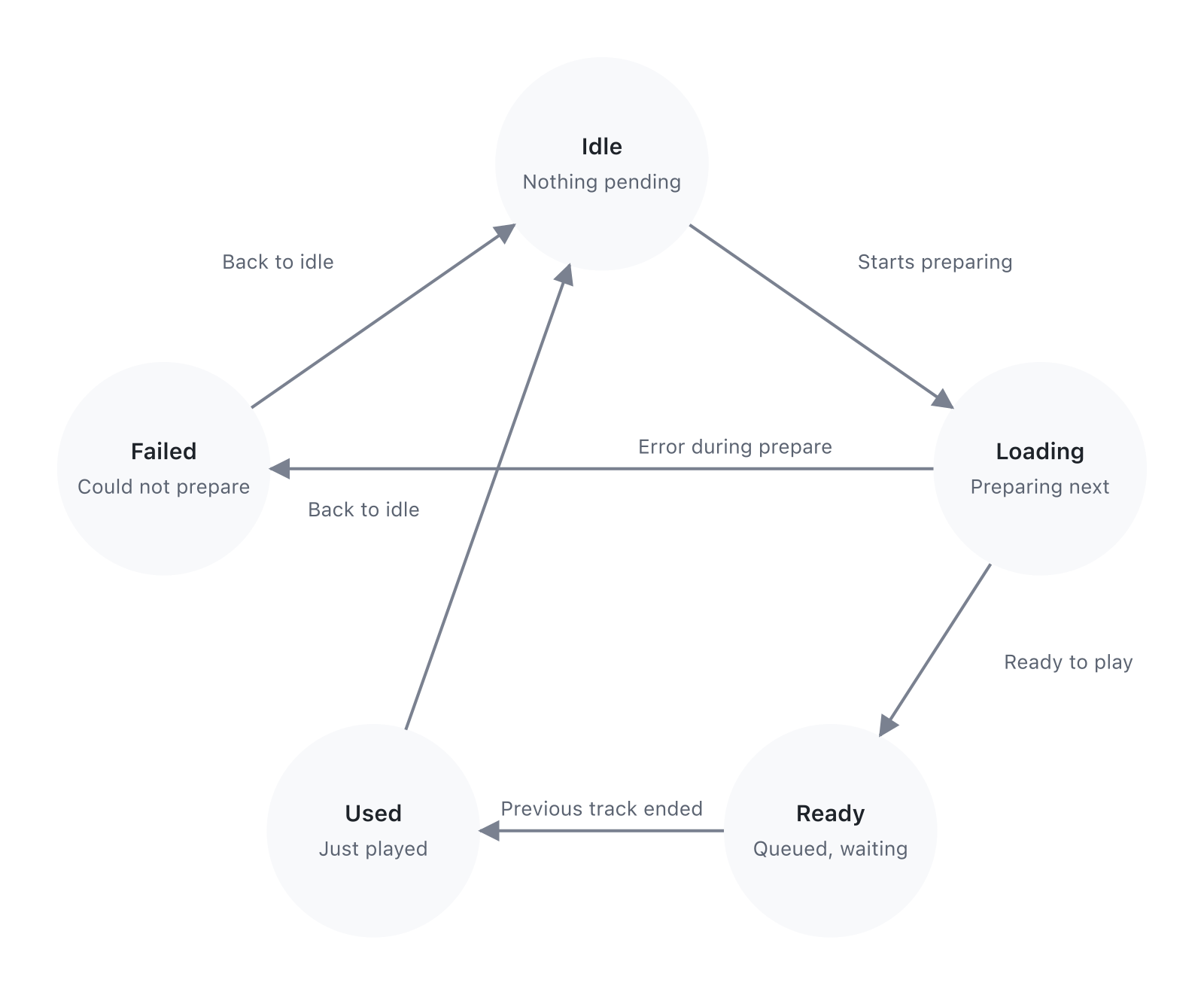
With setPrefetchPlaylist(true), mpv opens the next playlist entry in
the background before the current one ends. player.stream.prefetchState
follows that work, so you can show progress or log a failed prefetch
without parsing log lines.
player.stream.prefetchState.listen((state) {
  switch (state) {
    case PrefetchState.idle:
      // No background prefetch in progress.
    case PrefetchState.loading:
      // Opening the next entry and filling its cache
      showIndicator('Prefetching…');
    case PrefetchState.ready:
      // The next entry is open and cached up to cache-secs
      showIndicator('Ready');
    case PrefetchState.used:
      // The track just started from the prefetched stream.
      // Stays until the next `loading` or a cancel.
      showIndicator('Using prefetched');
    case PrefetchState.failed:
      // Opening the next entry failed (network error, unsupported
      // codec, on_load hook abort). Stays until the next `loading`.
      showIndicator('Prefetch failed');
  }
});| State | When it fires | Notes |
|---|---|---|
idle |
Default; after a cancel or a dropped prefetch | |
loading |
Opening the next entry | Until the entry is open and cached |
ready |
Next entry open and cached | The track change will use it |
used |
Track transitioned via the prefetched stream | Stays until the next loading or a cancel |
failed |
Opening the next entry failed | Stays until the next loading |
For a progress bar, use player.stream.prefetchCacheDuration: how much
of the next entry is cached, as a Duration. Divide it by your cache
target; it is Duration.zero while nothing is being prefetched.
player.stream.prefetchCacheDuration.listen((buffered) {
  const target = Duration(seconds: 30); // your cache target
  final pct = (buffered.inMilliseconds / target.inMilliseconds)
      .clamp(0.0, 1.0);
  showPrefetchProgress(pct); // 0 to 1
});Section 13 covers their settings and examples.
| Stream | Type | Set with | Notes |
|---|---|---|---|
fft |
FftFrame |
- | Smoothed FFT bands and raw bins, for a bar visualizer. |
pcm |
PcmFrame |
- | Samples after the effects chain, for a waveform or a level meter. |
spectrum |
SpectrumSettings |
setSpectrum, updateSpectrum |
The FFT and smoothing settings. |
waveform |
WaveformData? |
- | Envelope of the loaded track, null on a track change until the first bins. |
loudnessScan |
LoudnessScan? |
- | Integrated loudness, range, sample and true peak of the loaded track, with its progress. |
loudnessMeter |
Loudness |
- | Live momentary, short-term, integrated and range readings from an Ebur128Effect. |
Two streams follow the OS media session, covered in section 14.
| Stream | Type | Set with | Notes |
|---|---|---|---|
mediaSession |
MediaSession? |
setMediaSession |
The published session, or null. Same as state.mediaSession. |
mediaSessionCommands |
MediaSessionCommand |
- | Commands from the OS (play, pause, next, seek and so on). The player applies them itself; the stream is for logging or extra handling. |
These deliver only what happens after listen().
| Stream | Type | Notes |
|---|---|---|
seekCompleted |
void |
After each load or seek, once mpv is ready to play. |
endFile |
MpvFileEndedEvent |
Every file end, with its reason. See 11.2. |
error |
PlayerError |
Load failures and mpv errors. See 11.1. |
log, internalLog |
MpvLogEntry |
mpv's log and the library's. See 11.4. |
hook |
MpvHookEvent |
Hooks you registered. See 12.2. |
For what the typed API does not cover, the raw API talks to mpv directly.
getRawProperty returns null when the property does not exist or the read fails.
final String? value = await player.getRawProperty('audio-codec');
final String? samplerate = await player.getRawProperty('audio-params/samplerate');
getRawPropertyNode returns the property as decoded maps, lists and
scalars instead of a string:
final tracks = await player.getRawPropertyNode('track-list') as List?;setRawProperty throws MpvCommandException when mpv rejects the
write, for a typo or an out-of-range value. The exception carries
name, mpv's code and its message. Writes to af and
pause, also through options/ and file-local-options/, throw
ArgumentError: use the effects chain and play() or pause() instead.
try {
  await player.setRawProperty('audio-samplerate', '96000');
  await player.setRawProperty('audio-channels', 'stereo');
} on MpvCommandException catch (e) {
  print('mpv rejected ${e.name}: ${e.message} (code=${e.code})');
}sendRawCommand throws MpvCommandException the same way. af and
af-command throw ArgumentError, because the effects chain owns them.
So do the commands that write af or pause (set, add, multiply,
cycle, cycle-values, change-list, also through options/ and
file-local-options/), and loadfile with af or pause in its
per-file options (af-add, no-pause and the like included). The check
guards against mistakes: it covers these commands, not every way mpv
offers to change a property.
await player.sendRawCommand(['playlist-shuffle']);
await player.sendRawCommand(['ao-reload']);
Other commands and properties from the
mpv documentation go through these
methods, except the writes to af and pause listed above.
Prefer the typed setters when they cover what you need: they update
state right away, while a raw write shows up only once mpv reports the
change.
player.stream.error emits PlayerError, a sealed class with two subtypes: EndFileError when a file stops because of an error, and LogError when mpv logs an error that may not stop playback:
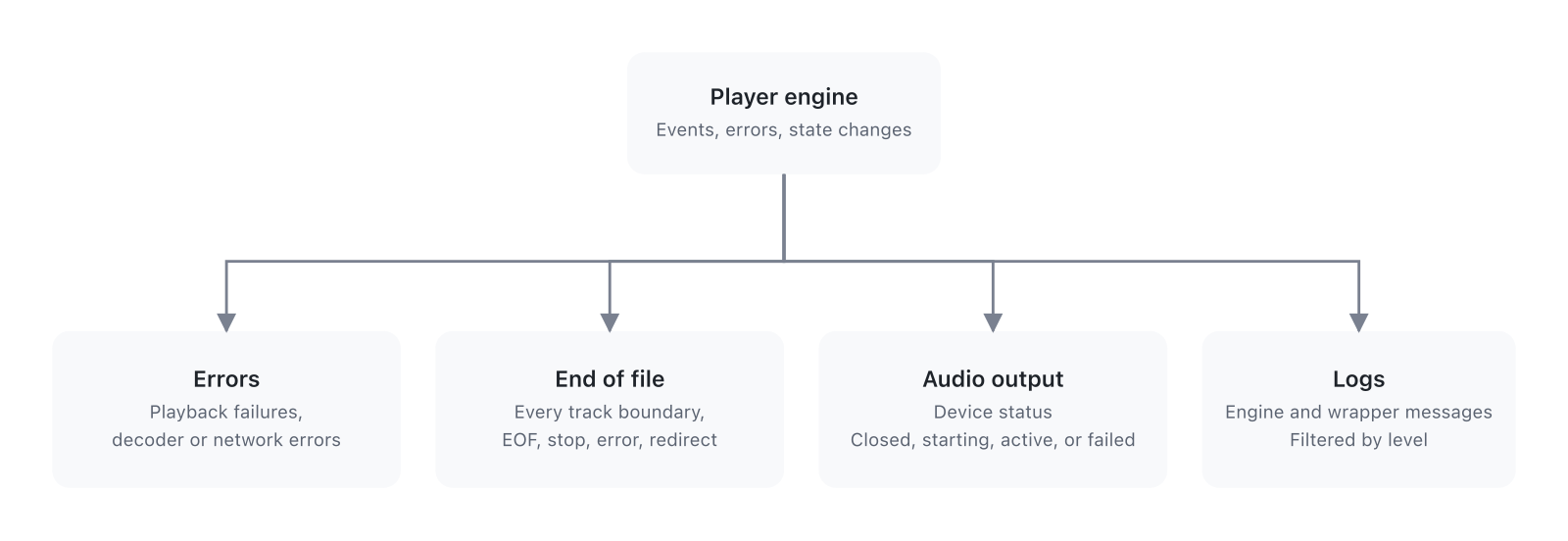
player.stream.error.listen((error) {
  switch (error) {
    case EndFileError():
      // The file stopped: network timeout, file not found and so on
      print('End-file error: reason=${error.reason}, code=${error.code}');
      print('  isLoadingError: ${error.isLoadingError}');
      print('  isAudioOutputError: ${error.isAudioOutputError}');
      print('  isFormatError: ${error.isFormatError}');
    case LogError():
      // mpv logged at error or fatal level; playback may go on
      print('Log error [${error.prefix}] ${error.level}: ${error.message}');
  }
});
EndFileError fields:
reason: aMpvEndFileReasonenum (eof,stop,quit,error,redirect)code: the raw mpv error code (e.g.-13forMPV_ERROR_LOADING_FAILED)isLoadingError:truefor network or file loading failuresisAudioOutputError:truewhen the audio output driver failed to initializeisFormatError:truewhen the file format is unrecognizable or has no audio
LogError fields:
prefix: the mpv subsystem (e.g.'ffmpeg','ao','demux')level:LogLevel(LogLevel.errororLogLevel.fatal)text: the raw log line from the mpv subsystemmessage:'[prefix] level: text', with the level as mpv names it (error,fatal)
player.stream.endFile emits an MpvFileEndedEvent every time a file ends, not only on errors. mpv can report a dropped network connection as a normal end of file (reason: eof, no error code), so compare the position with the duration to tell them apart:
player.stream.endFile.listen((event) {
  if (event.reason == MpvEndFileReason.eof) {
    final pos = player.state.position;
    final dur = player.state.duration;
    if (dur > Duration.zero && (dur - pos).inSeconds > 5) {
      print('Ended early, probably a network drop');
    }
  }
});
MpvFileEndedEvent fields:
reason: aMpvEndFileReasonenum valueerror: mpv's error code, non-zero only whenreasonisMpvEndFileReason.error
player.stream.audioOutputState follows the audio output as it opens,
plays and fails, for a "Connecting" indicator on slow devices or to
notice a silent player.
player.stream.audioOutputState.listen((state) {
  switch (state) {
    case AudioOutputState.closed:        // no audio output open
    case AudioOutputState.initializing:  // opening the device
    case AudioOutputState.active:        // open and playing
    case AudioOutputState.failed:        // the device could not be opened
  }
});
When the state turns failed, player.stream.error also emits a
LogError, so one error listener covers the silent case too.
player.stream.log carries mpv's messages and player.stream.internalLog
the library's own, so you can route them apart, for example log to a
debug overlay and internalLog to crash reporting.
// mpv: ffmpeg, demux, ao, cplayer and so on
player.stream.log.listen((entry) {
  if (entry.level == LogLevel.error || entry.level == LogLevel.fatal) {
    print('[${entry.level.mpvValue}] ${entry.prefix}: ${entry.text}');
  }
});

// The library: hook timeouts, resolver errors and so on, with the
// prefix 'mpv_audio_kit'
player.stream.internalLog.listen((entry) {
  print('[mpv_audio_kit:${entry.level.mpvValue}] ${entry.text}');
});
PlayerConfiguration.logLevel sets the starting level: LogLevel.warn
for release builds, debug or v while developing, off to silence mpv.
setLogLevel changes it later:
player.setLogLevel(LogLevel.debug);
player.setLogLevel(LogLevel.off);The streams above report what happens during playback. A call that
fails throws a PlayerException, a sealed class:
PlayerDisposedException: the player was disposed.PlayerInitException: libmpv could not load or start. Every call on that player throws it, with the reason inmessage.MpvCommandException: libmpv rejected the request, for example a seek with no file loaded. Carriesname,codeandmessage.SourceException: a source could not be prepared before reaching libmpv, such as a missingasset://or an unreadablecontent://.
try {
  await player.seek(position);
} on PlayerException catch (e) {
  switch (e) {
    case PlayerDisposedException():
      break;
    case PlayerInitException(:final message):
      print('libmpv did not start: $message');
    case MpvCommandException(:final name, :final message):
      print('$name rejected: $message');
    case SourceException(:final uri):
      print('cannot open $uri');
  }
}
Invalid arguments are programming errors: they throw ArgumentError or
RangeError before anything is written to libmpv (a negative volume, a
playlist index out of range, checked against mpv's own playlist count).
next() and previous() return false when there is no track to go to,
without throwing.
A hook pauses mpv at a step of loading a file, such as right before the stream opens, until your code says to go on. Use it to resolve a URL at the last moment, add headers for one file or switch to another source, with no local proxy:
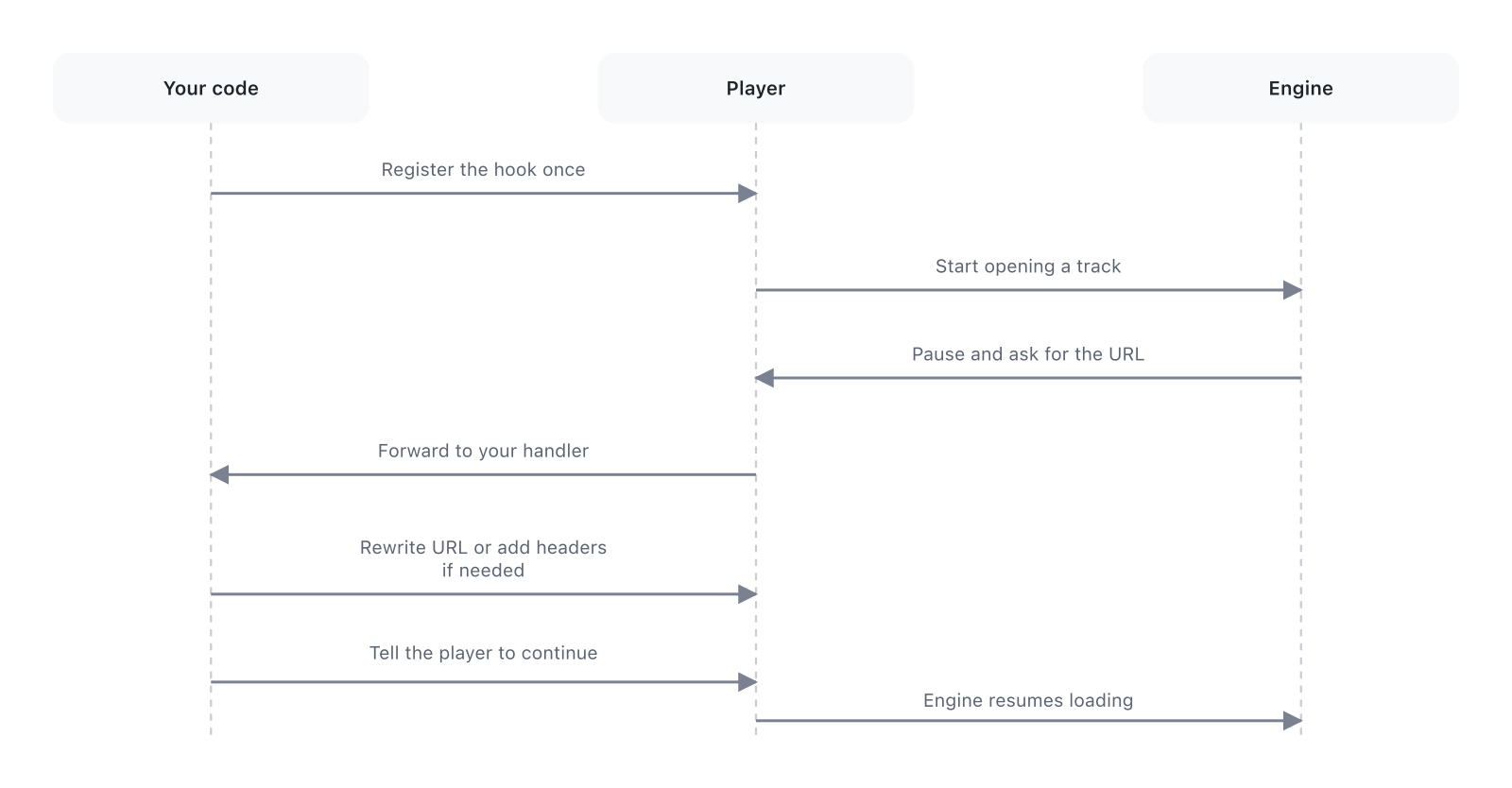
Headers alone need no hook: pass them in Media.httpHeaders. To resolve URLs, setSourceResolver does the hook wiring for you.
Call registerHook after creating the player, before the first open:
player.registerHook(Hook.load);With a timeout, the library continues the hook itself if your code has not done so in time, for example after an unhandled exception:
player.registerHook(Hook.load, timeout: const Duration(seconds: 10));The hooks mpv offers:
6 hooks (click to expand)
| Hook | When it fires |
|---|---|
Hook.beforeStartFile |
Before any work on the file begins |
Hook.load |
Before the stream opens. Change the URL or add headers for this file |
Hook.loadFail |
After the stream failed to open. Try a fallback URL |
Hook.preloaded |
File open, before tracks are selected and the decoder starts |
Hook.unload |
Before the file closes. Clean up what belongs to it |
Hook.afterEndFile |
After the file ended and was unloaded |
Hooks fire during prefetch too: when mpv opens the next entry in advance, on_load runs for it, so a custom scheme such as plex-transcode:// gets resolved for every track. Your listener runs once per track either way, and setRawProperty('stream-open-filename', ...) works in both cases.
Listen to player.stream.hook and call continueHook when you are done. Call it on every path, errors included: until you do, mpv waits.
player.stream.hook.listen((event) async {
  if (event.hook == Hook.load) {
    try {
      final url = await player.getRawProperty('stream-open-filename') ?? '';
      if (url.startsWith('my-scheme://')) {
        final resolved = await myResolver(url);
        await player.setRawProperty('stream-open-filename', resolved.url);

        // Per-file HTTP headers, sent for HLS segments too
        if (resolved.headers.isNotEmpty) {
          final headerString = resolved.headers.entries
              .map((e) => '${e.key}: ${e.value}')
              .join(',');
          await player.setRawProperty(
            'file-local-options/http-header-fields',
            headerString,
          );
        }
      }
    } finally {
      player.continueHook(event.id);
    }
  } else {
    player.continueHook(event.id);
  }
});file-local-options/http-header-fields sets headers for the current file only. For an HLS stream they reach the playlist and every segment, the same as Media.httpHeaders:
await player.setRawProperty(
  'file-local-options/http-header-fields',
  'Authorization: Bearer abc123',
);setSourceResolver resolves the URL of each entry right before it opens, in one callback, with no registerHook, continueHook or placeholder scheme. 12.5 shows the same idea done by hand with a hook. The resolver gets the entry's original Media, with its extras and httpHeaders, so it can read your own data (a track id, which login to use) and return the URL to play:
player.setSourceResolver((request) async {
  final id = request.media.extras?['trackId'] as String?;
  if (id == null) return null;         // not ours, keep the URL as-is
  return service.getPlaybackUrl(id);   // temporary CDN or token URL
});

// Queue by id, with no network calls until each track actually opens:
await player.openAll([
  Media('resolve://1', extras: {'trackId': '1'}),
  Media('resolve://2', extras: {'trackId': '2'}),
]);
The player calls the resolver:
- before every stream opens (
on_load), prefetch included; - once more after a failed open (
on_load_fail), withrequest.isRetryset: return a fresh URL, for example with a new token, and mpv tries again. This happens at most once per load, and only when the new URL differs from the one that failed.
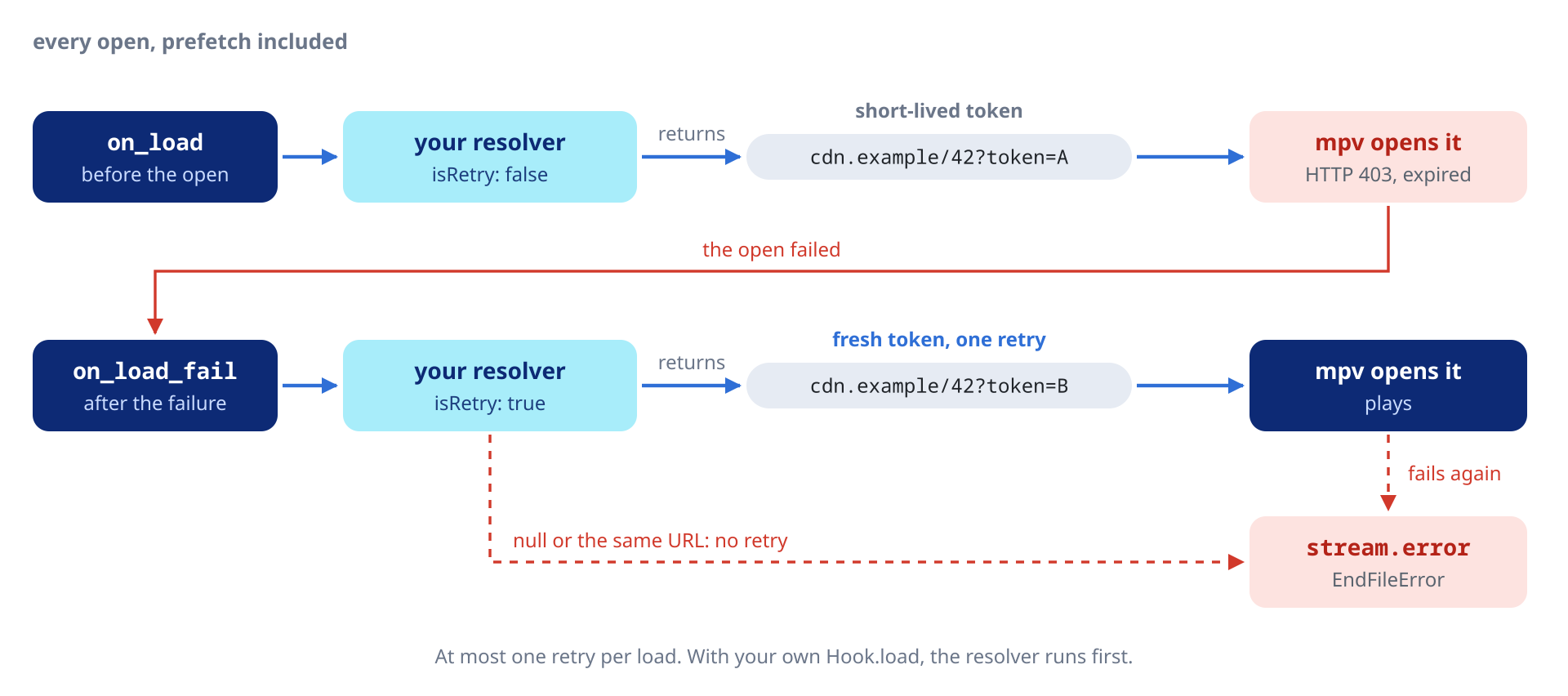
Returning null (or the incoming request.uri unchanged) keeps the current URL, so a resolver that only handles some entries leaves the rest untouched. A thrown error goes to internalLog and keeps the current URL.
The resolver works alongside your own hooks. If you also registered Hook.load, the resolver runs first; your listener then gets the event with stream-open-filename already changed, and still calls continueHook. A resolver that hangs is cut off by timeout (default 15 s), after which the library continues the hook. Pass null to remove the resolver.
Building a playlist with Future.wait runs all the getStreamUrl calls at once. If the server refuses parallel sessions, as Plex does for transcoding, keep the session parameters and return a placeholder URL such as my-scheme://session-id. on_load fires for one track at a time as mpv opens them, so the real calls never overlap:
// No real API calls yet
final medias = await Future.wait(tracks.map((t) async {
  final url = await service.getStreamUrl(t.id); // returns "my-scheme://abc"
  return Media(url);
}));
await player.openAll(medias);

// When mpv reaches each track, on_load calls myResolver("my-scheme://abc"),
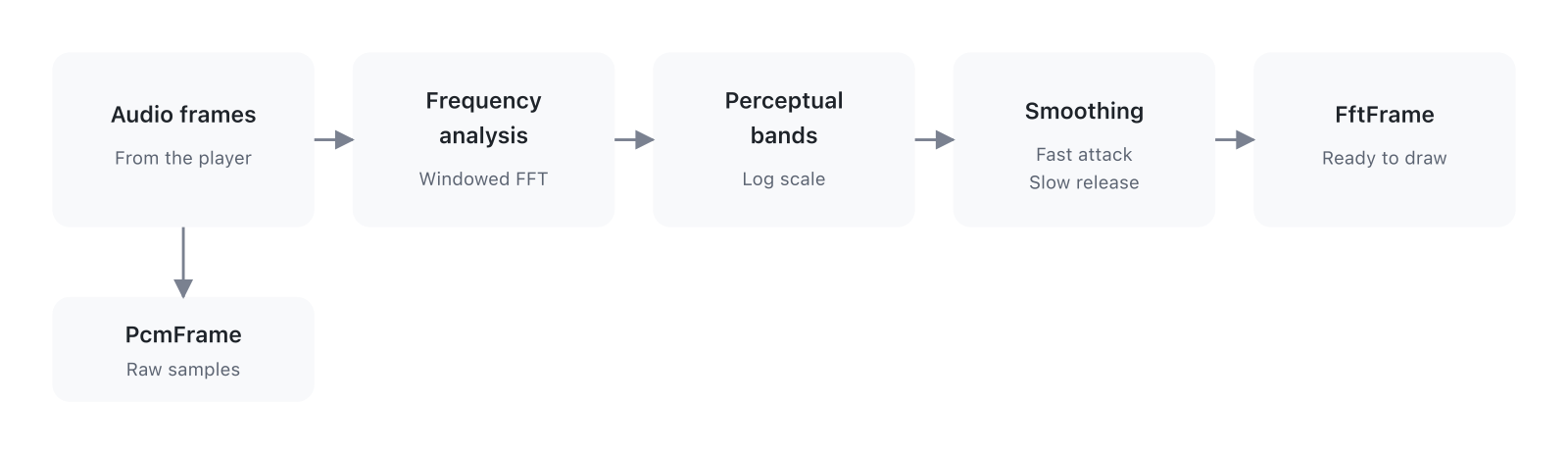
// which makes the /decision call and returns the start.m3u8 URLplayer.stream.fft and player.stream.pcm carry the audio going to the
output, after the effects chain and the volume: what you hear. Paint
bands in a CustomPainter, drive a level meter with samples, or run
your own analysis:
Every stream in this section does its work only while it has a
listener: fft, pcm, the taps, waveform, loudnessScan and
loudnessMeter start on the first listen() and stop on the last
cancel. There is nothing to turn on.
player.stream.fft emits an FftFrame at a fixed interval, 30 times a
second by default.
6 fields per frame (click to expand)
| Field | Type | What it is |
|---|---|---|
bins |
Float32List |
FFT magnitude per linear-frequency bin, from 0 to 1. Length fftSize / 2. |
bands |
Float32List |
Smoothed, log-spaced bands for a bar visualizer. Length bandCount. |
timestamp |
Duration |
libmpv's engine clock when the samples were captured, counted from engine start. It is not the position in the track: use position for that. |
sampleRate |
int |
Sample rate of the output, in Hz. |
bandLowHz |
double |
Lower edge of the band axis. |
bandHighHz |
double |
Upper edge of the band axis (clamped to Nyquist). |
player.stream.fft.listen((frame) {
  for (var i = 0; i < frame.bands.length; i++) {
    final h = frame.bands[i] * canvasHeight;
    // draw bar i with height h …
  }
});
Paint bands as they come: they rise fast and fall slowly, so the bars
move smoothly without animation code. Use bins for your own mapping
(mel, Bark, constant-Q, peak detection).
SpectrumSettings holds the FFT and smoothing settings. setSpectrum
applies them in one call, and updateSpectrum changes one field.
// 60 frames a second, 128 bands, a narrower dB window
player.setSpectrum(const SpectrumSettings(
  fftSize: 2048,
  bandCount: 128,
  emitInterval: Duration(milliseconds: 16),
  minDb: -90,
  maxDb: -20,
));

// Change one field, e.g. from a slider
player.updateSpectrum((s) => s.copyWith(attackSmoothing: 0.7));
10 fields (click to expand)
| Field | Default | Range or choice |
|---|---|---|
fftSize |
2048 | Power of 2: 256, 512, 1024, 2048, 4096 |
bandCount |
64 | Typical 32-128 |
bandLowHz |
20.0 | Lowest band edge, in Hz |
bandHighHz |
20000.0 | Clamped to Nyquist (sampleRate / 2) |
window |
WindowFunction.hann |
Hann, Blackman-Harris, Rectangular |
emitInterval |
33 ms | 8 to 67 ms (about 120 to 15 frames a second) |
attackSmoothing |
0.5 | Smoothing while a band rises; higher reacts faster |
releaseSmoothing |
0.1 | Smoothing while a band falls; lower decays slower |
minDb, maxDb |
-100, -30 | dB range mapped to 0 to 1, the Web Audio AnalyserNode defaults |
overlapFactor |
4 | Power of 2: 1 (no overlap), 2, 4 (75 %), 8, 16 |
The FFT memory is reallocated only when a setting requires it, so changing settings from a slider is cheap.
While playback is paused no frames arrive, and the last one stays on screen. To fade the bars to zero on pause, animate them yourself.
player.stream.pcm emits PcmFrames at the same rate as fft, with the
samples themselves instead of the spectrum. Use it for an oscilloscope,
a level or peak meter, or any analysis that needs amplitude.
double peak = 0;
player.stream.pcm.listen((frame) {
  for (final s in frame.samples) {
    if (s.abs() > peak) peak = s.abs();
  }
  peak *= 0.92; // decay
  vuController.value = peak;
});
samples is a Float32List with the channels interleaved (L, R, L, R).
frame.samplesPerChannel is the number of samples in each channel.
player.stream.tap(filter, side: ...) captures the samples on either
side of one stage of the effects chain. The stage is named by its
filter, through the AudioFilter enum, and by instance when the
filter appears more than once (0, the default, is the first): with two
EqualizerEffects in the list, instance: 1 taps the second. Disabled
stages count too, and emit nothing. The tap follows the occurrence, not a
particular stage: moving other filters around keeps it where it is, while
swapping the two equalizers swaps what instance: 0 taps. libmpv captures
up to eight stages at a time, counted across all players of the process,
and two players tapping the same stage read one mixed feed. TapSide.pre
captures before the filter and TapSide.post after it.
// Input and output of one filter
player.stream
    .tap(AudioFilter.equalizer, side: TapSide.pre)
    .listen((pcm) => paintInputWaveform(pcm.samples));
player.stream
    .tap(AudioFilter.equalizer, side: TapSide.post)
    .listen((pcm) => paintOutputWaveform(pcm.samples));
For bands, run the samples through BandProcessor. It uses the same FFT,
window and smoothing as stream.fft, so a stage's curve moves like the
main one:
final processor = BandProcessor(player.state.spectrum);
// Follow the spectrum settings
final cfgSub = player.stream.spectrum.listen(processor.setSettings);
final tapSub = player.stream
    .tap(AudioFilter.equalizer, side: TapSide.post)
    .listen((pcm) {
      final fft = processor.process(pcm);
      if (fft != null) painter.bands = fft.bands;
    });
Every typed stage exposes its filter, so you can tap the whole chain
stage by stage:
final seen = <AudioFilter, int>{};
for (final e in player.state.audioEffects) {
  final f = e.filter;
  if (f == null) continue;  // raw stage
  // Disabled stages count toward the instance too.
  final instance = seen.update(f, (n) => n + 1, ifAbsent: () => 0);
  if (!e.enabled) continue;  // disabled: nothing to tap
  player.stream.tap(f, instance: instance, side: TapSide.post).listen(_paint);
}player.stream.waveform emits a mono envelope of the loaded track,
computed on a worker thread: about 2000 bins, each with its min, max and
RMS, enough to paint a waveform
overview or a waveform-style seekbar. There is one waveform per process:
with several players, the last open() wins.
Local files are decoded ahead of time: partial envelopes arrive while
the decode runs (wave.decoding), then the final one. An HTTP file that
plays from its start, such as a direct-play file, is decoded from mpv's
own cache as it downloads, so the envelope fills at the pace of the
download. Streams that cannot be decoded
ahead of time (adaptive, non-seekable or transcoded network sources)
fill in as playback advances, and a live stream of unknown length keeps
a rolling window (wave.live). wave.filled has one byte per bin, 1
once the bin holds data, so you can draw the rest as a flat baseline.
On loud, heavily limited masters the peaks sit near full scale for most
of the track. Drawing wave.rms as the body of the waveform, with the
min and max as a lighter outline, keeps verses, choruses and drops
readable. wave.rms is null with a libmpv older than libmpv-r14.
Such a file is downloaded once: the analysis reads the packets mpv
already cached. When one pass from the start to the end is not possible
(playback starting further in, a seek past the cache, a track switch, a
cut download, the cache off or on disk, a file larger than the cache),
the analysis opens the source a second time, with the same network
options as playback (tls-verify, tls-ca-file, headers, user agent,
cookies). Either way the result is the same. The loudness scan below
uses the same decode.
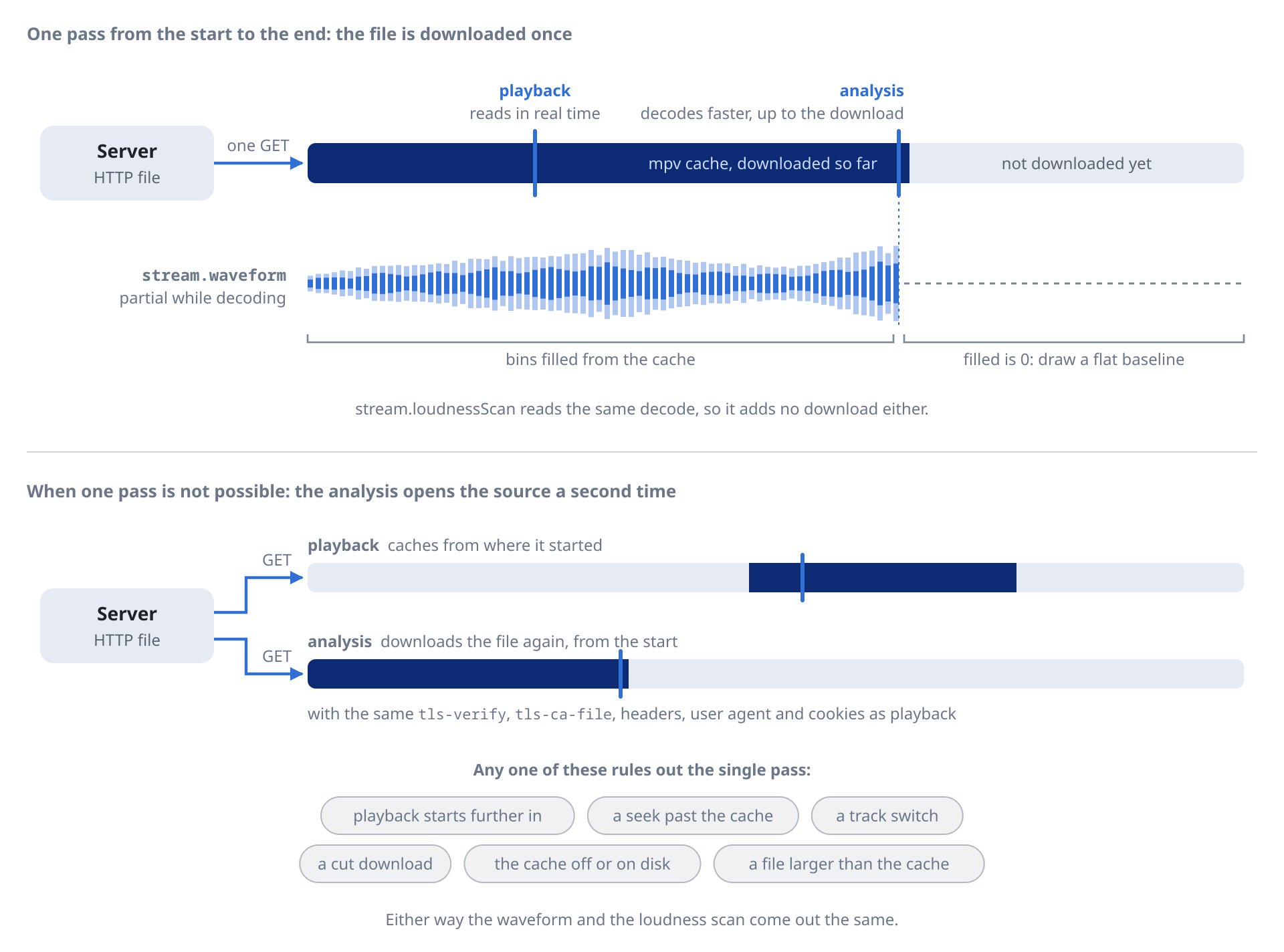
player.stream.waveform.listen((wave) {
  if (wave == null) return; // null on track change, until the first bins land
  // wave.min and wave.max: Float32List, range [-1, +1], wave.bins long.
  // wave.rms: Float32List?, range [0, 1], same length.
  // Bin i covers wave.duration * i / wave.bins to wave.duration * (i + 1) / wave.bins
  for (var i = 0; i < wave.bins; i++) {
    if (wave.filled[i] == 0) continue; // no data yet: draw a baseline
    // draw a light bar from wave.min[i] to wave.max[i]
    // and a solid one from -wave.rms![i] to wave.rms![i]
  }
});player.stream.loudnessScan measures the EBU R128 loudness of the loaded
track the same way as the waveform: the whole file is decoded apart from
playback, right after it loads, many times faster than real time. While
the scan runs the stream emits scanning snapshots with
progress, then one final LoudnessScan per track with integrated LUFS,
loudness range, sample peak and true peak, often before the audio has
started playing.
Use it to level the volume of files without ReplayGain tags:
player.stream.loudnessScan.listen((scan) {
  if (scan?.state == LoudnessScanState.ready) {
    // ReplayGain 2.0 reference is -18 LUFS.
    player.setVolumeGain((-18.0 - scan!.integrated!).clamp(-24.0, 24.0));
  }
});
The stream emits null when the track changes, so old results clear.
Sources that can only be decoded as they play (adaptive or live network
streams) report LoudnessScanState.unavailable: use the live meter below
for those.
player.stream.loudnessMeter emits momentary, short-term, integrated
and loudness-range readings of the audio as it plays, for a level meter
or a broadcast loudness display. The meter reads the
first enabled Ebur128Effect of the chain with its metadata option on,
so add one at the point of the chain you want to measure:
await player.updateAudioEffects(
  (fx) => [...fx, const Ebur128Effect(metadata: true)],
);
player.stream.loudnessMeter.listen((l) => meter.paint(l.momentary));
Without the meter in the chain the stream emits nothing.
setMediaSession publishes the player to the system media controls
(Now Playing, Control Center and the lock screen on iOS and macOS, MPRIS
on Linux, SMTC on Windows, the media notification on Android) and
receives the commands the OS sends back. Pass null to remove the entry. Only one Player per process may own the
session at a time (enabling a second throws StateError); dispose()
releases it automatically.
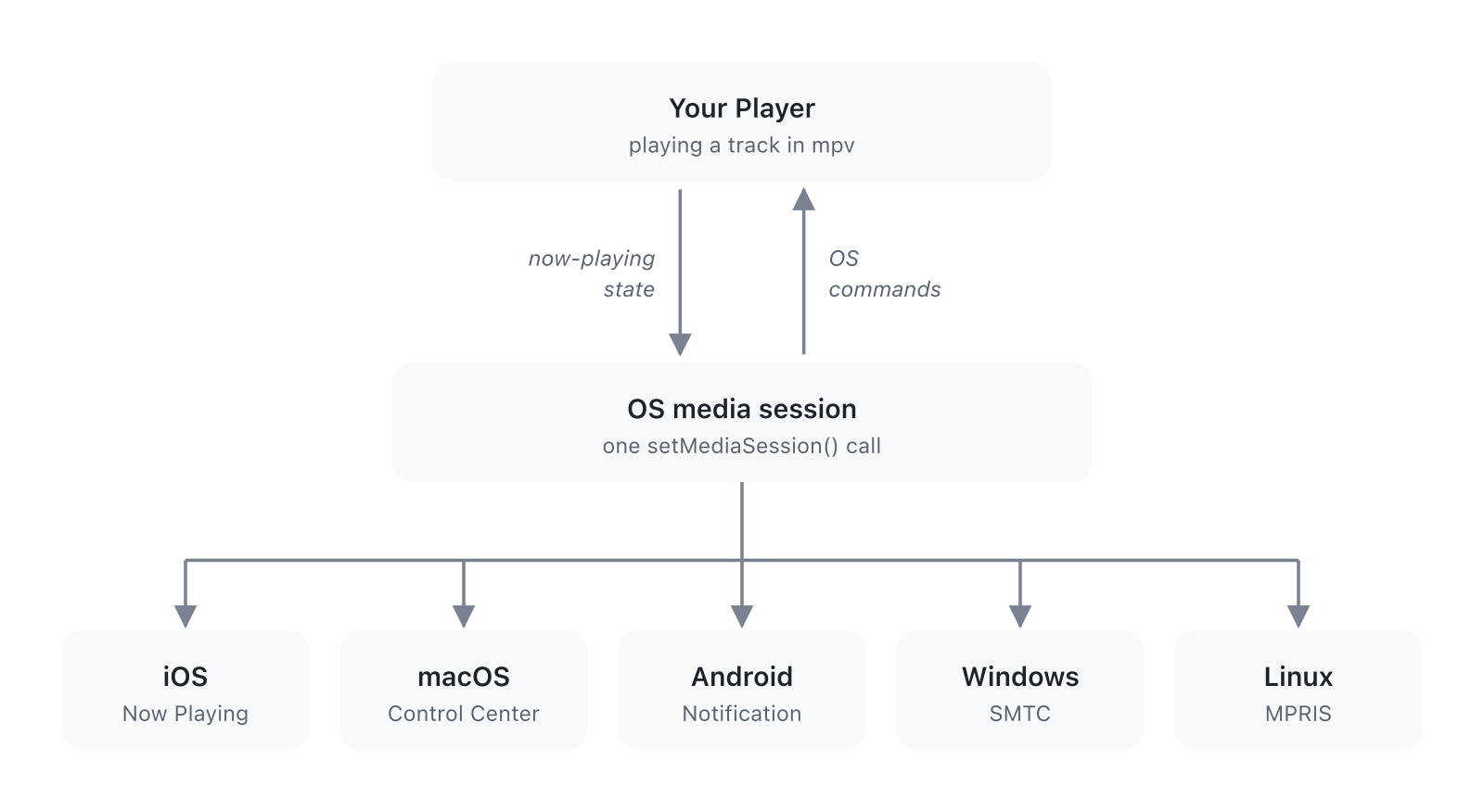
Title, artist, album, artwork and duration come from the playing file, with nothing to push:
await player.setMediaSession(const MediaSession());  // enable
await player.setMediaSession(null); // removeEach metadata field overrides the file: null keeps mpv's value, a
string replaces it, and an empty string leaves it blank. copyWith
changes one field:
await player.setMediaSession(
  (player.state.mediaSession ?? const MediaSession())
      .copyWith(title: 'Custom title', artist: 'Custom artist'),
);
For a file without tags, such as a transcoded stream, each field falls
back to the entry's Media.extras: title, artist and album as
strings, and art as an http(s):// or file:// cover URL when the
artwork is embedded and the file has none. A stream with no title tag
and no extras['title'] falls back to mpv's media-title, taken from the
URL with the query removed. Setting MediaSession.title is still better.
MediaSession.artwork picks the image:
MediaSessionArtwork.embedded            // default, the file's embedded cover
MediaSessionArtwork.custom(myCoverArt)  // your own image, ignoring the file cover
MediaSessionArtwork.uri(myArtUrl)       // a remote image, downloaded before it reaches the OS
MediaSessionArtwork.none                // no artwork
Network URLs never reach the OS media session as text, since they often
carry credentials in the query (Subsonic, Jellyfin, Plex). MPRIS on Linux
gets xesam:url only for local files. A remote cover reaches the OS as an
image. On Linux, Android and Windows the package downloads it in Dart: the
download always verifies the server certificate, even when tls-verify is
off for playback, trusts tls-ca-file on top of the system roots, refuses
a redirect from https to plain http, and is tried at most 3 times. On iOS and macOS the system downloads it, with the
system roots only.
The player applies OS commands itself (play from the lock screen calls
play(), scrubbing calls seek(), and so on) and also emits them on
player.stream.mediaSessionCommands:
player.stream.mediaSessionCommands.listen((command) {
  switch (command) {
    case MediaSessionCommandSeekTo(:final position):
      log('scrubbed to $position');
    case MediaSessionCommandNext():
      // next and previous drive mpv's playlist when one is loaded; with a
      // single track they only emit here, so advance your own queue.
      myQueue.next();
    case _:
      break;
  }
});actions lists the controls the OS may show. Each platform draws only
some of them, and a lock screen usually shows 3 or 4. An action a
platform does not draw is simply left out. The
default set is play, pause, playPause, next, previous and seek; the
enum also has stop, fastForward, rewind, setRepeatMode, setShuffle,
setPlaybackRate and like (a favorite or star). The skip intervals and the
speed list apply only when their action is in the set.
const MediaSession(
  actions: {
    MediaAction.play, MediaAction.pause, MediaAction.playPause,
    MediaAction.next, MediaAction.previous, MediaAction.seek,
    MediaAction.fastForward, MediaAction.rewind, MediaAction.setPlaybackRate,
    MediaAction.setRepeatMode, MediaAction.setShuffle,
  },
  fastForwardInterval: Duration(seconds: 30),
  rewindInterval: Duration(seconds: 15),
  supportedPlaybackRates: [1.0, 1.25, 1.5, 2.0],
  autoApplyPlaylistNavigation: false,
);
With autoApplyPlaylistNavigation: false the next and previous buttons no
longer change track, and you handle them yourself, for example as a 30 s
skip in an audiobook split into files. The command still arrives on
stream.mediaSessionCommands.
The actions each platform's media controls draw:
| Action | iOS | macOS | Android | Windows | Linux¹ |
|---|---|---|---|---|---|
play, pause, playPause |
Yes | Yes | Yes | Yes | Yes |
next, previous |
Yes | Yes | Yes | Yes | Yes |
seek (scrubber) |
Yes | Yes | Yes | Yes | KDE |
fastForward, rewind |
Yes | Yes | Yes | Yes | No |
stop |
No | No | No | Yes | No |
setRepeatMode, setShuffle |
No | No | Yes | No² | KDE |
setPlaybackRate |
No | No | No | No² | KDE |
like |
Yes | No | Yes | No | No |
¹ On Linux it depends on the desktop: KDE Plasma draws seek, repeat, shuffle and rate, while GNOME's popup shows only previous, play-pause and next. ² Windows SMTC stores repeat, shuffle and rate, but its flyout has no button for them.
interruptionPolicy decides what happens on a phone call, Siri, or
another app taking the audio focus:
InterruptionPolicy.pauseAndResume // default: pause, resume when the OS allows
InterruptionPolicy.pauseOnly      // pause, never resume on its own
InterruptionPolicy.keepPlaying    // keep playing at full volume
keepPlaying has limits the OS sets: on iOS an accepted phone or
FaceTime call, or Siri, still takes the audio, and on Android 12 and
later the system may fade the app out when another app gains focus.
Unplugging headphones always pauses, even with keepPlaying, as Apple's
guidelines require. macOS, Linux and Windows have no per-app audio
session, so the policy does nothing there.
Background playback on iOS also needs the setup in Permissions.
On Linux (MPRIS) and Windows (SMTC) the OS labels the controls with your app's name. macOS, iOS and Android take it from the app bundle and ignore these fields.
const MediaSession(
  appName: 'My Player',               // name shown by MPRIS and SMTC
  desktopEntry: 'com.example.myapp',  // Linux only, see below
);
desktopEntry is the name, without .desktop, of the file you install
in /usr/share/applications/. The Linux desktop uses it to find the icon
shown beside the controls; with null it shows a generic icon. On Windows the icon comes from
the executable, so only appName applies there.
Network sources need:
<uses-permission android:name="android.permission.INTERNET" />The package's own manifest declares FOREGROUND_SERVICE,
FOREGROUND_SERVICE_MEDIA_PLAYBACK and POST_NOTIFICATIONS for the
media session. The app does not need to request
POST_NOTIFICATIONS at runtime: Android 13 and later exempt media session
notifications, so the media controls show without it.
In Signing & Capabilities, add the Background Modes capability and check
Audio, AirPlay, and Picture in Picture. That writes this to Info.plist:
<key>UIBackgroundModes</key>
<array>
  <string>audio</string>
</array>Add to DebugProfile.entitlements and Release.entitlements:
<key>com.apple.security.network.client</key>
<true/>libmpv comes prebuilt, so building the app needs only the Flutter desktop tools, no audio -dev packages. At runtime libmpv needs libasound2, and a PipeWire client (0.3.57 or later) or PulseAudio to reach the host's sound server. Desktop distributions ship them; a minimal container does not:
sudo apt update

# Flutter desktop build tools
sudo apt install clang cmake ninja-build pkg-config libgtk-3-dev liblzma-dev

# Runtime libraries to play sound through the host
sudo apt install libasound2 libpipewire-0.3-0 libpulse0
The alsa driver cannot reach the sound card from inside a container: use pipewire or pulse. On WSL only pulse works.
I wrote the native bindings, the isolate code and most of the architecture with Claude Code.
Jellyfin, Plex and Samba are trademarks of their respective owners. mpv_audio_kit is not affiliated with them.
Developed by Alessandro Di Ronza