







The build scripts for the libmpv inside mpv_audio_kit. They compile mpv and FFmpeg without video, with a set of patches the package relies on (waveform, loudness scan, audio taps and more), for macOS, iOS, Android, Windows and Linux.
Everything runs from ./build, a terminal menu where you pick the targets and follow the builds.
git clone https://github.com/ales-drnz/libmpv-scripts
git clone https://github.com/ales-drnz/mpv_audio_kit

cd libmpv-scripts
./build
On Windows use build.cmd. You need Go, plus Docker for Linux, Windows and Android, and Xcode for Apple targets.
| Platform | Architectures | File in builds/release/ |
|---|---|---|
| macOS | arm64 and x86_64 (universal) | libmpv_macos.xcframework.zip |
| iOS | arm64 device, arm64 and x86_64 simulator | libmpv_ios.xcframework.zip |
| Android | arm64-v8a, armeabi-v7a, x86_64 | libmpv_android-<abi>.so |
| Linux | x86_64, aarch64 | libmpv_linux-<arch>.so |
| Windows | x86_64, arm64 | libmpv_windows-<arch>.dll |
Each library exports only the mpv_* C API and carries no video decoders. The versions of mpv, FFmpeg and every other dependency are pinned in scripts/shared/_versions.sh.
| Tool | Needed for |
|---|---|
| Go | always, it runs ./build |
| Docker | Linux, Windows and Android (Android on macOS builds without it) |
| Xcode | macOS and iOS |
The Android NDK is downloaded by the build, you don't need to install it.
| Host | Targets |
|---|---|
| macOS | all of them |
| Linux | all except macOS and iOS |
| Windows | all except macOS and iOS |
Apple targets need a Mac. Without one, GitHub Actions can build them for you.
Building needs only this repo. Installing the results needs mpv_audio_kit next to it:
your-projects/
├── libmpv-scripts/
└── mpv_audio_kit/
If the package lives somewhere else, set MPV_AUDIO_KIT_ROOT=/path/to/mpv_audio_kit.
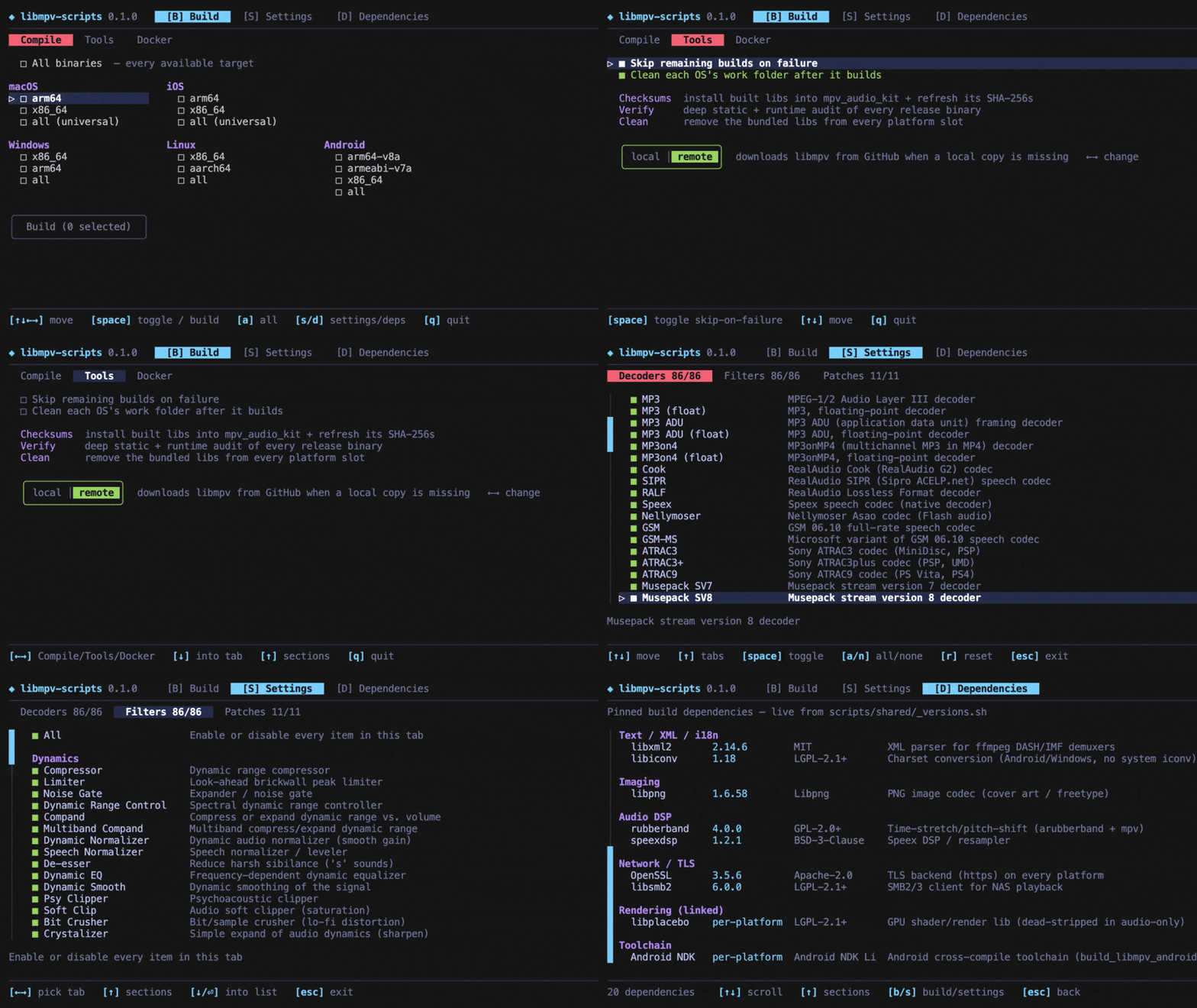
Run ./build. Arrow keys move, Space selects, Enter confirms, Q quits. The keys for each screen are listed at the bottom. There are three screens, switched with B, S and D.
Three tabs:
- Compile: pick platforms and architectures, then press Build. Each build shows its progress, time and warning count, and Enter opens its log.
- Tools: install the results into
mpv_audio_kit(Checksums), check them (Verify), switch the package between local and downloaded libraries, remove the bundled ones (Clean), and refresh the bundled CA certificates (Update CA). - Docker: see, build or delete the Docker images. The image a build needs is created automatically the first time.
Choose which audio decoders, audio filters and patches go into the build. Fewer decoders and filters make a smaller library, but a format you remove won't play. Your choices are saved separately from the defaults, and you can reset them at any time.
Every library in the build, with its version and license.
On a Mac with Xcode:
./build macos          # universal xcframework
./build ios            # device and simulator xcframework
./build macos-arm64 # one architectureOn any host with Docker running. Both architectures are cross-compiled inside the image:
./build linux          # x86_64 and aarch64
./build windows        # x86_64 and arm64
./build linux-x86_64 # one architectureOn macOS it builds directly on the host, which is the fastest option. Elsewhere it builds in Docker. The Docker tab can force Docker on macOS too.
./build android                  # all three ABIs
./build android-arm64-v8a # one ABI./build accepts targets as arguments and runs them in order, stopping at the first failure:
./build all            # everything this host can build, then checksums
./build macos verify   # build macOS, then verify it
./build list           # every target
These variables are passed to the Docker builds:
| Variable | Effect |
|---|---|
JOBS=N |
parallel jobs, all cores by default |
ENABLE_LTO_DEPS=0 |
turn off link-time optimization for the dependencies |
FORCE_DOWNLOAD=1 |
download the sources again |
KEEP_BUILD=1 |
keep the build folders |
WIPE_ALL=1 |
also delete the downloaded sources |
To build another version of a dependency, set MPV_VERSION, FFMPEG_VERSION and so on (see scripts/shared/_versions.sh).
Every push to a release/ branch runs .github/workflows/build.yml, which builds all nine libraries on GitHub's runners, Apple included. The run ends with a libmpv-release artifact holding the libraries and a SHA256SUMS file.
./build checksumsThis copies each library from builds/release/ into the package (Frameworks, jniLibs, libs) and writes its SHA-256 into the package's build files: build.gradle.kts, the two CMakeLists.txt, the podspecs and Package.swift.
mpv_audio_kit can use the libraries copied into it, or download them from its GitHub releases.
| Command | Effect |
|---|---|
./build lib-local |
installs the local builds and makes every platform use them, never downloading |
./build lib-remote |
makes every platform download the release when the local copy is missing or doesn't match |
./build lib-clean |
removes the copied libraries from the package |
The switch edits the regions marked mpvkit: in the package's build files, so don't edit those by hand. Set it back to remote before publishing the package.
./build verify checks every library in builds/release/: architecture, exported API, the patched mpv properties, the included decoders and filters, that no video code slipped in, and the libraries it depends on. Where the host can load it, it also opens the library and calls into it. The report has one row per library, and Enter shows the full log.
- Build all nine libraries, usually by pushing a
release/branch (see 3.5). - Create the
libmpv-rNrelease onmpv_audio_kitand upload the libraries. - In
mpv_audio_kit, setRELEASE_VERSIONinscripts/bump_version.shand run it, then run./build checksumsfrom here.
./build is a small Go program (Bubble Tea) that runs the shell scripts in scripts/, one per platform. Apple targets build with Xcode on the host. Linux, Windows and Android build inside a Docker image from docker/Dockerfile, which has one stage per platform, so you only keep the toolchains you use.
Each build downloads the pinned sources, applies the patches in patches/ to mpv and FFmpeg, compiles only the audio parts, and strips the library down to the mpv_* API. Every patch finds its place by exact text and stops the build if upstream has changed underneath it.
- "Go not found": install Go and run again.
- A Linux, Windows or Android build fails right away: Docker isn't running.
- macOS and iOS are greyed out: they need a Mac with Xcode. GitHub Actions can build them instead.
- "could not locate the mpv_audio_kit repo": clone it next to this folder or set
MPV_AUDIO_KIT_ROOT. - The first Docker build is slow: it is building the image, later builds reuse it.
- Android in Docker is slow on Apple Silicon: the NDK is x86_64 only. Build on the host (the default), or turn on Rosetta in Docker Desktop.
The build pipeline, the Go TUI and the patches for mpv and FFmpeg were written with Claude Code.
Developed by Alessandro Di Ronza