



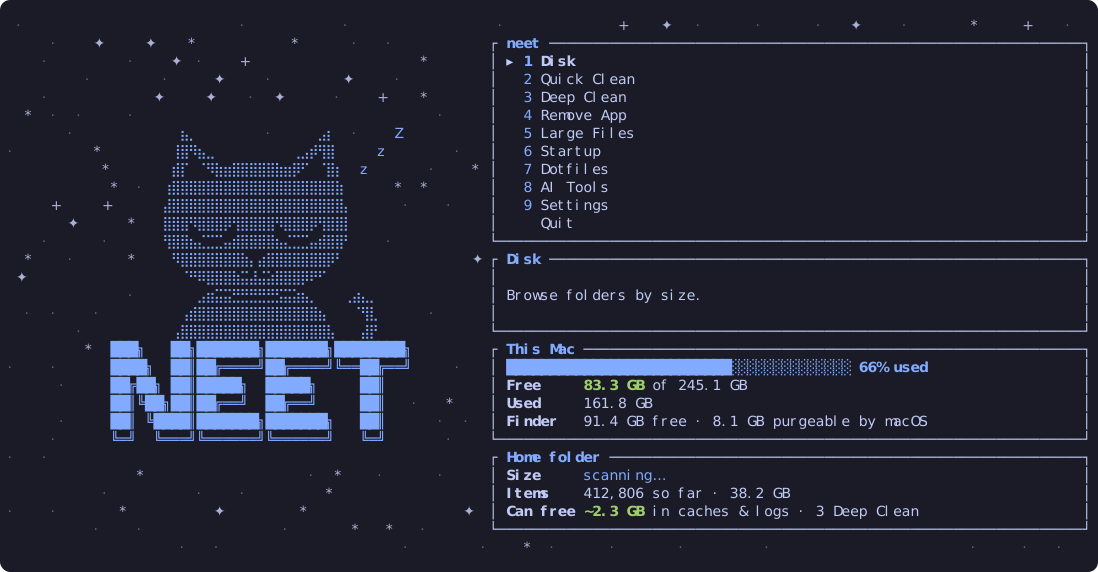
- macOS 13 or later, on Apple silicon or Intel.
- Install the published crate with Rust:
cargo install neet --lockedFor the newest code on master, including changes not yet released:
cargo install --git https://github.com/ado11231/neet --locked neet- From a checkout, use
cargo run --releaseto build and run that branch. - Install a checkout with
cargo install --path crates/neet --locked --force. - Downloads are also on GitHub Releases.
neet| # | Screen | What it does |
|---|---|---|
| 1 | Disk | Browse folders by size, as a list or a treemap, and see where space outside your home folder goes. |
| 2 | Quick Clean | Find build folders, installers, Trash, Docker, and simulator space. |
| 3 | Deep Clean | Clear caches and logs, after you review every path. |
| 4 | Remove App | Remove an app and its leftover files. |
| 5 | Large Files | Find large or old files. |
| 6 | Startup | See what starts on its own, and turn off your own launch agents. |
| 7 | Dotfiles | Edit settings files with backups, and export them with chezmoi. |
| 8 | AI Tools | Browse, continue, and clean up assistant chats, and manage skills and where they come from. |
| 9 | Settings | Power and sleep, Mac settings for Finder, typing, and the Dock, your shell PATH, and neet's preferences. |
| Key | Does |
|---|---|
↑ ↓ or j k |
Move |
Enter |
Open |
1–9 |
Open a screen from Home |
Esc |
Go back |
? |
Help for the current screen |
q |
Quit |
Every cleanup asks first, and only Docker, simulator, and Empty Trash actions skip the Trash. See SAFETY.md.
MIT or Apache 2.0.