
🌐 Company Site - Here
🤗 Hugging Face - Here
📚 Help Center - Here
🐳 Docker Hub - Here
- Docker (recommended):
docker pull faceplugin/face-recognition:latestthendocker run— Option A - Or local: download CPU runtime into
lib/cpu/— Option B, then./run.sh— API on 8083 - Confirm it is running:
curl -s http://127.0.0.1:8083/api/health(no license needed yet) - Contact us with your machine code to obtain a license key, then activate with
POST /api/activate— Activate your license - Try it: Postman, curl, or local Gradio demo on 9003 (
python3 demo.py)
Docs: doc.faceplugin.com
Try online: Hugging Face Space
FacePlugin Face Recognition SDK is a fully on-premise biometric engine for Linux and Docker. It runs face detection (bounding box, landmarks, pose, attributes), ICAO-style face quality analysis, template extraction, 1:1 matching, and feature similarity scoring.
The SDK supports KYC, access control, and identity verification workflows, and is built for banking, eKYC, and on-premise compliance. All processing runs on your own server, and no images or biometric data are ever sent to FacePlugin.
The SDK runs as a REST API server on Linux (x86_64), or through Docker on Linux, Windows, and macOS (Apple Silicon uses amd64 emulation). It runs on CPU only. This repository is self-contained, with no other FacePlugin repository required.
| Feature | API |
|---|---|
| Face detection (bounding box, landmarks, pose, attributes) | POST /api/detect · sdk.detect |
| Face quality analysis (ICAO-style checks) | POST /api/quality · sdk.quality |
| Face template extraction for matching | POST /api/feature · sdk.feature |
| 1:1 face match (two images) | POST /api/match · sdk.match |
| Feature vector similarity scoring | POST /api/similarity · sdk.similarity |
| Health / machine code / activate | GET /api/health · GET /api/machinecode · POST /api/activate |
| License capabilities | GET /api/licenseStatus · sdk.get_license_status |
| Platform | Repository |
|---|---|
| Android (Recognition) | FaceRecognition-Android |
| iOS (Recognition) | FaceRecognition-iOS |
| React Native (Recognition) | FaceRecognition-React-Native |
| Flutter (Recognition) | FaceRecognition-Flutter |
| Ionic Capacitor (Recognition) | FaceRecognition-Ionic-Capacitor |
| Ionic Cordova (Recognition) | FaceRecognition-Ionic-Cordova |
| Windows (Recognition) | FaceRecognition-Windows |
| Linux / Docker (Recognition) | FaceRecognition-Docker (this repo) |
| Android (Liveness) | FaceLivenessDetection-Android |
| iOS (Liveness) | FaceLivenessDetection-iOS |
| Windows (Liveness) | FaceLivenessDetection-Windows |
| Linux / Docker (Liveness) | FaceLivenessDetection-Docker |
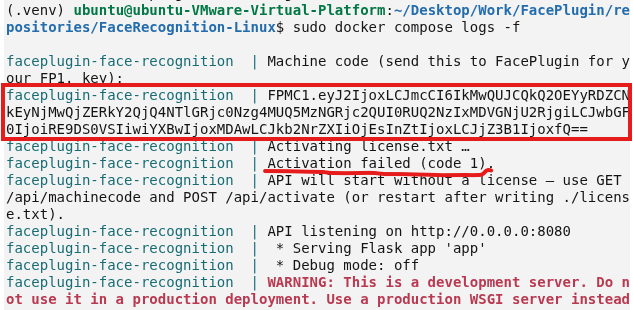
You do not need a license to start the API. The server prints your machine code on startup, which you'll need to activate your license. Product endpoints unlock after you activate.
| Item | Minimum | Recommended |
|---|---|---|
| CPU | 2 cores | 4 cores |
| RAM | 4 GB | 8 GB |
| Disk | 4 GB | 8 GB |
| OS (Docker) | Linux + Docker Engine | Ubuntu 22.04 / 24.04 |
The runtime is already inside the image, so no Google Drive download is needed.
sudo docker pull faceplugin/face-recognition:latest
sudo docker run -d --name faceplugin-face-recognition \
  --shm-size=2gb --privileged \
  -p 8083:8083 \
  -v /etc/machine-id:/etc/machine-id:ro \
  faceplugin/face-recognition:latest
sudo docker logs -f faceplugin-face-recognition
# Look for the machine code line in the logs
On Docker Desktop (macOS/Windows) omit the /etc/machine-id volume.
To run multiple containers on one Linux host with a shared machine code / license, see the docs:
This option runs the server directly on your machine. It requires glibc 2.38 or newer (for example, Ubuntu 24.04). Check your version with ldd --version. No GPU is needed; this product runs on CPU only.
git clone https://github.com/Faceplugin-ltd/FaceRecognition-Docker.git
cd FaceRecognition-DockerThe lib/cpu/ folder is empty on GitHub because the native libraries and model files are too large to host there.
- Open the FaceRecognition Linux runtime folder on Google Drive.
- Download every file in the folder.
- Place the files directly in
lib/cpu/, not in a subfolder.
Your project should look like this:
FaceRecognition-Docker/
└── lib/
    └── cpu/
        ├── libFaceRecognitionSDK.so
        ├── libfar-eng.so
        ├── far.fpk
        └── ... (remaining files from Google Drive)
⚠️ If Google Drive gives you a zip, extract it and move the files up so you don't end up withlib/cpu/SomeFolder/libFaceRecognitionSDK.so.
pip3 install -r requirements.txt
./run.sh
The API starts at http://127.0.0.1:8083, and the machine code is printed in the terminal. Continue with Activate your license.
Licenses work offline and are tied to the machine code of the environment where the server runs. Offline cryptography is built into the SDK, so no OpenSSL install is needed.
⚠️ Docker and local installs have different machine codes. Get the machine code from the same environment you'll use in production. If you'll run in Docker, send the code from the Docker container, not from the host.
-
Start the server using Docker Hub or
./run.sh(see Start the API). You don't need a license for the first start. -
Get your machine code. It's printed in the startup log, or you can fetch it with
GET /api/machinecode. -
Send the machine code to FacePlugin (contact us). We'll reply with a license key for that machine code.
-
Activate the license. Save the license key to
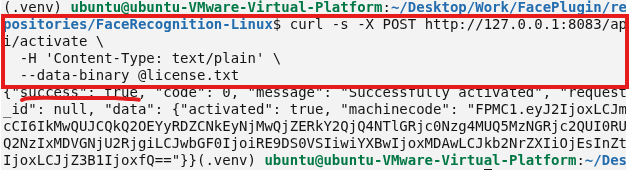
license.txtin the project root, replacing anything already in the file. Then send it to the running server:curl -s -X POST http://127.0.0.1:8083/api/activate \ -H 'Content-Type: text/plain' \ --data-binary @license.txtIf you run in Docker, this command is required, because detached containers don't re-read
license.txtafter they start. The same command also works with./run.sh.
After activation, GET /api/licenseStatus reports what the key unlocks. The Gradio demo shows the same summary as License: at the top of the page.
This App exposes recognition APIs only. Typical labels:
- Recognition only / Recognition + Liveness — Detect / Quality / Match
- Liveness only — recognition APIs stay unavailable on this App
- Not licensed — machine code only until you activate
Check status anytime:
curl -s http://127.0.0.1:8083/api/licenseStatuscurl -s http://127.0.0.1:8083/api/healthImport postman/FaceRecognition-API.postman_collection.json.
Default base URL: http://127.0.0.1:8083
The Docker image includes only the API server, not the demo UI. To view results in your browser, run the Gradio demo on your own machine. Make sure the API is already running on port 8083 first.
pip3 install -r requirements-demo.txt
DEMO_PORT=9003 API_BASE=http://127.0.0.1:8083 python3 demo.py
Open http://127.0.0.1:9003 in your browser. Sample images, if included, are in assets/examples/samples/. The page header shows your current license status, taken from /api/licenseStatus.
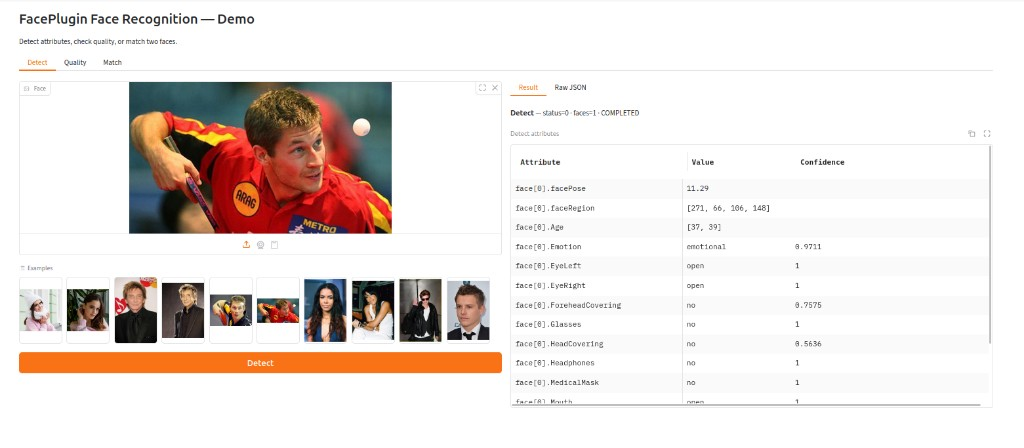
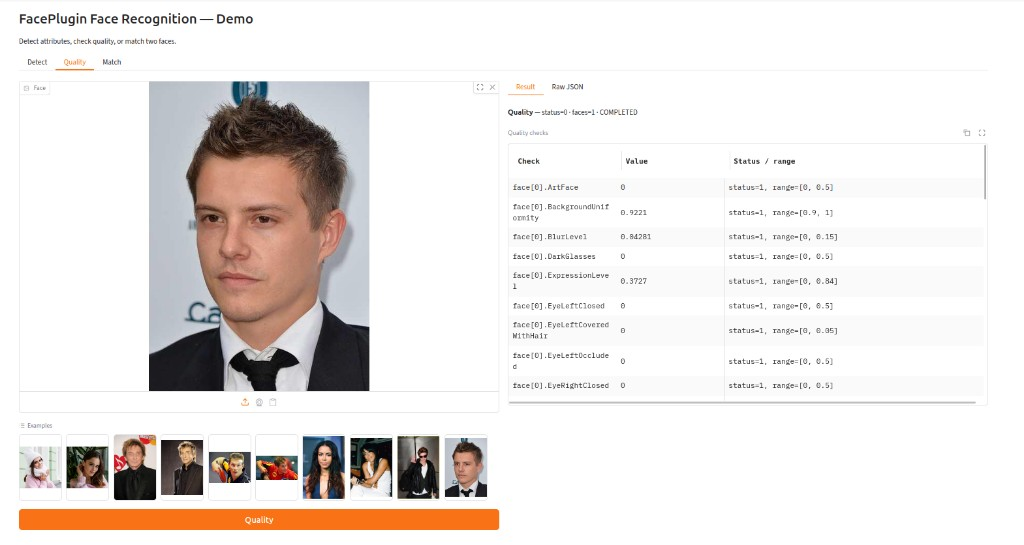
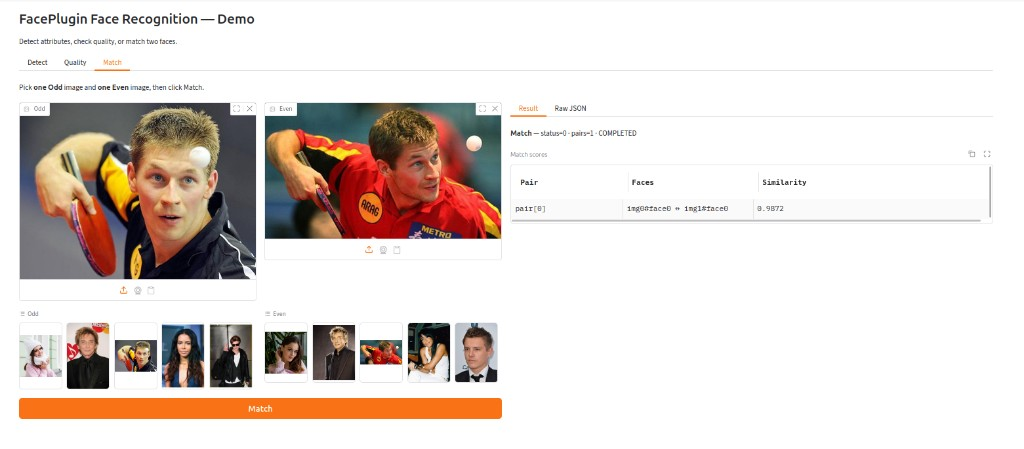
- Detect — bounding box, landmarks, pose, and attributes
- Quality — ICAO-style face quality checks
- Match — 1:1 match scores; pick one image from the Odd group and one from the Even group, then Match
Each tab shows a Result table and Raw JSON for integration. Detect / Quality examples are every file under assets/examples/samples/.
Two paths. You do not need the Gradio demo (demo.py) in production; it is a host-only test UI.
HTTP (any language) — start the API (see Start the API) and keep it running, then POST base64 images as JSON to /api/detect, /api/quality, /api/match, /api/feature, or /api/similarity. See the Postman collection for request examples, and doc.faceplugin.com for the full protocol.
Python in-process — on the same Linux host as lib/cpu/ (or inside the container), copy sdk.py + lib/cpu/ into your project (or import sdk from this repo) and call the SDK directly, with no HTTP hop. See About SDK.
Use the Python bindings in sdk.py. Return code 0 means success.
First, obtain the machine code for activation and request a license based on the machine code.
import sdk

machine_code = sdk.get_machine_code()
print("machineCode:", machine_code) # machine codeNext, activate the SDK with the path to your license file (license.txt containing your license key).
ret = sdk.activate("license.txt")If activation is successful, the return value will be 0. Otherwise, an error value will be returned.
After activation, call the initialization function of the SDK.
ret = sdk.init_sdk()If initialization is successful, the return value will be 0. Otherwise, an error value will be returned.
result = sdk.detect(base64_image, crop_image=False)result = sdk.quality(base64_image, crop_image=False)result = sdk.feature(base64_image)result = sdk.match(base64_image1, base64_image2, crop_image=False)result = sdk.similarity(feature1_b64, feature2_b64)status = sdk.get_license_status()HTTP endpoints: /api/health, /api/machinecode, /api/licenseStatus, /api/backend, /api/activate, /api/detect, /api/quality, /api/match, /api/feature, /api/similarity.
Request a license, machine-code activation (machine code → license key), or integration help:


