Repository navigation
Annotate pasted images (arrows, circles, numbered comments) before sending #19126

Replies: 5 comments

|
Adding the ChatGPT desktop UX details and screenshots from #19885, which was closed as a duplicate of this discussion. I agree with this feature request , the workflow would be:
For example, I could point to a button and say "Move this below the heading" without having to describe its location. Location-based comments alone would be useful to me, independently of drawing or cropping tools and browser-preview annotations. Reference screenshotsThe image toolbar and Comment action 
A numbered comment placed on the image 
The comment collected beside the image in the composer 
|

|
+1, and one thought on implementation. The desktop preview already has an Annotate mode (added in #3053) with select, region, freehand draw, and erase, but no arrows or connectors yet. Could this feature reuse or abstract that same tool for attached images instead of adding a new dependency like Excalidraw? An arrow or connector tool would cover a common case for me: box a region and point to another spot with "move it here." Would maintainers want the preview Annotate tooling extended this way? If so, I'm happy to send small, stacked PRs. |

|
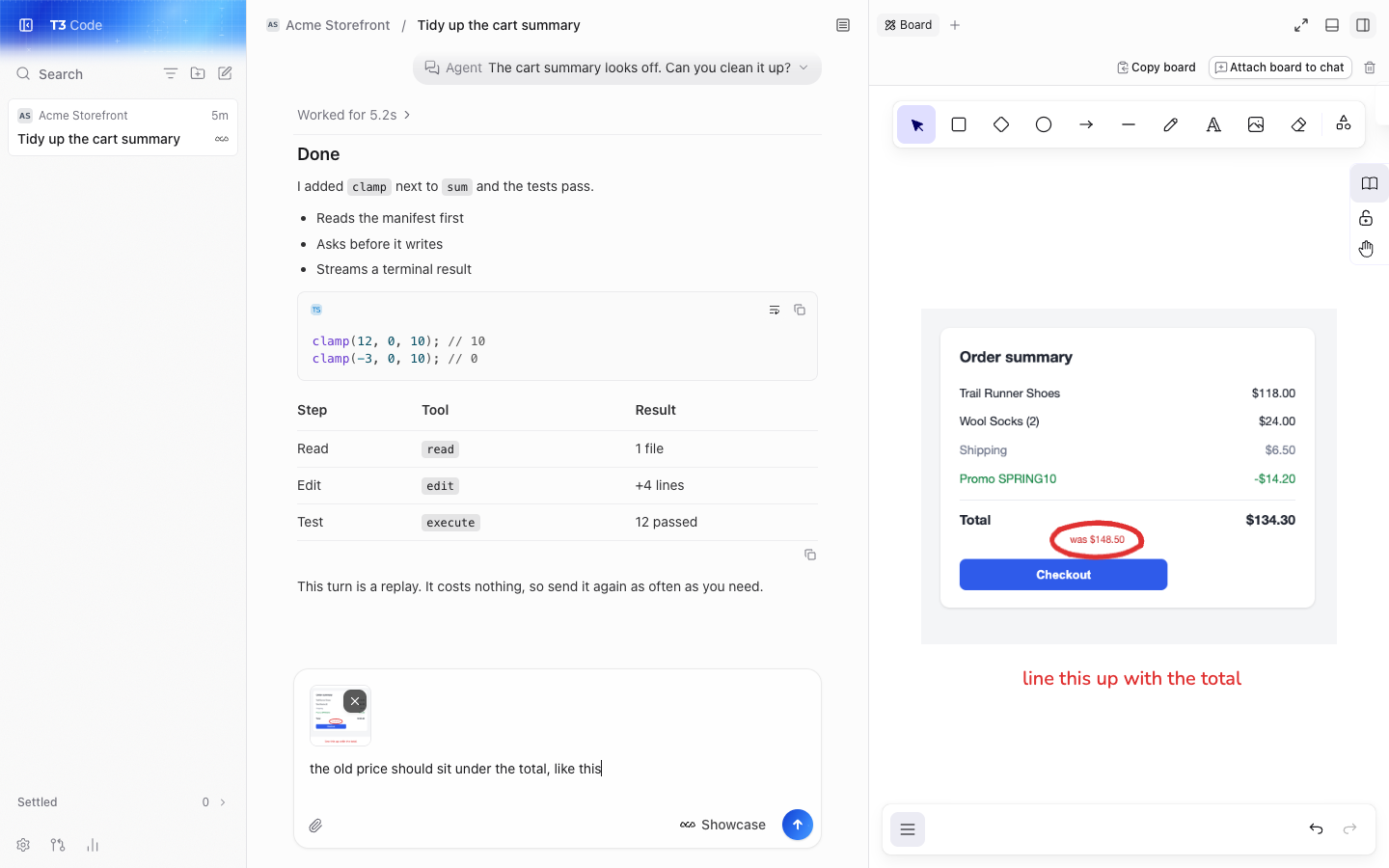
hey, I've found this super useful, like I reach for it once a day at least. I built a Board tab for this in my fork: it sits in the right panel next to the chat. Paste a screenshot, circle the thing that's wrong, write a word or two, and attach it to the composer. I'd like to know if you want it in T3 Code.
The problem Most of what I tell an agent about a UI is "this bit here". Today that means opening another app to mark up the screenshot, then dragging it back, or describing the spot in words. This thread and #25310 ask for the same thing. Why it fits T3 It keeps the whole loop in the app, and it works with every provider because the result is just an image in the composer. The server doesn't change, so it works the same on a remote environment. Preview Annotate already does this for live pages in the desktop browser. This covers everything else: pasted screenshots, images from other apps, and web as well as desktop. Scope
Not included: numbered comments sent as text, as this thread suggests, or editing an image that's already attached. Those could come later. What it costs It uses Excalidraw, and that's the real cost, so here are the numbers from a production web build on current main:
Someone here asked if this could reuse the preview Annotate tools instead of adding a dependency. I think that's a fair question. Those tools live in the desktop preview, so they'd need pulling out to work on images and on web, and they don't have arrows or text yet. Excalidraw gets you all of that today, but it's a big dependency for a small feature. The question Would you take this, and is Excalidraw OK, or would you rather build on Annotate? It's working on current main with tests, on this branch, and I'll only open a PR if you want it. |

|
I'd like to revisit this for images already attached to a chat draft. The goal is to mark the exact area an agent should change without exporting the image to another app and attaching it again. I saw that #1429 was declined because users already have their preferred screenshot tools. This would cover the step after an image is attached, including images received from elsewhere, rather than replacing screenshot capture. Would maintainers consider an attachment editor with crop, rectangle, circle, freehand, and text before sending? The original would remain recoverable, edits would apply only when saved, and the result would go through the existing image attachment flow. That scope is broader than this discussion's initial proposal. Before implementing anything, I'd like explicit agreement on whether this belongs in T3 Code, which tools should ship first, and which clients need support. Reusing the existing preview annotation tools would be preferable where practical, without adding a board or a large editor dependency. |
|
Following up on my earlier question: I've built this for personal use in my fork, while keeping upstream approval separate. The prototype is on feat/image-annotations. The workflow is: attach an image, click its thumbnail to mark it up, save back to the draft, then send through the existing attachment flow. Reopening keeps the original and undo history available. It adds no editor dependency or separate board. The editor loads on demand on web; shared editing logic also has a mobile client. I understand the concern in #1429 about duplicating screenshot tools. The gap I'm trying to cover is editing an image that's already in the draft, including images received from someone else, without exporting it to another app and attaching it again. My fork currently has crop, rectangles, ellipses, drawing, text and mosaic, with movable/resizable marks and editable colors and thickness. I would shrink that to whatever scope maintainers consider appropriate for a first PR. It does not implement this discussion's numbered comments or text summaries. I've manually checked cropping, drawing, text, restyling, undo/redo, and save/reopen in the web client, and the 11 focused shared-editor tests pass. Physical Android setup is still in progress; I'm not claiming mobile verification or full upstream readiness. Would maintainers approve an attachment-only markup workflow in principle? If so, which tools and clients should a first PR cover, and should it build on the existing preview annotation implementation? I'm happy to provide a short recording and prepare a focused implementation once the direction is agreed. |


Uh oh!
There was an error while loading. Please reload this page.
Problem
When I paste a screenshot into the chat input, the only thing I can do with the thumbnail is look at it or remove it. Most screenshots I send are about one specific spot ("this button is misaligned", "this error here"), and I end up describing positions in words, or annotating in another tool first and pasting the result.
Proposal
Clicking an attached image thumbnail opens a lightweight annotation editor:
What the agent receives
Comments travel as text rather than drawn pixels, because small rendered text is read unreliably by models, and the numbers on the image tie each comment to its spot. The original image should stay recoverable (re-open the thumbnail to edit marks again).
Out of scope for a first version
Freehand drawing, rectangles, text boxes and cropping. They can follow if the basics prove useful.
Why
It turns "the third button in the second row, the one next to the dropdown" into a circle and a number, and it makes UI feedback loops with the agent much faster and less ambiguous.
All reactions